

Sign Documents: eSign & Fill
Molham Alfakhri Business iPhoneiPadiPod touch
Sign Documents: eSign & Fill is a free Business app for iPhone and iPad by Molham Alfakhri. Requires iOS 16.0. Updated January 6, 2026.
- Price
- Free
- on the App Store
- Size
- 13 MB
- Age 4+
- Updated
- Jan 6
- 2026 · v1.0
Screenshots

About Sign Documents: eSign & Fill
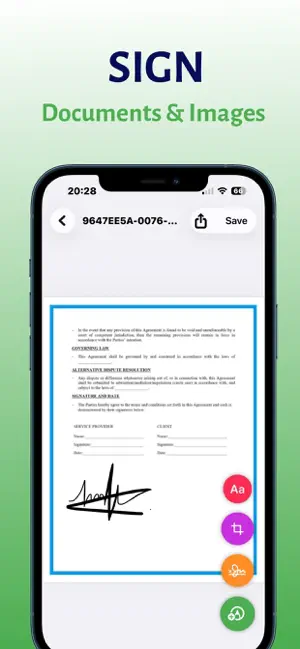
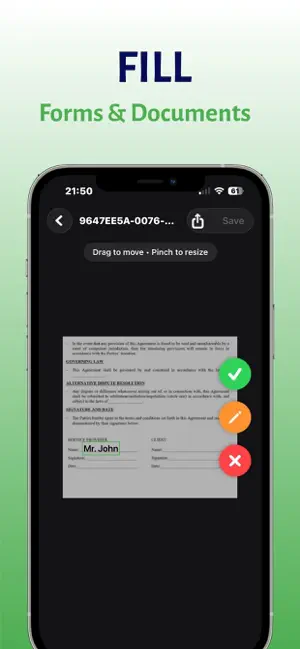
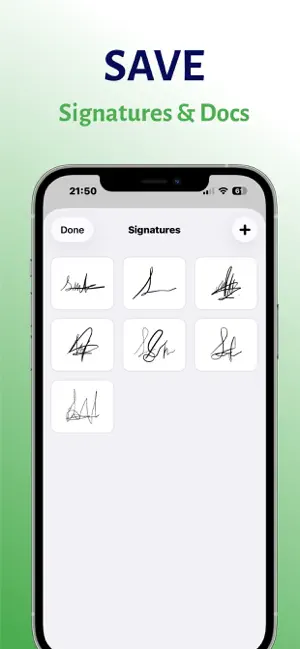
"Sign Documents: eSign & Fill" is the ultimate tool for signing and filling documents directly on your iPhone. Whether you are a business professional, a freelancer, or just need to sign a school permission slip, "Sign Documents: eSign & Fill" makes the process fast, secure, and incredibly easy. Say goodbye to printers, scanners, and bulky paperwork. With "Sign Documents: eSign & Fill", your office is wherever you are. Import any PDF, add your personal signature, fill in text fields, dates, and checkboxes, and share the completed document in seconds. WHY CHOOSE "SIGN DOCUMENTS: ESIGN & FILL"? • Professional E-Signatures: Create a realistic, handwritten signature using your finger or Apple Pencil. Save it for future use and apply it to any document with a single tap. You can resize, rotate, and position your signature perfectly to ensure your documents look professional. • Smart Form Filling: Filling out applications, contracts, and tax forms has never been easier. Tap anywhere to add text, adjust font sizes, and change colors to match the document's requirements. • Complete Privacy & Security: We value your data privacy. "Sign Documents: eSign & Fill" processes your documents locally on your device. Your sensitive contracts and personal information are encrypted and stored securely. We do not have access to your files. • Seamless Import & Export: - Import documents from your Files app, Photos, or scan physical papers using your camera. - Export and share signed PDFs via Email, iMessage, WhatsApp, AirDrop, or save them back to your preferred cloud storage (iCloud, Google Drive, Dropbox). • Organize Your Workflow: Keep all your signed documents organized in one place. Rename, duplicate, or delete files to manage your paperwork efficiently. • Offline Capable: No internet? No problem. "Sign Documents: eSign & Fill" works perfectly offline, allowing you to sign contracts even when you are on the go. PERFECT FOR: - Business Contracts & Agreements - NDAs (Non-Disclosure Agreements) - Rental & Lease Agreements - Sales Invoices & Receipts - Tax Forms & Financial Documents - School Permission Slips - Job Offers & Employment Contracts We offer 1 free credit for every new user to experience the speed and convenience of "Sign Documents: eSign & Fill" immediately. Upgrade to Premium to unlock unlimited document signing and advanced features. Download "Sign Documents: eSign & Fill" today and transform the way you handle paperwork! Privacy Policy: https://www.freeprivacypolicy.com/live/ef0fae01-29bd-45dd-9feb-fcb873526548 Terms of Use: https://www.apple.com/legal/internet-services/terms/site.html
App privacy
The developer, Molham Alfakhri, reported these privacy practices to Apple.
Data Not Collected
The developer does not collect any data from this app.
Alternatives to Sign Documents: eSign & Fill
Looking for apps like Sign Documents: eSign & Fill? Here are 6 similar apps on the App Store. The highest rated is Signature Maker - e Sign App (5.0/5), and all 6 are free to download.
-
 Signature Maker - e Sign App
5.0
-
 Signature: Fill and Sign PDF
4.8
-
 Fill & Sign Documents PDF Scan
4.7
-
 Sign PDF documents
1.0
-
 Sign Documents - DocInk
5.0
-
 Sign Documents: PDF Signature
4.7
| App | Rating | Price | Last updated | Compare |
|---|---|---|---|---|
| Sign Documents: eSign & Fill | – | Free | January 6, 2026 | |
| Signature Maker - e Sign App | 5.0 / 5 (5) | Free | Sep 8, 2026 | Compare |
| Signature: Fill and Sign PDF | 4.8 / 5 (132) | Free | Sep 5, 2026 | Compare |
| Fill & Sign Documents PDF Scan | 4.7 / 5 (299) | Free | Aug 21, 2026 | Compare |
| Sign PDF documents | 1.0 / 5 (1) | Free | Aug 1, 2026 | Compare |
| Sign Documents - DocInk | 5.0 / 5 (6) | Free | Oct 17, 2026 | Compare |
| Sign Documents: PDF Signature | 4.7 / 5 (39) | Free | Apr 28, 2026 | Compare |