

SnapDic
RaynearSoft LLC Education iPhoneiPadiPod touch
SnapDic is a free Education app for iPhone and iPad by RaynearSoft LLC. Requires iOS 15.6. Updated September 17, 2026.
- Price
- Free
- on the App Store
- Size
- 159 MB
- Age 12+
- Updated
- Sep 17
- 2026 · v1.0.6
Screenshots

About SnapDic
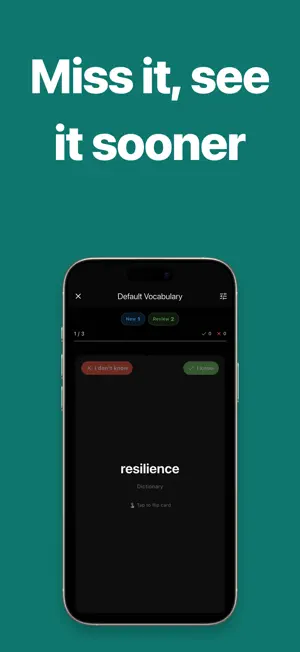
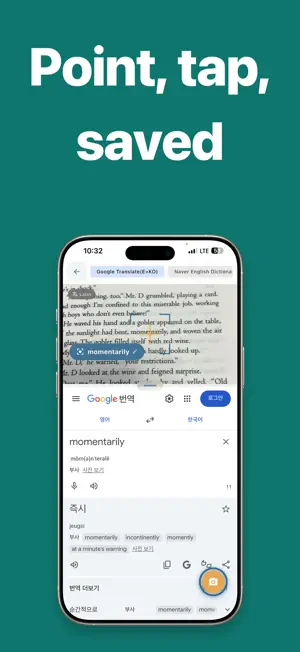
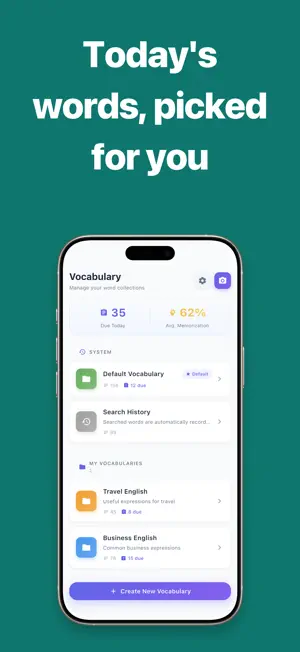
Collecting words is easy. Meeting them again at the right moment is not. SnapDic makes saving a word take one tap, then lets FSRS decide when you should see it again. Three ways to collect a word • Point your camera — on-device OCR reads text from books, signs, and screens; tap a word to see its meaning • Share from any app — select a word while reading and send it straight to your vocabulary • Search directly — look it up in the dictionary you prefer and save it on the spot Memorize with FSRS FSRS (Free Spaced Repetition Scheduler) tracks the stability and difficulty of each word separately and picks your next review date from them. Words you already know drift further apart; words you keep missing come back sooner. You never have to decide what to review or when. Features • Camera OCR dictionary — English, Korean, Japanese, and Chinese • Offline dictionaries — look words up with no connection • Share sheet intake — save a word without leaving what you were reading • Multiple vocabulary lists • FSRS-based review mode with automatic scheduling • Pick the dictionary you want at save time • Search history • Adjustable split — size the camera and dictionary panes to taste Made for • Readers who keep skipping over words they don't know • Anyone who builds vocabulary lists and never opens them again • People who want to remember words for years, not until the test This app is subject to Apple's standard terms and conditions (EULA). For more information, see Apple's Standard Terms and Conditions(https://www.apple.com/legal/internet-services/itunes/dev/stdeula/).
What’s new
Version 1.0.6 · Updated September 17, 2026
• New home screen widget — see today's due cards and your streak without opening the app. • Share a word or sentence from any app and it lands straight in your vocabulary. • Swipe to grade your review cards. No more hunting for buttons. • Card backs now collect pronunciation, definitions, examples, and the sentence you captured. • Fixed the app failing to launch on iOS 27. • Fixed streaks showing a day behind, and the first-run guide not appearing.
App privacy
The developer, RaynearSoft LLC, reported these privacy practices to Apple.
Data Used to Track You
The following data may be used to track you across apps and websites owned by other companies:
- Identifiers: Device ID
- Usage Data: Product Interaction, Advertising Data
- Diagnostics: Crash Data, Performance Data, Other Diagnostic Data
Data Not Linked to You
The following data, which may be collected but is not linked to your identity, may be used for the following purposes:
- Identifiers: Device ID
- Usage Data: Product Interaction, Advertising Data
- Diagnostics: Crash Data, Performance Data, Other Diagnostic Data
Used for: Third-Party Advertising, Developer’s Advertising or Marketing, Analytics
Alternatives to SnapDic
Looking for apps like SnapDic? Here are 6 similar apps on the App Store. The highest rated is LensDict - Camera Dictionary (5.0/5), and all 6 are free to download.
-
 SolEnglish - 틈틈히 배우는 영어
-
 MemoWordAI
-
 Carv – Swipe Flashcards
-
 LensDict - Camera Dictionary
5.0
LensDict - Camera Dictionary
5.0
-
 nawana: Language Learning
5.0
nawana: Language Learning
5.0
-
 스냅플(Snaple): 영단어 암기
| App | Rating | Price | Last updated | Compare |
|---|---|---|---|---|
| SnapDic | – | Free | September 17, 2026 | |
| SolEnglish - 틈틈히 배우는 영어 | – | Free | Jun 11, 2026 | Compare |
| MemoWordAI | – | Free | Jun 30, 2026 | Compare |
| Carv – Swipe Flashcards | – | Free | Jan 28, 2026 | Compare |
| LensDict - Camera Dictionary | 5.0 / 5 (1) | Free | May 21, 2026 | Compare |
| nawana: Language Learning | 5.0 / 5 (1) | Free | Sep 27, 2026 | Compare |
| 스냅플(Snaple): 영단어 암기 | – | Free | Sep 5, 2026 | Compare |
Compare SnapDic with the top alternatives: ratings, updates, ASO score and keyword gaps →