

Carv – Swipe Flashcards
HOJUN JEONG Education iPhoneiPadiPod touch
Carv – Swipe Flashcards is a free Education app for iPhone and iPad by HOJUN JEONG. Requires iOS 17.6. Updated October 17, 2026.
- Price
- Free
- on the App Store
- Size
- 49 MB
- Age 4+
- Updated
- Oct 17
- 2026 · v1.4.0
Screenshots



About Carv – Swipe Flashcards
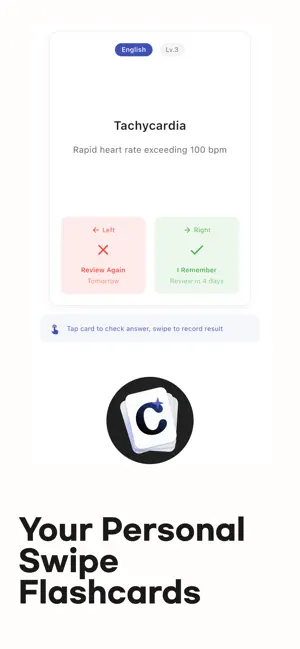
Is your “Watch Later” and saved posts list growing? You save videos—but don’t watch them. You watch them—but don’t remember. English phrases from Shorts. Useful tips from Reels. Knowledge you found on YouTube. You think, “This is good.” A few days later, it’s gone. Why does this keep happening? Even when we try hard to memorize, we forget about 46% of new information within one day, and nearly 70% within a week. This isn’t a guess. It’s proven by the Ebbinghaus Forgetting Curve. Let flashcards handle remembering for you This app is built on scientific spaced repetition. It reminds you to review right before you forget— so short-term memory becomes long-term memory. Just 3 minutes at a time is enough. How does it work? 1. We notify you right before memory fades “15 cards you’ll forget tomorrow if you skip today.” The app calculates the optimal review timing. Cards you know well appear less often. Cards you struggle with appear more—automatically. 2. Create flashcards in 3 seconds Watching Shorts and find a great phrase? Save it instantly as a card. Hint on the front. Answer on the back. Add notes if you want. 3. Just paste a YouTube link Paste a YouTube link and AI analyzes the subtitles, then automatically turns key points into flashcards. For language videos, expressions and example sentences are neatly organized. 4. 3 minutes on your commute is enough Swipe once to mark “Remembered / Not Remembered.” On the subway. During lunch. Before sleep. Those small moments add up. 5. Missed cards come back again Cards you get wrong appear again at the end of the session. Until you get them right. No more “kind of remembered” moments. 6. Build your own decks with tags English words, Japanese phrases, Chinese conversation, coding terms, hobbies—anything. Tag them to review only what you need. Colors and icons help you organize visually. 7. See your learning in numbers Reviewed cards. Accuracy rate. Study streaks. Clear stats keep you motivated. 8. Check instantly from your Home Screen See pending review cards at a glance with widgets. One tap to start reviewing. 9. Even faster with Siri (iOS) “Hey Siri, start flashcard review.” Long-press the app icon to add cards instantly. Perfect for moments like these Your “Watch Later” list has over 300 videos You’re watching the same video for the third time You keep forgetting vocabulary You need English, Japanese, or Chinese word lists Preparing for TOEIC, TOEFL, JLPT, or HSK You saw something great in Shorts but can’t recall it You want YouTube expressions to truly become yours Exam D-30 with too much to memorize You want highlighted book sentences to actually stick Start now Privacy & Data Your cards are stored locally on your device by default. When you log in, they are securely backed up to the cloud, so you can keep your data even when switching devices. We do not collect or store personally identifiable information. Works offline. Automatically syncs when you’re back online. Privacy Policy https://shellednuts.blog/products/flashmemorizer/privacy-policy Terms of Use (EULA) https://www.apple.com/legal/internet-services/itunes/dev/stdeula/
What’s new
Version 1.4.0 · Updated October 17, 2026
New features for learning Japanese. • Furigana (readings) appear above kanji when you expand the explanation • Community is now Hub: download shared decks into a tag of your choice and review right away • Bottom tabs for quicker navigation • Japanese sentence cards from anime and drama screenshots (Korean interface only) • Stability improvements
App privacy
The developer, HOJUN JEONG, reported these privacy practices to Apple.
Data Not Linked to You
The following data, which may be collected but is not linked to your identity, may be used for the following purposes:
- Identifiers: Device ID
- Usage Data: Product Interaction, Other Usage Data
- Diagnostics: Crash Data, Performance Data, Other Diagnostic Data
- Contact Info: Email Address
Used for: Third-Party Advertising, Analytics, App Functionality
Alternatives to Carv – Swipe Flashcards
Looking for apps like Carv – Swipe Flashcards? Here are 6 similar apps on the App Store.
-
 SnapDic
-
 단어암기장
-
 MemoWordAI
-
 영어 기사 — 뉴스로 배우는 영어 단어
-
 Dicter - 평생 기억되는 나만의 단어장
-
 VocaHub: Build Your Vocabulary
| App | Rating | Price | Last updated | Compare |
|---|---|---|---|---|
| Carv – Swipe Flashcards | – | Free | October 17, 2026 | |
| SnapDic | – | Free | Oct 9, 2026 | Compare |
| 단어암기장 | – | Free | Apr 22, 2026 | Compare |
| MemoWordAI | – | Free | Jun 30, 2026 | Compare |
| 영어 기사 — 뉴스로 배우는 영어 단어 | – | Free | Sep 5, 2026 | Compare |
| Dicter - 평생 기억되는 나만의 단어장 | – | 1.99 USD | Aug 18, 2026 | Compare |
| VocaHub: Build Your Vocabulary | – | Free | Jun 16, 2026 | Compare |