

Floor Plan: Room Scanner
GUNEY BERKAY ATES Business iPhoneiPadiPod touch
Floor Plan: Room Scanner is a free Business app for iPhone and iPad by GUNEY BERKAY ATES. Requires iOS 17.6. Updated October 23, 2026.
- Price
- Free
- on the App Store
- Size
- 27 MB
- Age 4+
- Updated
- Oct 23
- 2026 · v1.2.2
Screenshots

About Floor Plan: Room Scanner
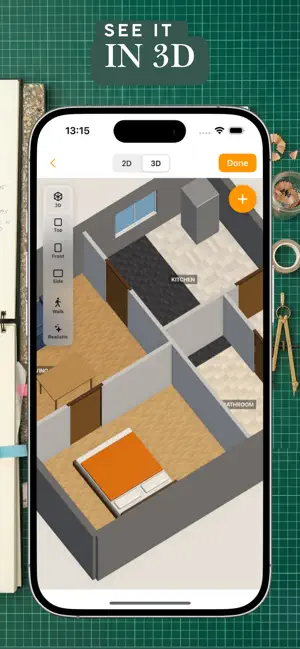
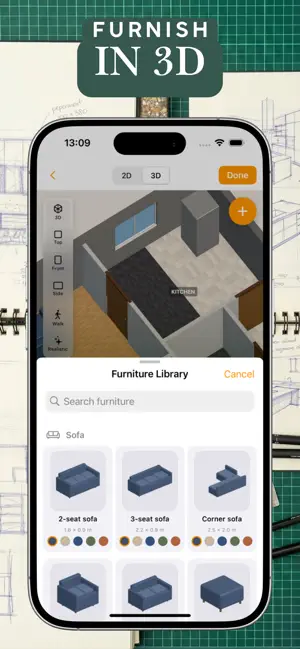
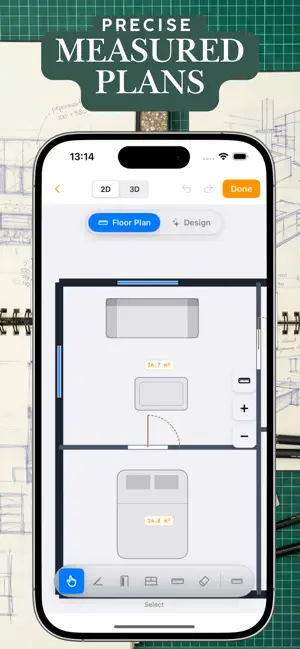
Create professional floor plans with your iPhone — in minutes, not hours. Scan a room with the LiDAR sensor, or draw your plan by hand on any iPhone or iPad. Walls, doors and windows are detected automatically when you scan. The result is a scaled floor plan with wall dimensions, room areas and a legend — ready to send, print or add to a property listing. Scanning needs an iPhone 12 Pro or newer, or an iPad Pro with LiDAR. Drawing works on every device. WHO IS IT FOR? Real estate agents create plans for listings on site. Appraisers and inspectors document walkthroughs. Architects make quick as-built drawings for CAD. Property managers keep plans with tenant records. Homeowners measure and plan renovations. HOW IT WORKS Walk slowly through the space with your iPhone pointed at the walls — or draw rooms with your finger. Name rooms, move walls, place doors, windows and furniture, and check everything in 3D. Export a PDF, PNG or JPG. FEATURES • LiDAR scanning with automatic wall, door and window detection (Apple RoomPlan) • Draw mode on any iPhone or iPad • Editor for walls, doors, windows, room names and furniture • 3D view of your plan • Professional PDF with dimension chains, room areas, legend and scale bar • Living area calculated per local standard where supported (e.g. WoFlV in Germany, Carrez in France, NEN 2580 in the Netherlands) • Multi-floor plans • DXF export for AutoCAD and other CAD software — free • Edit the same plan in the web editor on a big screen • App and documents in 8 languages: English, German, French, Spanish, Italian, Dutch, Korean, Chinese PRICING Scanning, drawing, editing and DXF export are free. Exporting a PDF, PNG or JPG needs either a subscription (weekly or yearly) or a one-time purchase for a single floor plan. Subscriptions renew automatically unless cancelled at least 24 hours before the end of the current period. Manage or cancel anytime in your iPhone Settings under "Subscriptions". Terms of Use (EULA): https://www.apple.com/legal/internet-services/itunes/dev/stdeula/ Privacy: https://floorplaneditor.com/datenschutz
What’s new
Version 1.2.2 · Updated October 23, 2026
• On an iPhone with LiDAR, the home screen now starts your first room scan with one tap. Drawing a plan and the demo plan are one tap away. • Bug fixes and performance improvements.
App privacy
The developer, GUNEY BERKAY ATES, reported these privacy practices to Apple.
Data Used to Track You
The following data may be used to track you across apps and websites owned by other companies:
- Purchases: Purchase History
- Identifiers: User ID, Device ID
- Usage Data: Product Interaction
Data Linked to You
The following data, which may be collected and linked to your identity, may be used for the following purposes:
- Purchases: Purchase History
- Identifiers: Device ID, User ID
- Usage Data: Product Interaction
Used for: Third-Party Advertising, Analytics, App Functionality
Data Not Linked to You
The following data, which may be collected but is not linked to your identity, may be used for the following purposes:
- Contact Info: Email Address, Name
- User Content: Photos or Videos
Used for: App Functionality
Alternatives to Floor Plan: Room Scanner
Looking for apps like Floor Plan: Room Scanner? Here are 6 similar apps on the App Store. The highest rated is UniFi Design (5.0/5), and all 6 are free to download.
-
 Roomio: floor plan creator
4.4
-
 RoomScan Pro LiDAR floor plans
4.3
-
 Floor Plan Scanner: PanoRoom
4.7
-
 RenoPlan - Floor Plan Creator
4.5
-
 DrawPlan
3.5
-
 UniFi Design
5.0
| App | Rating | Price | Last updated | Compare |
|---|---|---|---|---|
| Floor Plan: Room Scanner | – | Free | October 23, 2026 | |
| Roomio: floor plan creator | 4.4 / 5 (14) | Free | Oct 28, 2026 | Compare |
| RoomScan Pro LiDAR floor plans | 4.3 / 5 (2,128) | Free | Oct 23, 2026 | Compare |
| Floor Plan Scanner: PanoRoom | 4.7 / 5 (352) | Free | Oct 29, 2026 | Compare |
| RenoPlan - Floor Plan Creator | 4.5 / 5 (752) | Free | Feb 13, 2025 | Compare |
| DrawPlan | 3.5 / 5 (5,320) | Free | Oct 23, 2026 | Compare |
| UniFi Design | 5.0 / 5 (5) | Free | Oct 28, 2026 | Compare |