

LastCall. Staff Scheduling
Francisco Soltero Business iPhoneiPadiPod touch
LastCall. Staff Scheduling is a free Business app for iPhone and iPad by Francisco Soltero. Rated 5.0/5 from 24 ratings. Requires iOS 15.1.
- Rating
- 5.0
- 24 ratings
- Price
- Free
- on the App Store
- Size
- 49 MB
- Age 12+
- Updated
- Oct 13
- 2026 · v1.7.7
Screenshots


About LastCall. Staff Scheduling
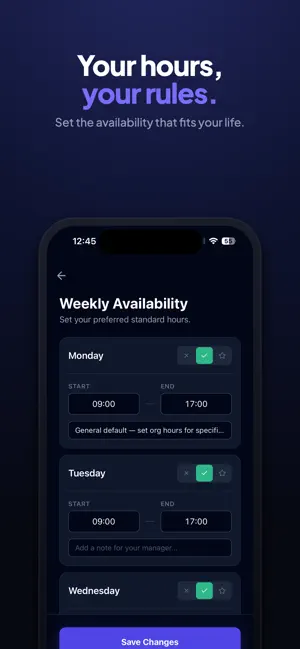
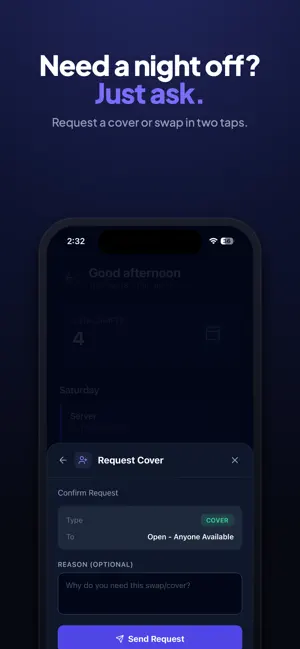
Most scheduling software is built for restaurants. Bars come second. LastCall. is bar-first by design — built for late nights, overlapping roles, and the constant shift changes that define bar operations. Managers can build and publish schedules in minutes, catch conflicts before they happen, and keep their team in sync. Role-based scheduling supports bartenders, barbacks, bouncers, and security, with real-time conflict detection that flags double shifts and back-to-back transitions before they become problems. For staff, it’s simple: see your shifts anytime, submit your availability once, and request swaps without the group chat chaos. LastCall. is built to scale from a single bar to multi-venue operations. SUBSCRIPTIONS. LastCall. offers auto-renewing subscriptions: • Basic — $19.99/month • Pro — $39.99/month • Enterprise — $59.99/month
Ratings & reviews
5.0
24 ratings
What’s new
Version 1.7.7 · Updated October 13, 2026
• Drafts save themselves. While you build a draft schedule it saves a few seconds after your last change and shows Saving, Saved or Unsaved changes. Leaving with unsaved edits asks whether to save, discard or stay. • No more overwriting each other. If someone else changed the schedule while you were editing, the builder tells you who and lets you load their version or keep yours. • Print the week. Managers tap the printer in the schedule builder; staff tap it on Weekly Schedule. You get a landscape sheet with one row per person and every day of the week, in call order, ready to print, AirDrop or save as a PDF. • Shifts in call order. Within each position, shifts follow your shift tags: 1st on, 2nd on and so on. Admins set the order by dragging tags in Organization Settings › Shift tags. • Keep contact details private. A new venue setting, Staff contact details, can show coworkers' emails and phone numbers to managers only. You always see your own. • Message a coworker from the schedule (Enterprise). Tap their shift on Weekly Schedule, or the message button on their Team card. • Weekly Schedule now highlights your own shifts and marks the days you work. • Fixed: voiding a timecard could freeze the screen on iPhone.
App privacy
The developer, Francisco Soltero, reported these privacy practices to Apple.
Data Linked to You
The following data, which may be collected and linked to your identity, may be used for the following purposes:
- Purchases: Purchase History
- Contact Info: Email Address, Name, Phone Number
- Identifiers: User ID, Device ID
- Usage Data: Product Interaction
- Diagnostics: Performance Data
Used for: Analytics, App Functionality
Alternatives to LastCall. Staff Scheduling
Looking for apps like LastCall. Staff Scheduling? Here are 6 similar apps on the App Store. The highest rated is FlowDay - AI Daily Planner (5.0/5), and all 6 are free to download.
-
 FlowDay - AI Daily Planner
5.0
FlowDay - AI Daily Planner
5.0
-
 HIGHLIGHT NIL
5.0
HIGHLIGHT NIL
5.0
-
 DayFlow: To Do List & Planner
-
 WiseTrack: Expense Tracker
5.0
WiseTrack: Expense Tracker
5.0
-
 HummingTask: ADHD Planner
-
 The Inde Bank
5.0
The Inde Bank
5.0
| App | Rating | Price | Last updated | Compare |
|---|---|---|---|---|
| LastCall. Staff Scheduling | 5.0 / 5 (24 ratings) | Free | October 13, 2026 | |
| FlowDay - AI Daily Planner | 5.0 / 5 (1) | Free | Sep 2, 2026 | Compare |
| HIGHLIGHT NIL | 5.0 / 5 (2) | Free | Mar 11, 2026 | Compare |
| DayFlow: To Do List & Planner | – | Free | May 5, 2026 | Compare |
| WiseTrack: Expense Tracker | 5.0 / 5 (3) | Free | Oct 24, 2026 | Compare |
| HummingTask: ADHD Planner | – | Free | Jul 22, 2026 | Compare |
| The Inde Bank | 5.0 / 5 (20) | Free | Oct 17, 2026 | Compare |