

FlowDay - AI Daily Planner
Simao Alves Productivity iPhoneiPadiPod touch
FlowDay - AI Daily Planner is a free Productivity app for iPhone and iPad by Simao Alves. Rated 5.0/5 from 1 ratings. Requires iOS 17.0.
- Rating
- 5.0
- 1 ratings
- Price
- Free
- on the App Store
- Size
- 19 MB
- Age 4+
- Updated
- Sep 2
- 2026 · v1.3
Screenshots


About FlowDay - AI Daily Planner
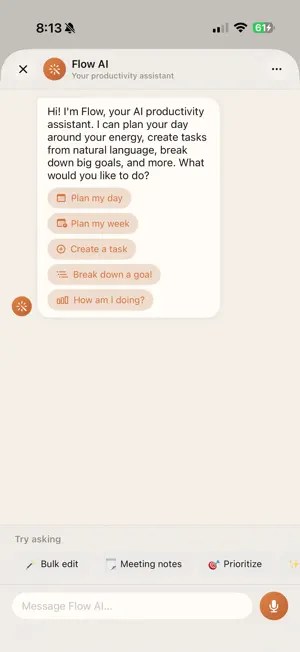
FlowDay is the AI-powered daily planner that works with your energy, not against it. Unlike other task managers, FlowDay learns when you're at your sharpest and schedules deep work during peak hours — so you stop fighting your natural rhythm and start flowing with it. YOUR AI PRODUCTIVITY ASSISTANT Talk to Flow AI like a colleague. Say "Plan my day" and get an energy-optimized schedule in seconds. Create tasks with natural language: "Call the dentist Tuesday at 2pm" just works. Ask "How am I doing?" for real-time productivity insights. ENERGY-AWARE SCHEDULING Check in with your energy each morning. FlowDay's AI matches your hardest tasks to high-energy windows and lighter work to wind-down hours. One tap on Auto-Schedule fills your day around your calendar and energy level. HABITS THAT STICK Build daily routines with streak tracking, completion heatmaps, and smart reminders. Set habits like "Read for 20 minutes" or auto-track from your tasks with "Complete 3 deep work sessions." Earn XP and level up as you build consistency. FOCUS TIMER Built-in Pomodoro timer with customizable intervals. Link focus sessions to specific tasks so your time is always accounted for. Background notifications keep you on track. COLLABORATE WITH ANYONE Share projects with your team, family, or accountability partner. Invite teammates via iMessage, WhatsApp, or any channel with a single tap. Real-time task sync keeps everyone aligned. DAILY BRIEF Wake up to an AI-written summary of your day. See what's ahead, what's overdue, and get smart suggestions — all before your first cup of coffee. GAMIFICATION THAT MOTIVATES Earn XP for completing tasks and habits. Level up, maintain your streak, and watch your Focus Score climb. FlowDay makes productivity feel rewarding, not draining. GMAIL INTEGRATION Turn emails into tasks. Connect your inbox and capture action items in one tap — no more losing important emails in the noise. BEAUTIFUL ON EVERY DEVICE Designed for iPhone and iPad with a native three-panel layout on iPad that makes managing tasks feel effortless. Dark mode, warm theme, and cool theme included. FLOWDAY PRO — $9.99/month Unlock unlimited AI calls, smart filters, kanban boards, week view, premium templates, attachments, and priority support. Free users get 5 AI calls per day to try everything. Terms of Use (EULA): https://www.apple.com/legal/internet-services/itunes/dev/stdeula/
What’s new
Version 1.3 · Updated September 2, 2026
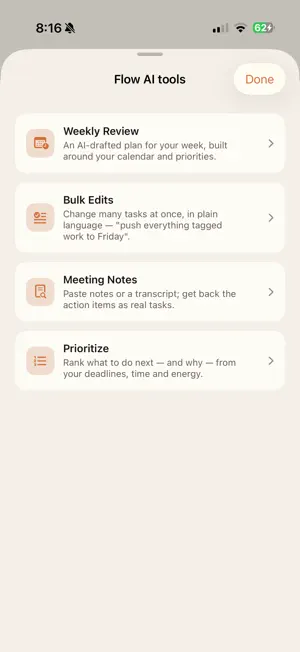
Flow AI goes deeper into your day in 1.3: • Weekly Review & Planning — Flow AI reviews the week you actually had and helps you plan the next one, instead of a blank page. • Meeting Notes → Tasks — paste your notes or a transcript and get back real action items, with owners and dates. • Bulk Edits in Plain Language — change many tasks at once just by describing it, like "push everything tagged admin to Friday." • Smart Auto-Prioritization — one tap ranks what to do next based on deadlines, effort, and your energy. Plus reliability improvements to swipe actions, task editing, and habit-streak reminders.
App privacy
The developer, Simao Alves, reported these privacy practices to Apple.
Data Linked to You
The following data, which may be collected and linked to your identity, may be used for the following purposes:
- Contact Info: Email Address, Name
- User Content: Other User Content
- Identifiers: User ID
Used for: App Functionality
Data Not Linked to You
The following data, which may be collected but is not linked to your identity, may be used for the following purposes:
- Diagnostics: Crash Data
Used for: Analytics