

Invoice Go: Invoice Maker
Adrian Garcia Business iPhoneiPadiPod touch
Invoice Go: Invoice Maker is a free Business app for iPhone and iPad by Adrian Garcia. Requires iOS 17.0. Updated August 25, 2026.
- Price
- Free
- on the App Store
- Size
- 8 MB
- Age 4+
- Updated
- Aug 25
- 2026 · v1.1
Screenshots


About Invoice Go: Invoice Maker
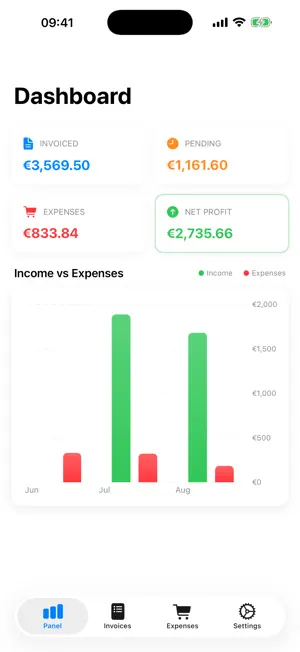
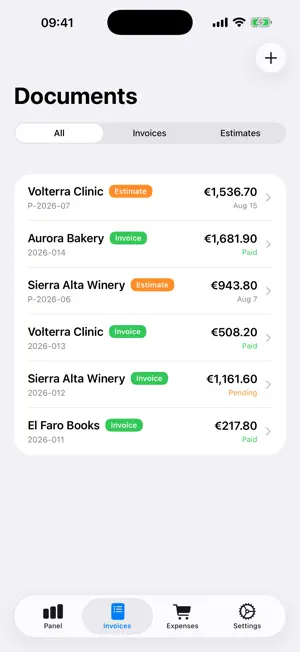
Invoice Go does one thing and does it fast: it turns the work you just finished into a good-looking invoice, as a PDF, ready to send by email or messaging. No sign-up, no cloud, and nobody else looking at your numbers. BUILT FOR PEOPLE IN A HURRY Open it, pick a client, add line items, and the PDF is there. Numbering looks after itself, tax rates apply themselves, and the total updates as you type. Regular clients are already filled in. ESTIMATE FIRST, INVOICE AFTER Send a quote, and when they say yes, turn it into an invoice with one tap. Nothing to copy across, nothing to retype. YOUR DATA NEVER LEAVES THE PHONE No account, no servers, no sync. Invoices, clients, expenses and your bank details stay on the device. It works perfectly in airplane mode, on a site with no signal, or on a train. YOUR BRAND, NOT OURS Add your logo, pick your brand colour, set your own tax rates, and sign with a finger. The PDF looks like it came from your business, because it did. KNOW WHERE YOU STAND The dashboard shows what you have invoiced and what is still unpaid, in charts you can read at a glance. Expenses go in as quickly as invoices do. FREE AND PRO Free gets you 3 invoices and 3 estimates, with a small line at the bottom of the PDF. PRO removes every limit: unlimited invoices and estimates, no line on the PDF, digital signature, full expense history, and import from Contacts. YOU CHOOSE HOW TO PAY Most invoicing apps only rent you access. Here the subscription is optional: you can pay once and keep PRO forever, with no renewals. - PRO Monthly: auto-renewing subscription - PRO Annual: auto-renewing subscription, the best value - PRO Lifetime: a single payment, yours forever Payment is charged to your Apple Account at confirmation of purchase. Subscriptions renew automatically unless canceled at least 24 hours before the end of the current period; your account is charged for renewal within 24 hours before the period ends. You can manage or cancel your subscription in your Apple Account settings. If a plan includes a free trial, any unused portion is forfeited when you buy a subscription. Terms of Use (EULA): https://www.apple.com/legal/internet-services/itunes/dev/stdeula/ Privacy Policy: https://techy.eus/invoicego/privacidad
What’s new
Version 1.1 · Updated August 25, 2026
Invoice Go now asks what you think once you have made a couple of invoices, so you can rate it without leaving the app. The App Store listing is properly localised too.
App privacy
The developer, Adrian Garcia, reported these privacy practices to Apple.
Data Not Collected
The developer does not collect any data from this app.
Alternatives to Invoice Go: Invoice Maker
Looking for apps like Invoice Go: Invoice Maker? Here are 6 similar apps on the App Store. The highest rated is Milava: Childcare Schedule (5.0/5), and 5 of the 6 are free to download.
-
 InvoiceFlow Pro
-
 Simple Invoice & Estimate App
-
 Quotea: Quotes & Invoices
-
 Invoice And Estimate Maker App
-
 Milava: Childcare Schedule
5.0
Milava: Childcare Schedule
5.0
-
 Facturas simples instantáneas
| App | Rating | Price | Last updated | Compare |
|---|---|---|---|---|
| Invoice Go: Invoice Maker | – | Free | August 25, 2026 | |
| InvoiceFlow Pro | – | Free | Aug 22, 2026 | Compare |
| Simple Invoice & Estimate App | – | 4.99 USD | Nov 14, 2024 | Compare |
| Quotea: Quotes & Invoices | – | Free | Oct 18, 2026 | Compare |
| Invoice And Estimate Maker App | – | Free | May 29, 2026 | Compare |
| Milava: Childcare Schedule | 5.0 / 5 (1) | Free | Oct 22, 2026 | Compare |
| Facturas simples instantáneas | – | Free | Oct 2, 2026 | Compare |