

ShareSwift: Fast File Transfer
Shaheer Masroor Utilities iPhoneiPadiPod touch
ShareSwift: Fast File Transfer is a free Utilities app for iPhone and iPad by Shaheer Masroor. Requires iOS 16.6. Updated February 3, 2026.
- Price
- Free
- on the App Store
- Size
- 24 MB
- Age 4+
- Updated
- Feb 3
- 2026 · v1.0
Screenshots


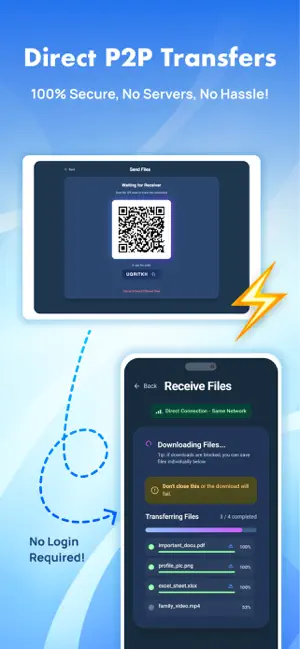

About ShareSwift: Fast File Transfer
Send any type of files instantly, in original quality, with no cables, no login, 100% Secure & Private. Just open, scan, send! ShareSwift makes file transfer fast & effortless. ▶ Key Features: • Effortless File Transfers Share/Transfer your photos, videos, documents, movies, PDFs, anything... in 100% original quality, at fast speed - faster than Bluetooth, email, or cloud uploads. Large files? No Problem! • Share between ANY device Any other OS phone → iPhone iPhone → PC Laptop → Any Phone ANY device → ANY device True Cross-Platform Sharing: If it has a browser, it can receive your file. • 100% Secure P2P Your files go directly from device to device. No servers, no tracking, no data collection. Your privacy stays where it belongs - with you. • Simple & Friendly UI Just scan a QR code and send. No accounts, no emails, no passwords - just pure, instant sharing. • Transfer to PC or Mac Instantly Send files to your computer wirelessly through any browser. No USB cables. No drivers. No setup. ▶ Top Features: • Fast & Effortless P2P file transfer • Cross-platform: IOS, macOS, Windows, any other O • Supports ALL file types • Secure, private, and encrypted • No login or personal info needed • Transfer in original, uncompressed quality • Share via browser - zero installation needed on receiving device • Unlimited file transfer - send anything ShareSwift replaces slow Bluetooth, messy cables, email attachments, and cloud uploads. Whether you’re sending photos to friends, transferring videos to your laptop, or moving data to a new phone, ShareSwift gets it done fast and effortless! Fast. Secure. Private. This is file sharing done right!
App privacy
The developer, Shaheer Masroor, reported these privacy practices to Apple.
Data Used to Track You
The following data may be used to track you across apps and websites owned by other companies:
- Contact Info: Email Address
- Identifiers: Device ID
- Usage Data: Product Interaction, Advertising Data
Data Not Linked to You
The following data, which may be collected but is not linked to your identity, may be used for the following purposes:
- Usage Data: Advertising Data, Product Interaction
- Location: Coarse Location
- Identifiers: Device ID
- Diagnostics: Crash Data
- Contact Info: Email Address
Used for: Third-Party Advertising, Developer’s Advertising or Marketing, Analytics, Product Personalization, App Functionality
Alternatives to ShareSwift: Fast File Transfer
Looking for apps like ShareSwift: Fast File Transfer? Here are 6 similar apps on the App Store. The highest rated is SEYFR – File Transfer (5.0/5), and all 6 are free to download.
-
 EpzyDrop - File Transfer
-
 SEYFR – File Transfer
5.0
SEYFR – File Transfer
5.0
-
 VibeDrop - P2P Share and Calls
1.0
VibeDrop - P2P Share and Calls
1.0
-
 Calculator ۬
4.0
Calculator ۬
4.0
-
 NearbySend: Fast File Transfer
-
 Nagarik Alert
| App | Rating | Price | Last updated | Compare |
|---|---|---|---|---|
| ShareSwift: Fast File Transfer | – | Free | February 3, 2026 | |
| EpzyDrop - File Transfer | – | Free | Jul 13, 2026 | Compare |
| SEYFR – File Transfer | 5.0 / 5 (1) | Free | Sep 16, 2026 | Compare |
| VibeDrop - P2P Share and Calls | 1.0 / 5 (1) | Free | Dec 30, 2025 | Compare |
| Calculator ۬ | 4.0 / 5 (2) | Free | Oct 13, 2026 | Compare |
| NearbySend: Fast File Transfer | – | Free | Dec 11, 2025 | Compare |
| Nagarik Alert | – | Free | Sep 10, 2026 | Compare |