

Cob Paint
Freddie Iboy Graphics & Design iPhoneiPadiPod touch
Cob Paint is a free Graphics & Design app for iPhone and iPad by Freddie Iboy. Rated 5.0/5 from 5 ratings. Requires iOS 18.6. Updated October 20, 2026.
- Rating
- 5.0
- 5 ratings
- Price
- Free
- on the App Store
- Size
- 6 MB
- Age 4+
- Updated
- Oct 20
- 2026 · v1.5
Screenshots
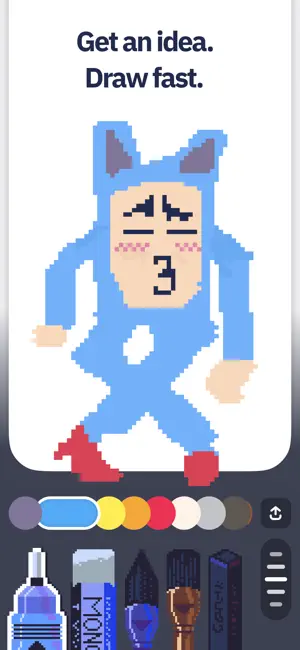


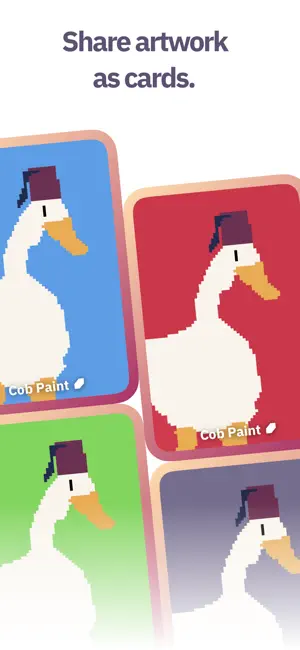
About Cob Paint
Cob Paint is a sketchbook made for fast, expressive pixel art. Your sketchbook should be a playground for quickly experimenting with ideas. Stop overthinking and just draw something now. Powered by a custom engine, painting feels instant and responsive, designed for perfectly imperfect artwork. Sketches in Cob Paint feel soft, warm, and personal. Expressive brushes and a focused color palette let you create freely without worrying about your tools. Cob Paint is your cozy home island that you’ll come back to anytime. Over time, new creative spaces may appear, each with their own tools, materials, and rules to explore. Each tool comes with it’s own story, from the familiar mechanical pencil to a chunky Japanese eraser you once fell in love with. You’ll fall in love with your tools. Now go make something and share it.
Ratings & reviews
5.0
5 ratings
What’s new
Version 1.5 · Updated October 20, 2026
I've been working towards this update for a long time, and Cob Paint finally feels like a real pixel art sketchbook. • Made for iPhone Duo. Closed, it's a pocket sketchbook. Open, the page fills the screen. Half open, your palette sits on one side of the fold and your painting on the other. • Watercolour, rebuilt. All-new water and pigment make watercolour look real. Tilt your phone to move the water around as it dries, and blow into the mic to dry it faster. • Eyedropper. Hold your finger still on the page and an eyedropper comes out. Lift to pick up any colour you see, even a wash over the paper. • Perfect shapes. Draw a line, arc, circle, oval or rectangle and keep holding at the end. It snaps into a clean shape you can stretch, or move with two fingers. • A mixing tray. Mix any colour you need. On iPhone Duo, half open it like a book. On any other phone, tap the water swatch twice. • More room on iPhone and iPad. The page fills the screen with the tools floating over it, and you can paint sideways. Swipe the palette down to tuck it away. • A new gallery. See many more of your paintings at once, as tall, wide or square cards. Pick light or dark in settings. • Every paint, more real. Gouache, chalk and pencil all feel more like the real thing, and clear water softens edges and lifts dried paint. • A sketchbook cover, with more to come.
App privacy
The developer, Freddie Iboy, reported these privacy practices to Apple.
Data Not Linked to You
The following data, which may be collected but is not linked to your identity, may be used for the following purposes:
- Identifiers: Device ID
- Usage Data: Product Interaction
Used for: Analytics
Alternatives to Cob Paint
Looking for apps like Cob Paint? Here are 6 similar apps on the App Store. The highest rated is Color Theory Studio (5.0/5), and 2 of the 6 are free to download.
-
 scanbust 3D
-
 Color Theory Studio
5.0
Color Theory Studio
5.0
-
 Image Play Studio
-
 Palette: Color & Brand Studio
-
 Ai Pin Dou
-
 EPS Viewer
1.0
EPS Viewer
1.0
| App | Rating | Price | Last updated | Compare |
|---|---|---|---|---|
| Cob Paint | 5.0 / 5 (5 ratings) | Free | October 20, 2026 | |
| scanbust 3D | – | 24.49 USD | Jan 9, 2026 | Compare |
| Color Theory Studio | 5.0 / 5 (1) | 2.99 USD | Mar 7, 2026 | Compare |
| Image Play Studio | – | 0.99 USD | Dec 23, 2025 | Compare |
| Palette: Color & Brand Studio | – | Free | Jun 22, 2026 | Compare |
| Ai Pin Dou | – | 0.99 USD | Jun 9, 2026 | Compare |
| EPS Viewer | 1.0 / 5 (1) | Free | Oct 13, 2026 | Compare |
Compare Cob Paint with the top alternatives: ratings, updates, ASO score and keyword gaps →