

Draw Anything: Paint Canvas
Juan Antonio Veloz Gutierrez Graphics & Design iPhoneiPadiPod touch
Draw Anything: Paint Canvas is a free Graphics & Design app for iPhone and iPad by Juan Antonio Veloz Gutierrez. Rated 5.0/5 from 9 ratings.
- Rating
- 5.0
- 9 ratings
- Price
- Free
- on the App Store
- Size
- 28 MB
- Age 4+
- Updated
- Oct 22
- 2026 · v2.1
Screenshots


About Draw Anything: Paint Canvas
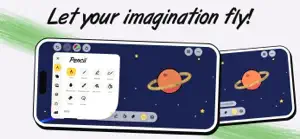
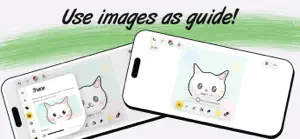
Capture your imagination and turn every spark of inspiration into a masterpiece with Draw Anything! Whether you’re a professional artist or just looking to pass the time with a fun doodle, our app provides the ultimate digital canvas for your creativity. Your All-in-One Creative Studio Why limit yourself? From a quick sketch on the train to a detailed graphic design for your next project, Draw Anything gives you the tools to express yourself without boundaries. Choose your favorite medium—be it a sharp pencil for fine lines, a vibrant crayon for nostalgic textures, or a smooth brush for that perfect paint stroke. Key Features to Love: Infinite Variety: Access a massive library of brushes, pens, and tools. Vibrant Color Palettes: Use our advanced color picker to find the exact shade you need or create your own custom themes. Photo Integration: Import any image from your gallery and use it as a reference or a base for your next creation. User-Friendly Interface: A sleek, distraction-free workspace designed so you can focus on what matters: the art. Share the Joy: Connect with friends! Export your work in high resolution or share your process directly to social media. From Doodles to Fine Art Draw Anything is built for everyone. Kids will love the playful crayon tools, while designers will appreciate the precision of our graphic engines. No matter your skill level, you’ll find that creating something beautiful has never been this intuitive. "The only limit is your imagination. Grab your digital pencil and start your journey today!" Ready to make your mark? Download Draw Anything now and transform your device into a portable art studio! Unlock the full potential of your creativity with Draw Anything PRO. Elevate your art with these exclusive professional tools: RAINBOW PENCIL Add a touch of magic to every stroke. This dynamic tool shifts through the full spectrum as you draw, creating mesmerizing gradients and vibrant patterns effortlessly. It’s perfect for eye-catching outlines or adding a whimsical flair to your sketches. IMPORT IMAGES Turn your photos into art. Bring any image from your gallery directly onto the canvas to use as a reference layer, a background, or a base for your next masterpiece. Trace, edit, and blend real-world textures into your digital designs with ease. INFINITE COLOR Break free from limited palettes. With our advanced color engine, you have access to every shade imaginable. Use the precision slider or hex codes to find the exact hue you need, ensuring your artwork looks exactly how you envisioned it. GRAVITY LINES Master the art of flow. This unique physics-based tool make your lines fall after you draw them, useful for temporary things. NEW IN 2.0 • Faster, smoother drawing with Apple Pencil support • Fill bucket and layers • Watercolor and fountain pen brushes • A daily drawing idea and streaks • Timelapse videos of your drawings • Home Screen widgets • My stats: see how much ink you've drawn • PRO Lifetime: pay once, keep PRO forever A subscription is needed to unlock PRO features including Rainbow Pencil, Import Images, Infinite Color, and Gravity Lines. Payment will be charged to your Apple ID account upon confirming the purchase. Subscriptions automatically renew unless canceled at least 24 hours before the end of the current period. Your account will be charged for renewal within 24 hours prior to the end of the current period. You can manage or cancel your subscription at any time from your account settings in the App Store. Read the EULA Terms in the following link https://www.apple.com/legal/internet-services/itunes/dev/stdeula/
Ratings & reviews
5.0
9 ratings
What’s new
Version 2.1 · Updated October 22, 2026
New for iPhone Duo: • Easel: open it halfway and the lower half holds your brushes and colors • Trace book: a reference photo on one page, your drawing on the other • Mirror mode and butterfly prints across the fold • With gravity on, drawings slide into the fold Plus fixes and speed improvements.
App privacy
The developer, Juan Antonio Veloz Gutierrez, reported these privacy practices to Apple.
Data Used to Track You
The following data may be used to track you across apps and websites owned by other companies:
- Location: Coarse Location
Data Not Linked to You
The following data, which may be collected but is not linked to your identity, may be used for the following purposes:
- Diagnostics: Other Diagnostic Data
- Location: Coarse Location
Used for: Analytics, App Functionality
Alternatives to Draw Anything: Paint Canvas
Looking for apps like Draw Anything: Paint Canvas? Here are 6 similar apps on the App Store. The highest rated is NiBoard: Whiteboard Drawing (4.6/5), and all 6 are free to download.
-
 Canvas: Template Design Maker
4.0
Canvas: Template Design Maker
4.0
-
 Learn How to Draw Tutorials
4.4
Learn How to Draw Tutorials
4.4
-
 NiBoard: Whiteboard Drawing
4.6
NiBoard: Whiteboard Drawing
4.6
-
 Canvas for Logo & Poster Maker
4.3
Canvas for Logo & Poster Maker
4.3
-
 Drawing Pad -
4.3
Drawing Pad -
4.3
-
 Graphic Design & Logo Creator.
4.6
Graphic Design & Logo Creator.
4.6
| App | Rating | Price | Last updated | Compare |
|---|---|---|---|---|
| Draw Anything: Paint Canvas | 5.0 / 5 (9 ratings) | Free | October 22, 2026 | |
| Canvas: Template Design Maker | 4.0 / 5 (141) | Free | Oct 29, 2026 | Compare |
| Learn How to Draw Tutorials | 4.4 / 5 (1,537) | Free | Oct 29, 2026 | Compare |
| NiBoard: Whiteboard Drawing | 4.6 / 5 (487) | Free | Oct 30, 2026 | Compare |
| Canvas for Logo & Poster Maker | 4.3 / 5 (5,275) | Free | Oct 29, 2026 | Compare |
| Drawing Pad - | 4.3 / 5 (99,234) | Free | Oct 16, 2026 | Compare |
| Graphic Design & Logo Creator. | 4.6 / 5 (14,904) | Free | Oct 10, 2026 | Compare |