

NiBoard: Whiteboard Drawing
Enid Hadaj Graphics & Design iPhoneiPadiPod touchMac
NiBoard: Whiteboard Drawing is a free Graphics & Design app for iPhone and iPad by Enid Hadaj. Rated 4.6/5 from 486 ratings. Requires iOS 17.0.
- Rating
- 4.6
- 486 ratings
- Price
- Free
- on the App Store
- Size
- 55 MB
- Age 4+
- Updated
- Oct 23
- 2026 · v12.2
Screenshots


About NiBoard: Whiteboard Drawing
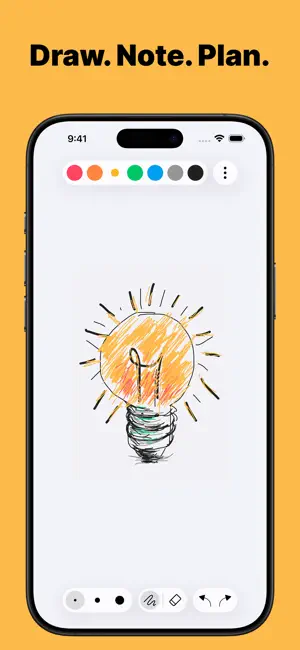
NiBoard is a simple whiteboard app for drawing, sketching, notes, and ideas. Whether you’re a student, teacher, creator, or just want a clean space to think visually, NiBoard helps you capture ideas quickly with an easy-to-use canvas, Apple Pencil support, drawing tools, editable objects, and boards for keeping your work organized. Why You’ll Love NiBoard • Simple from the first tap: Open a board and start drawing without setup. • Great for Notes, Lessons, and Ideas: Use NiBoard for quick explanations, visual thinking, planning, and sketches. • Organized Workspace: Keep different notes, sketches, lessons, and ideas in separate boards. • Apple Pencil Support: Draw with your finger, Apple Pencil, or both for precise control. • Clean, Minimal Interface: Focus on your ideas without distractions. Key Features • Pen & Highlighter: Draw naturally and highlight important notes, diagrams, and ideas. • Lines, Arrows, Shapes & Text: Create simple diagrams, organize ideas, and add clear labels. • Editable Objects: Select lines, arrows, and shapes to move, resize, recolor, and customize borders with three size options. • Shape Fill: Fill supported shapes with color for cleaner diagrams and visual notes. • Boards: Create, rename, duplicate, and pin boards to keep your ideas and projects organized. • Infinite Canvas: Expand your canvas and keep drawing without running out of space. • Canvas Styles: Use Blank, Grid, Dotted, and Lined canvas styles for cleaner sketches and notes. • Custom Color Palette: Create your own color palette with the full color picker. • Easy Editing: Use Undo/Redo, Eraser, and Zoom for quick fixes and detailed work. • Export: Export your boards as PNG or PDF. • Save & Share: Save your drawings or share them with others. • Dark Mode: Enjoy a comfortable drawing experience in any lighting. • Autosave: Your work is saved automatically. A subscription is required to unlock full access to the app. Terms of Service https://www.apple.com/legal/internet-services/itunes/dev/stdeula/
Ratings & reviews
4.6
486 ratings
What’s new
Version 12.2 · Updated October 23, 2026
• Added support for iPhone Duo • Bug fixes and improvements
App privacy
The developer, Enid Hadaj, reported these privacy practices to Apple.
Data Not Linked to You
The following data, which may be collected but is not linked to your identity, may be used for the following purposes:
- Purchases: Purchase History
Used for: Analytics, App Functionality
Alternatives to NiBoard: Whiteboard Drawing
Looking for apps like NiBoard: Whiteboard Drawing? Here are 6 similar apps on the App Store. The highest rated is Casual Whiteboard: Canvas Pro (4.5/5), and all 6 are free to download.
-
 Casual Whiteboard: Canvas Pro
4.5
Casual Whiteboard: Canvas Pro
4.5
-
 Whiteboard - Simple
3.3
Whiteboard - Simple
3.3
-
 Simple Drawing Pad
4.1
Simple Drawing Pad
4.1
-
 Flow: Note Taking & Sketchbook
4.1
Flow: Note Taking & Sketchbook
4.1
-
 Blackboard - Simple
4.5
Blackboard - Simple
4.5
-
 Tayasui Sketches
4.5
Tayasui Sketches
4.5
| App | Rating | Price | Last updated | Compare |
|---|---|---|---|---|
| NiBoard: Whiteboard Drawing | 4.6 / 5 (486 ratings) | Free | October 23, 2026 | |
| Casual Whiteboard: Canvas Pro | 4.5 / 5 (160) | Free | Oct 2, 2026 | Compare |
| Whiteboard - Simple | 3.3 / 5 (12) | Free | Jul 15, 2026 | Compare |
| Simple Drawing Pad | 4.1 / 5 (36) | Free | Jul 15, 2026 | Compare |
| Flow: Note Taking & Sketchbook | 4.1 / 5 (7,240) | Free | Oct 27, 2026 | Compare |
| Blackboard - Simple | 4.5 / 5 (14) | Free | Jul 14, 2026 | Compare |
| Tayasui Sketches | 4.5 / 5 (54,345) | Free | Oct 9, 2026 | Compare |