

Oak Viewer
Jeremy Dunlap Photo & Video iPhoneiPadiPod touch
Oak Viewer is a free Photo & Video app for iPhone and iPad by Jeremy Dunlap. Rated 5.0/5 from 2 ratings. Requires iOS 26.1. Updated October 27, 2026.
- Rating
- 5.0
- 2 ratings
- Price
- Free
- on the App Store
- Size
- 15 MB
- Age 17+
- Updated
- Oct 27
- 2026 · v1.7
Screenshots


About Oak Viewer
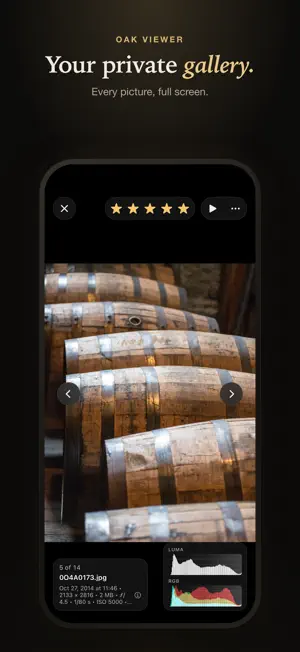
Oak Viewer is a private, intentional photo viewer for art collectors, photographers, and anyone who loves images. Discover artwork online, download gallery ZIP files in the built-in browser, and explore your collection in a calm, distraction-free space. Swipe smoothly between images, inspect fine details, and rate your favorites, all while keeping your library fully on-device. Oak Viewer is designed to feel more like a personal gallery than a utility. FULL-SCREEN VIEWING Experience your images the way they were meant to be seen. Swipe fluidly between photos, zoom to pixel level, and explore every detail with intuitive gestures. A clean interface keeps the focus on your images, while still giving you quick access to ratings, metadata, and tools when you need them. Also supports videos, PDFs, and text files in the same library. PRIVATE, ON-DEVICE LIBRARY Your collection stays on your device. No accounts. No cloud uploads. Just your library. Optional biometric app lock adds an extra layer of protection. DISCOVER & IMPORT COLLECTIONS Browse art and photography sites with the built-in private browser. • Long-press to save images directly • Import entire ZIP galleries • Batch import collections Build your collection effortlessly. ORGANIZE YOUR GALLERY Create unlimited folders and nested folders. Use Smart Folders to automatically gather images by rating, keeping your best work always within reach. Pin favorites for instant access. RATE & CURATE Review your collection with a fluid 1–5 star rating system. Long-press and slide to rate instantly while browsing, perfect for large collections. IMAGE INSIGHTS Learn more about every image: • Full EXIF metadata • Filename and resolution details • Real-time RGB and luminance histograms • Highlight and shadow clipping indicators • Precise zoom and panning feedback WIDGETS & QUICK ACCESS Bring your collection to your Home Screen: • Picture Frame widget rotates favorite folders • Resume widget jumps back into your last session DESIGNED YOUR WAY Customize your experience: • Themes and custom app icons • Custom library backgrounds • Adjustable grid density and spacing • Slideshow viewing • Keyboard shortcuts on iPad • Configurable trash policies TRY IT FREE Oak Viewer includes a 7-day free trial with full access to every feature. After your trial, choose the plan that works for you: • Yearly — $2.99/year, auto-renewing • Lifetime — $9.99, one-time purchase Payment is processed by Apple. Manage or cancel anytime in Settings > Subscriptions. Whether you’re collecting digital art, studying photography, or simply enjoying images at your own pace, Oak Viewer gives your collection a private space to breathe. Terms of Use: https://www.apple.com/legal/internet-services/itunes/dev/stdeula/ Privacy Policy: https://oakviewer.com/privacy
What’s new
Version 1.7 · Updated October 27, 2026
Keep in Sync Keep your library the same on two devices, such as an iPad and an iPhone. Pair them once in Settings → Storage & Sync → Keep in Sync, then tap Sync Now whenever both have Oak Viewer open. New photos and folders, ratings, moves, renames, Trash and smart folders go both ways, directly between your devices over your local network. Syncing always asks first, on both devices, and shows exactly what will change before anything happens. No photos are ever erased: anything deleted on one device goes to Trash on the other. You can stop syncing at any time. Fixes and refinements • Send Library no longer stalls on “Preparing library” and closes when the library is very large. • Switches and buttons are easy to read with the Classic theme in Dark Mode. • The Warm, Cool and Pink themes have readable titles in Dark Mode. • The Open in Maps button in photo info is readable. • Storage, backups, Keep in Sync and moving your library to a new device are now together in Settings → Storage & Sync.
App privacy
The developer, Jeremy Dunlap, reported these privacy practices to Apple.
Data Not Collected
The developer does not collect any data from this app.
Alternatives to Oak Viewer
Looking for apps like Oak Viewer? Here are 6 similar apps on the App Store. The highest rated is Photo Packs (5.0/5), and all 6 are free to download.
-
 BePix - adfree multi viewer
-
 Photo Packs
5.0
-
 PhotoView: EXIF Photo Viewer
5.0
-
 Zoom Compare: Pick Best Photos
-
 Hyperluts
-
 FixedFocus: Digiscoping Cam
4.0
| App | Rating | Price | Last updated | Compare |
|---|---|---|---|---|
| Oak Viewer | 5.0 / 5 (2 ratings) | Free | October 27, 2026 | |
| BePix - adfree multi viewer | – | Free | Oct 19, 2026 | Compare |
| Photo Packs | 5.0 / 5 (1) | Free | Oct 3, 2026 | Compare |
| PhotoView: EXIF Photo Viewer | 5.0 / 5 (1) | Free | Oct 23, 2026 | Compare |
| Zoom Compare: Pick Best Photos | – | Free | Jun 2, 2026 | Compare |
| Hyperluts | – | Free | May 5, 2026 | Compare |
| FixedFocus: Digiscoping Cam | 4.0 / 5 (1) | Free | Jul 20, 2026 | Compare |
Compare Oak Viewer with the top alternatives: ratings, updates, ASO score and keyword gaps →