

Klava Keyboard
Nikita Shimkus Utilities iPhoneiPadiPod touch
Klava Keyboard is a free Utilities app for iPhone and iPad by Nikita Shimkus. Rated 3.5/5 from 11 ratings. Requires iOS 17.6. Updated September 12, 2026.
- Rating
- 3.5
- 11 ratings
- Price
- Free
- on the App Store
- Size
- 78 MB
- Age 4+
- Updated
- Sep 12
- 2026 · v1.8
Screenshots

About Klava Keyboard
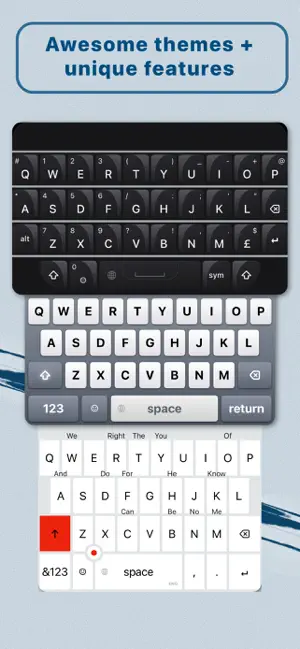
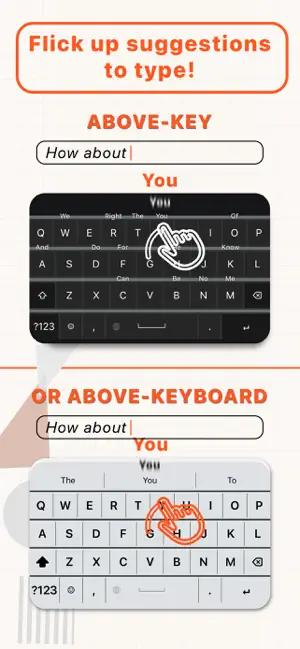
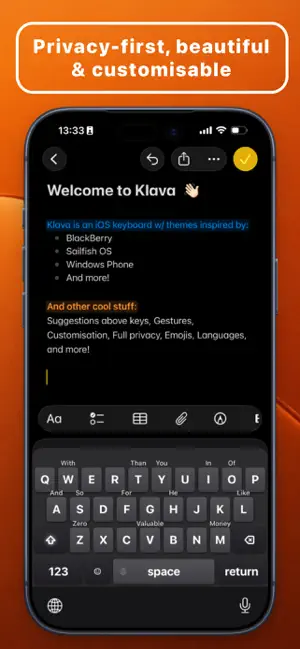
Many keyboards are boring. Some track what you type. Plenty just don't work. Klava ain’t any of that. Klava keyboard brings together smart above-key predictions, stunning themes, sick features and rock-solid privacy. And a bunch of other cool stuff (that you can customise or turn on / off). What Klava has that others don’t: - Smart above-key and above-keyboard suggestions that you can flick up. Like the good ol’ BlackBerry days - Privacy. Klava learns as you type, but what you type doesn’t ever leave the device. As it should be. Keep what's yours, we don't want to know that! - Beautiful themes, each with unique features. We got sleek modern themes. We got nostalgic themes, true classics even. We got more themes cooking as you are reading this - App shortcuts – a true revolution! Assign apps to keys & then jump to the app of your choice by simply long-pressing the key - High personalisation. Customise font size, colours, buttons and so on. Make Klava what you want it to be - Gestures that feel awesome. Our favourite: swipe left across the keyboard to delete words. Or set a custom action to the 'swipe right' gesture! - Autocorrect is here, plus text navigation with Cursor Mode via WASD or a joystick in some themes. It’s super nice - Built-in emojis. What’s more, type things like :) or :phone to get an instant emoji suggestion. Truly :fire (can't put emojis here, imagine one!) - You can switch keyboard layouts by simply holding the spacebar, smooth as heck - We could go on, but that’s probably enough for the App Store page. Last thing: we are releasing major updates for Klava at least every month, so expect more themes, features, languages and just plain new & nice stuff regularly Klava currently supports 25+ languages with more in the making: - English (US/GB) - Spanish (Español) - French (Français) - German (Deutsch) - Dutch (Nederlands) - Italian (Italiano) - Portuguese (Português) - Russian (Русский) - Finnish (Suomi) - Hungarian (Magyar) - Polish (Polski) - Romanian (Română) - Swedish (Svenska) - Bulgarian (Български) - Indonesian (Bahasa Indonesia) - Czech (Čeština) - Vietnamese (Tiếng Việt) - Arabic - Danish (Dansk)* - Croatian (Hrvatski)* - Norwegian (Norsk)* - Turkish (Türkçe)* - Greek (Ελληνικά)* - Serbian (Српски)* - Ukrainian (Українська)* - Hebrew* - Thai (ไทย)* *These languages don't support predictions above keys just yet, but you can type in your favourite themes in your language's layout! If you have ideas, feedback, want to say hi or give us a scolding (only if well-deserved!), drop a message to [email protected] Terms of Use: https://www.klava.space/terms
Ratings & reviews
3.5
11 ratings
What’s new
Version 1.8 · Updated September 12, 2026
A very nice (revolutionary) Klava update to end the summer - it was worth the wait! TL;DR: Shortcuts that take you to any app, a new Social theme to accompany that, free updates to existing themes (Metro8 gets a joystick), engine & layout improvements across the board, plus no more subscription! What’s new: - Shortcuts: map any app or link to a key, and then long-press that key to get teleported to that app. It’s fully privacy-preserving, snappy, and Klava ships with a few apps presets with nice icons - Social Theme: a new free theme to showcase the Klava Shortcuts! A ultimate toolkit for app-hopping from anywhere in your phone, right from your keyboard - Pod Theme: the Pod theme now has better interaction with the Click Wheel. You can scroll or press left & right buttons to move through suggestions, or press play/pause button to cycle through text cursor - Metro8 Theme: it gets a free joystick upgrade! Should we call it Metro10 now? - Alt Layouts: by popular request, alt layouts now available for French (with finally adding œ to long-press of o!), Dutch, Indonesian, German, Italian, Portuguese & Czech - Onboarding: reworked to be better, faster & smoother - Layout improvements, incl. Arabic, Dutch & Czech keyboards - Goodbye subscription: no more subscription fatigue. There’s a one-time payment to unlock EVERYTHING forever now. Great success
App privacy
The developer, Nikita Shimkus, reported these privacy practices to Apple.
Data Not Collected
The developer does not collect any data from this app.
Alternatives to Klava Keyboard
Looking for apps like Klava Keyboard? Here are 6 similar apps on the App Store. The highest rated is EFKey – Swipe & AI Keyboard (4.7/5), and all 6 are free to download.
-
 keyboard2
3.7
-
 EFKey – Swipe & AI Keyboard
4.7
-
 NuKey
4.4
-
 MarAI Keyboard
-
 Keyz Keyboard
4.4
-
 Magic Keyboard - Star Ripples
| App | Rating | Price | Last updated | Compare |
|---|---|---|---|---|
| Klava Keyboard | 3.5 / 5 (11 ratings) | Free | September 12, 2026 | |
| keyboard2 | 3.7 / 5 (21) | Free | Oct 15, 2026 | Compare |
| EFKey – Swipe & AI Keyboard | 4.7 / 5 (41) | Free | Oct 21, 2026 | Compare |
| NuKey | 4.4 / 5 (48) | Free | Oct 23, 2026 | Compare |
| MarAI Keyboard | – | Free | Oct 26, 2026 | Compare |
| Keyz Keyboard | 4.4 / 5 (13) | Free | Oct 15, 2026 | Compare |
| Magic Keyboard - Star Ripples | – | Free | Jan 5, 2026 | Compare |
Compare Klava Keyboard with the top alternatives: ratings, updates, ASO score and keyword gaps →