

AI Vision Monitor: Smart Cam
Erik Sindonen Utilities iPhoneiPadiPod touch
AI Vision Monitor: Smart Cam is a free Utilities app for iPhone and iPad by Erik Sindonen. Requires iOS 15.1. Updated August 24, 2026.
- Price
- Free
- on the App Store
- Size
- 30 MB
- Age 4+
- Updated
- Aug 24
- 2026 · v1.2.7
Screenshots

About AI Vision Monitor: Smart Cam
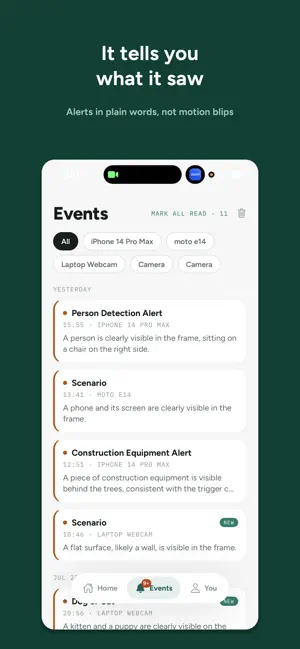
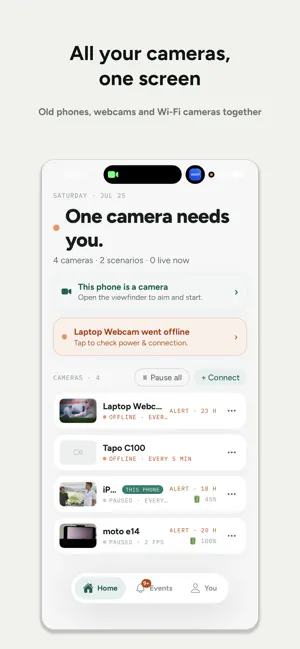
Point a camera at anything and tell the AI what to watch for, in plain words. "Alert me if my cat jumps on the counter." "Tell me when a package arrives." "Notify me if my 3D print fails." AI Vision Monitor watches so you don't have to. WHAT PEOPLE MONITOR • Pets: cat on the table, dog on the couch, empty food bowl • Home: package at the door, water leak, snow on the driveway, a free parking spot • Makers: 3D print failures, kiln, aquarium, plants • Family: the baby woke up, an elderly relative is up and about, kids came home • Work: shop entrance, storage room, equipment status HOW IT WORKS 1. Point a camera at the scene 2. Describe the event in your own words, in any language 3. Choose how often to check, from seconds to hours 4. Get an alert the moment it happens ANY CAMERA YOU ALREADY OWN • This phone: the viewfinder becomes a camera in one tap • Old phones and tablets: give a retired device a new job • USB webcams and Wi-Fi / RTSP cameras, through a free companion app for your computer • Run several cameras at once and see them all on one screen WHERE ALERTS ARRIVE • Push notifications • Email • Telegram and Discord WHY IT'S DIFFERENT • Not motion detection: the AI understands what it actually sees • Any scenario you can put into words, not a fixed list • It remembers earlier frames, so it won't alert twice for the same thing • Pick a lighter or a smarter AI model per scenario to control what you spend FAIR PRICING • 50 free credits to start, no card required • You pay only for the frames that are analysed • The estimated cost is shown before monitoring starts Also in your browser at app.aicameras.win. Same account, same cameras.
What’s new
Version 1.2.7 · Updated August 24, 2026
The viewfinder has two modes now: full screen while you look around, and the exact working frame once a scenario is armed. What you see in the working frame is exactly what the AI analyses. On sideways mounts the arrow now points at the real sky and the badge shows how the phone is turned. Camera mode is one tap from Home in any role.
App privacy
The developer, Erik Sindonen, reported these privacy practices to Apple.
Data Linked to You
The following data, which may be collected and linked to your identity, may be used for the following purposes:
- Usage Data: Product Interaction
- Purchases: Purchase History
- Contact Info: Email Address, Name
- User Content: Photos or Videos, Other User Content
- Identifiers: User ID
- Surroundings: Environment Scanning
Used for: Analytics, App Functionality
Data Not Linked to You
The following data, which may be collected but is not linked to your identity, may be used for the following purposes:
- Diagnostics: Crash Data, Other Diagnostic Data
Used for: App Functionality
Alternatives to AI Vision Monitor: Smart Cam
Looking for apps like AI Vision Monitor: Smart Cam? Here are 6 similar apps on the App Store. The highest rated is MyOmniSight (5.0/5), and all 6 are free to download.
-
 MyOmniSight
5.0
MyOmniSight
5.0
-
 Vision Assistant AI
5.0
Vision Assistant AI
5.0
-
 Pharo Previewer
5.0
Pharo Previewer
5.0
-
 MyEmergencyKit
-
 My AI Eyes
-
 WatchSpot: Motion Alarm Camera
5.0
WatchSpot: Motion Alarm Camera
5.0
| App | Rating | Price | Last updated | Compare |
|---|---|---|---|---|
| AI Vision Monitor: Smart Cam | – | Free | August 24, 2026 | |
| MyOmniSight | 5.0 / 5 (1) | Free | Jun 22, 2026 | Compare |
| Vision Assistant AI | 5.0 / 5 (3) | Free | Aug 9, 2026 | Compare |
| Pharo Previewer | 5.0 / 5 (1) | Free | Sep 3, 2026 | Compare |
| MyEmergencyKit | – | Free | Jun 11, 2025 | Compare |
| My AI Eyes | – | Free | Jun 28, 2025 | Compare |
| WatchSpot: Motion Alarm Camera | 5.0 / 5 (1) | Free | Oct 20, 2026 | Compare |