

ScreenDo - Event Log & Tracker
星宇 赵 Productivity iPhoneiPadiPod touch
ScreenDo - Event Log & Tracker is a free Productivity app for iPhone and iPad by 星宇 赵. Rated 5.0/5 from 1 ratings. Requires iOS 17.6. Updated March 20, 2026.
- Rating
- 5.0
- 1 ratings
- Price
- Free
- on the App Store
- Size
- 22 MB
- Age 17+
- Updated
- Mar 20
- 2026 · v2.0.0
Screenshots



About ScreenDo - Event Log & Tracker
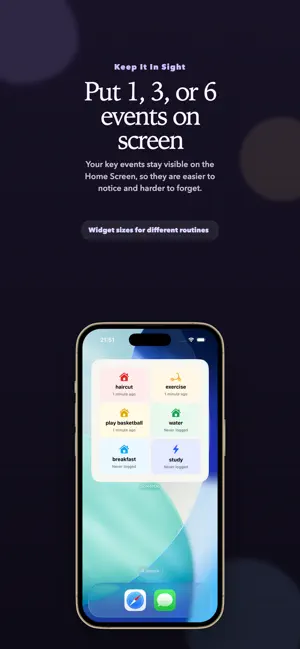
Stop guessing. Start understanding your life rhythm. ScreenDo helps you remember the last time something happened, without turning your life into a streak game. It is designed for the things that matter but do not happen on a perfect daily schedule: changing filters, watering plants, taking care of personal routines, replacing supplies, home maintenance, health-related tasks, and all the small recurring things that are easy to forget. Instead of asking you to keep a streak alive, ScreenDo focuses on one simple idea: record the last time, then let the pattern become clear. What you can do with ScreenDo: 1. Log in one tap Once you create an event, recording it takes a second. No complicated workflow, no pressure to stay perfect, and no friction when life gets busy. 2. Understand real intervals ScreenDo helps you see how often something usually happens, whether the rhythm is stable, and when the next time may be due. 3. View trends and history Readable logs and charts make it easier to understand timing, intervals, and changes over time, so you rely less on memory. 4. Track irregular life tasks Use ScreenDo for home care, personal upkeep, cleaning routines, wellness tasks, plant care, and other recurring events that do not fit a strict daily habit tracker. 5. Use widgets for faster logging Keep important events on your Home Screen so you can check status and log updates with less effort. 6. Keep your data close ScreenDo is built around a calmer, more private experience, with your records stored locally on your device by default. 7. Unlock Pro features Get unlimited events, iCloud backup, and data export for more flexible long-term tracking. Why ScreenDo feels different Most trackers are built around pressure: daily check-ins, streaks, missed days, and noisy reminders. But many of the things we actually forget are not daily habits. They are the tasks that happen every few days, every few weeks, or only once in a while. ScreenDo is built for that reality. It helps you notice patterns, reduce mental load, and stay on top of life with more calm and clarity. If you want less guessing, less friction, and a better way to remember what happened last, ScreenDo is made for you. Terms of Use: https://www.apple.com/legal/internet-services/itunes/dev/stdeula/
What’s new
Version 2.0.0 · Updated March 20, 2026
- Added a welcome flow, help guide, and in-app Terms & Privacy pages. - Added data import/export and iCloud backup for easier backup management. - Added more language support and improved widgets, insights, and logging experience.
App privacy
The developer, 星宇 赵, reported these privacy practices to Apple.
Data Not Collected
The developer does not collect any data from this app.
Alternatives to ScreenDo - Event Log & Tracker
Looking for apps like ScreenDo - Event Log & Tracker? Here are 6 similar apps on the App Store. The highest rated is Main Quest: Time Log (5.0/5), and all 6 are free to download.
-
 Pento: Writing Coach
-
 Main Quest: Time Log
5.0
Main Quest: Time Log
5.0
-
 Orbit – Habit & Memory Tracker
-
 Planish: ADHD Day Planner
-
 HomeHandy: Home Maintenance
-
 Capture: Voice Task Manager
| App | Rating | Price | Last updated | Compare |
|---|---|---|---|---|
| ScreenDo - Event Log & Tracker | 5.0 / 5 (1 rating) | Free | March 20, 2026 | |
| Pento: Writing Coach | – | Free | Aug 15, 2026 | Compare |
| Main Quest: Time Log | 5.0 / 5 (2) | Free | Jul 23, 2026 | Compare |
| Orbit – Habit & Memory Tracker | – | Free | Dec 16, 2025 | Compare |
| Planish: ADHD Day Planner | – | Free | Nov 1, 2026 | Compare |
| HomeHandy: Home Maintenance | – | Free | Sep 20, 2026 | Compare |
| Capture: Voice Task Manager | – | Free | Jul 6, 2026 | Compare |