

SplitterUp
All Day Software LLC Productivity iPhoneiPadiPod touch
SplitterUp is a free Productivity app for iPhone and iPad by All Day Software LLC. Rated 5.0/5 from 17 ratings. Requires iOS 16.0. Updated October 8, 2026.
- Rating
- 5.0
- 17 ratings
- Price
- Free
- on the App Store
- Size
- 76 MB
- Age 4+
- Updated
- Oct 8
- 2026 · v1.34.0
Screenshots


About SplitterUp
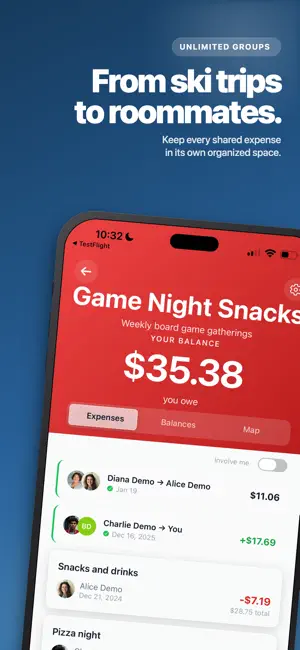
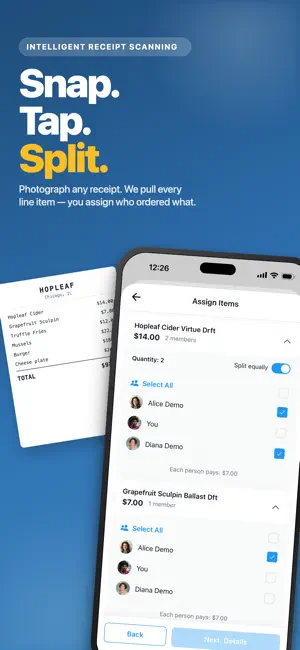
SplitterUp is the expense splitting app that doesn't charge a monthly fee. Split with friends, roommates, partners and travel groups — then see exactly who owes what. Split Any Way You Want • Create groups for trips, households, or shared bills • Split directly with a friend, no group needed • Quick Split for one-off expenses — just type names, no sign-up needed • Divide costs equally, by exact amounts, or by percentage • Save the split you use most and reuse it in one tap • Set up repeating expenses for rent, utilities and subscriptions Households • Add a couple or a whole home as one member of a group • The household pays a share its own size, then splits it internally • Household balances roll up on your dashboard Scan Receipts, Assign Items • Snap a photo — it's straightened and enhanced automatically • Line items, tax, tip and totals are extracted for you • Assign items to the people who ordered them, or let everyone claim their own • Split a receipt together, live, with the people next to you Every Currency, Handled Properly • Search any world currency and use it anywhere • Exchange rates are locked to the expense, so a balance doesn't drift • Set a currency per group, or override the rate on one expense • Always see the original amount next to the converted one Stay on Top of Balances • See exactly who owes you and who you owe • Open any balance to see how it was worked out • Record a payment in full or in part, in any currency, on any date • Add your Venmo, PayPal, Cash App or Zelle details so people can pay you back Spending Insights • See where your money actually went, by category and by group • Pick any date range, or drill into a single group • Export a group's expenses to Excel or CSV Works Anywhere, Even Offline • Add and edit expenses with no signal — it all syncs when you're back • Stays in sync across iPhone, iPad and the web • Ask Siri to start an expense, or add a Home Screen shortcut Keep Everyone in the Loop • Invite people by email, or share a link anyone can join from • Split with people who don't have the app — invite them later and their share comes with them • Get notified when an expense is added or a payment is recorded Find It Again Later • Search a group by description, person, amount, category or place • Favorite the people and groups you use most • Archive what you're done with, without losing the history Tag Where You Spent • Add a location to any expense, and see the group's expenses on a map Designed for iPhone and iPad • iPad layouts built for the screen, not stretched from a phone • Face ID and Touch ID for quick, secure access Privacy First • Export or delete your data anytime • No ads, no data selling Perfect for roommates, couples, travel groups and anyone who shares expenses. Download SplitterUp and stop the awkward "who owes what" conversations. Terms of Use: https://splitterup.app/terms Privacy Policy: https://splitterup.app/privacy
Ratings & reviews
5.0
17 ratings
What’s new
Version 1.34.0 · Updated October 8, 2026
Czech, Portuguese and Italian SplitterUp now comes in Czech, Brazilian Portuguese and Italian. If your language still isn't there, you can ask us to add it. Also in this release: pay an expense in installments, choose whether an edit applies to just one repeating expense or the ones still to come, see how many payments are left, type amounts with a keyboard on iPad and Mac, and faster loading. WHAT'S NEW • Czech, Portuguese and Italian — If your phone is set to one of them, SplitterUp switches the next time it opens, or you can choose one under Account and then Language. While I wish we could afford professional translators, these were translated with AI tools. If something reads wrong in your language, please tell us from Feedback. • Group settings, redesigned — Group settings are now a short list where every setting opens its own page, with a refreshed look. Your group's name, photo and color are edited in one place. On the People page, tap a person to see everything you can do for them. • Your data loads much faster — SplitterUp now shows your balances, groups and recent expenses from your device the moment it opens, even offline, and updates them as it syncs. After you sign in, your groups appear right away and fill in as the rest of your data arrives. • Repeating expenses and installments — Pay an expense in installments from the new Schedule section when you add an expense: choose Installments, set how many payments with − and +, and see every payment date before you save. Tap How it works for a quick walkthrough. You can also choose whether an edit applies to just one repeating expense or the ones still to come, and see how many payments are left. Find the details under Profile → Help & Support → FAQ — or tap to open them now. IMPROVEMENTS • You can now type the amount with a hardware keyboard on iPad and on Mac, calculations included, such as 12.5+3*2. Tab or Return moves from the description to the amount, and the on-screen calculator still works with touch. • In Account->Categories, the built-in categories you don't use, and drag any category by its handle to put them in your order. Your own categories, and your groups' categories, can be reordered too. Find them under Account and then Categories, or in a group's settings. • Joined a group as a guest on the web? Get a transfer code there, then enter it in the app to keep your balance and history. • On the web, the People page now has its own address, web.splitterup.app/people. Old Friends links open it too. • On itemized expenses, you can now add or remove people from items while offline. The change saves when you reconnect, and if someone else edited the expense meanwhile, their version is kept and you're told. Adding someone by name, Let them decide and inviting someone new still need a connection. • When you add someone to a receipt item with more than one unit, such as three beers, SplitterUp now asks how many each person had instead of splitting it evenly. FIXES • When you make two changes in a row, such as editing a receipt item and then the expense description, both changes now save. Before, the second change could be thrown away. • Fixed a crash on iPhone and iPad when the balance on the home screen animated. • A repeating expense that missed some dates now adds every missed expense at once and sends you one summary notification instead of one for each. • Balances now stay correct while you're offline after you edit or delete receipt items, after you delete or edit an expense that has a share already marked as settled, and for receipts that are still being finalized. • Opening SplitterUp from an invite link, or after signing in, no longer stacks a duplicate screen. • When you edit a group expense, someone who has left the group is no longer offered as a new person who paid. • Resuming a paused repeating expense now continues from its next date instead of adding an expense for every date it was paused.
App privacy
The developer, All Day Software LLC, reported these privacy practices to Apple.
Data Linked to You
The following data, which may be collected and linked to your identity, may be used for the following purposes:
- Diagnostics: Crash Data, Other Diagnostic Data
- Financial Info: Other Financial Info
- Location: Precise Location
- Contact Info: Email Address, Name, Phone Number
- Identifiers: User ID
Used for: Analytics, App Functionality
Data Not Linked to You
The following data, which may be collected but is not linked to your identity, may be used for the following purposes:
- Contacts: Contacts
Used for: App Functionality
Alternatives to SplitterUp
Looking for apps like SplitterUp? Here are 6 similar apps on the App Store. The highest rated is Brick - Ditch Distractions (4.9/5), and all 6 are free to download.
-
 Flatastic: Household Chores
4.7
Flatastic: Household Chores
4.7
-
 Brick - Ditch Distractions
4.9
Brick - Ditch Distractions
4.9
-
 Proton Drive: Cloud Storage
4.1
Proton Drive: Cloud Storage
4.1
-
 Focus Friend, by Hank Green
4.8
Focus Friend, by Hank Green
4.8
-
 ScreenZen- Screen Time Control
4.9
ScreenZen- Screen Time Control
4.9
-
 AnyList: Grocery Shopping List
4.9
AnyList: Grocery Shopping List
4.9
| App | Rating | Price | Last updated | Compare |
|---|---|---|---|---|
| SplitterUp | 5.0 / 5 (17 ratings) | Free | October 8, 2026 | |
| Flatastic: Household Chores | 4.7 / 5 (310) | Free | Sep 30, 2026 | Compare |
| Brick - Ditch Distractions | 4.9 / 5 (58,569) | Free | Oct 26, 2026 | Compare |
| Proton Drive: Cloud Storage | 4.1 / 5 (1,259) | Free | Sep 28, 2026 | Compare |
| Focus Friend, by Hank Green | 4.8 / 5 (9,451) | Free | Oct 21, 2026 | Compare |
| ScreenZen- Screen Time Control | 4.9 / 5 (52,507) | Free | Sep 6, 2026 | Compare |
| AnyList: Grocery Shopping List | 4.9 / 5 (81,148) | Free | Sep 11, 2026 | Compare |
Compare SplitterUp with the top alternatives: ratings, updates, ASO score and keyword gaps →