

FlowSet DJ
Marcio Oliveira Music iPhoneiPadiPod touchMacApple Watch
FlowSet DJ is a free Music app for iPhone and iPad by Marcio Oliveira. Requires iOS 26.0. Updated September 30, 2026.
- Price
- Free
- on the App Store
- Size
- 348 MB
- Age 4+
- Updated
- Sep 30
- 2026 · v2.2.1
Screenshots


About FlowSet DJ
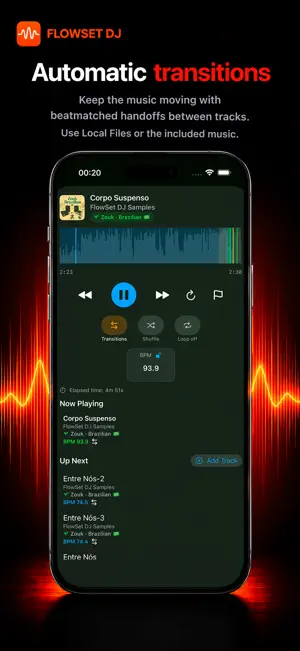
FlowSet DJ turns playlists into ready-to-play sets for parties, dance classes, socials, rehearsals, practice, and workouts. Save the set setup once; FlowSet creates a fresh playback queue and removes repeated tracks for each session. Music is included: start with built-in instrumental tracks and playlists, called FlowSet Samples, without importing audio or connecting an account. You can also connect Apple Music playlists or use your own local audio, including .m3u and .m3u8 playlists. Build and organize your sets: - Combine playlists, save the setup, and let FlowSet prepare the playback order. - Group saved setups into categories and reorder them for your classes or events. - Name and collapse loops in a saved setup to keep longer music plans easy to follow. - Add tracks during playback and change what plays next with Pro. - Flag tracks during playback to review them later. Practice choreography: Open a song in single-track playback, select the part you want to repeat, and adjust its tempo for rehearsal. Section looping repeats part of one song; loops in a saved setup keep selecting tracks to fill a planned session duration. Playback and sources: Local Files and FlowSet Samples support section looping, BPM analysis, tempo changes, and automix with automatic and beatmatched transitions. Tempo controls need a completed BPM analysis. Apple Music playlists work for set building and playback through your Apple Music library and account; Apple Music tracks do not support these audio-processing features in FlowSet DJ. Manage storage in Settings with separate controls for track data and temporary Local Files playback copies. Clearing track data also removes your manual BPM fixes; audio, playlists, installed sample packs, and saved sets are preserved. Control playback from Apple Watch paired with your iPhone. Free mode includes the core set-building workflow, built-in music, manual tempo adjustment, and five minutes of section practice per day on each device. Single tracks and playlists have no playback-time limit. Free Smart Sets have playback-time, saved-setup, and action limits. Pro removes those limits and the section-practice limit; unlocks adding tracks to the playing queue, release of setup loops during playback, and BPM lock; and lets you download every FlowSet Samples pack. Terms of Use: https://www.flowsetdj.com/terms-and-conditions/ Privacy Policy: https://www.flowsetdj.com/privacy-policy
What’s new
Version 2.2.1 · Updated September 30, 2026
What's new: - Choose whether to share usage data to help improve FlowSet DJ. - Smoother app startup when checking your music. - More reliable track starts and transitions, including between tracks with very different speeds. - Playback improvements throughout the app.
App privacy
The developer, Marcio Oliveira, reported these privacy practices to Apple.
Data Not Linked to You
The following data, which may be collected but is not linked to your identity, may be used for the following purposes:
- Usage Data: Product Interaction
- Diagnostics: Crash Data, Performance Data
Used for: Analytics
Alternatives to FlowSet DJ
Looking for apps like FlowSet DJ? Here are 6 similar apps on the App Store. The highest rated is DJ Mixer Studio (5.0/5), and all 6 are free to download.
-
 iMixd
-
 DJ Mixer Studio
5.0
-
 DJ Music Mixer - DMixer
4.5
-
 Offtrack: AI DJ Mixer
4.7
-
 Cross DJ - Music Mixer App
4.0
-
 DJ Mixer Studio:Remix Music
4.6
| App | Rating | Price | Last updated | Compare |
|---|---|---|---|---|
| FlowSet DJ | – | Free | September 30, 2026 | |
| iMixd | – | Free | Sep 2, 2026 | Compare |
| DJ Mixer Studio | 5.0 / 5 (3) | Free | Oct 7, 2026 | Compare |
| DJ Music Mixer - DMixer | 4.5 / 5 (1,770) | Free | Oct 10, 2026 | Compare |
| Offtrack: AI DJ Mixer | 4.7 / 5 (6,675) | Free | Oct 10, 2026 | Compare |
| Cross DJ - Music Mixer App | 4.0 / 5 (1,933) | Free | Sep 23, 2026 | Compare |
| DJ Mixer Studio:Remix Music | 4.6 / 5 (11,231) | Free | Jul 5, 2025 | Compare |
Compare FlowSet DJ with the top alternatives: ratings, updates, ASO score and keyword gaps →