

Sign Documents PDF Now :Signup
盛成 杨 Business iPhoneiPadiPod touch
Sign Documents PDF Now :Signup is a free Business app for iPhone and iPad by 盛成 杨. Rated 5.0/5 from 3 ratings. Requires iOS 17.6. Updated September 3, 2026.
- Rating
- 5.0
- 3 ratings
- Price
- Free
- on the App Store
- Size
- 3 MB
- Age 17+
- Updated
- Sep 3
- 2026 · v1.0.5
Screenshots


About Sign Documents PDF Now :Signup
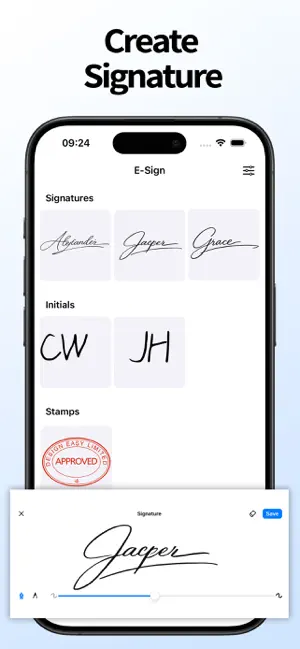
Sign any PDF in seconds — anytime, anywhere. SignUp offers the fastest and most secure way to add your signature, initials, stamp, or text to documents, completely offline. Key Features: Multiple Signature Options Draw your signature with your finger or stylus. Scan a real signature or initials from paper for a personal touch. Import custom stamps or company seals. Type text anywhere in the document for quick form filling. Smart Signed Document Management Two clear tabs for easy navigation: Documents Tab: Organize PDFs into Signed and Unsigned categories for quick access and tracking. Signatures Tab: Manage all your signing tools in one place—complete signatures, initials, and stamps are neatly organized and ready to use. Share & Print with Ease Instantly share signed documents via email, messaging, or cloud apps. Print directly from your device to a compatible printer. Your Privacy, Protected All document and signature data is stored only on your device using local storage. Information leaves your device only when you intentionally choose to share or print. Perfect for contracts, forms, approvals, and any document needing a signature—Ease keeps things simple, organized, and completely private. Download now and sign with confidence. FREE TRIAL FOR 7 DAYS - OFFERING UNLIMITED GALLERY CLEANING FOR A LIMITED TIME You may cancel your subscription at any time! SignUp’s free trial allows you unlimited access to all features for the duration of 7 days. Your account will be automatically charged for renewal, based on the annual subscription plan, within 24 hours before the end of the 7 days free trial period. You can cancel auto-renewal at any time, given that the cancellation is at least 24 hours before the end of the current period. Any unused portion of a free trial period will be forfeited when making a purchase of an auto-renewing subscription. Manage your subscription directly from your iPhone Subscriptions can be managed by the user and auto-renewal can be turned off by going to the Account Settings: Open the Settings app -> Tap your name -> Tap Subscriptions -> Tap the subscription that you want to manage. By using SignUp, you agree to our Privacy Policy and Terms of Use: Privacy policy: https://teufeltim.github.io/docsign_privacy/ Terms of use: https://teufeltim.github.io/docsign_tou/
What’s new
Version 1.0.5 · Updated September 3, 2026
This version improves the app's stability.
App privacy
The developer, 盛成 杨, reported these privacy practices to Apple.
Data Linked to You
The following data, which may be collected and linked to your identity, may be used for the following purposes:
- Purchases: Purchase History
- User Content: Photos or Videos, Other User Content
- Identifiers: Device ID
Used for: Product Personalization, App Functionality, Other Purposes
Data Not Linked to You
The following data, which may be collected but is not linked to your identity, may be used for the following purposes:
- Diagnostics: Crash Data
- Other Data: Other Data Types
Used for: Other Purposes
Alternatives to Sign Documents PDF Now :Signup
Looking for apps like Sign Documents PDF Now :Signup? Here are 6 similar apps on the App Store.
-
 Sign Documents: eSign & Fill
-
 Document signature : PDF eSign
-
 Amerifirst Doc Sign
-
 DoInvoice: Invoice Maker
-
 PDF Toolkit: Scanner & Editor
-
 item Live Chat
| App | Rating | Price | Last updated | Compare |
|---|---|---|---|---|
| Sign Documents PDF Now :Signup | 5.0 / 5 (3 ratings) | Free | September 3, 2026 | |
| Sign Documents: eSign & Fill | – | Free | Jan 6, 2026 | Compare |
| Document signature : PDF eSign | – | Free | May 12, 2026 | Compare |
| Amerifirst Doc Sign | – | Free | Feb 12, 2026 | Compare |
| DoInvoice: Invoice Maker | – | Free | May 14, 2026 | Compare |
| PDF Toolkit: Scanner & Editor | – | Free | Oct 24, 2026 | Compare |
| item Live Chat | – | Free | Sep 29, 2025 | Compare |