

Vlog Dual - Video Camera
鹏飞 周 Photo & Video iPhoneiPadiPod touch
Vlog Dual - Video Camera is a free Photo & Video app for iPhone and iPad by 鹏飞 周. Requires iOS 17.0. Updated October 23, 2026.
- Price
- Free
- on the App Store
- Size
- 56 MB
- Age 4+
- Updated
- Oct 23
- 2026 · v1.0.5
Screenshots


About Vlog Dual - Video Camera
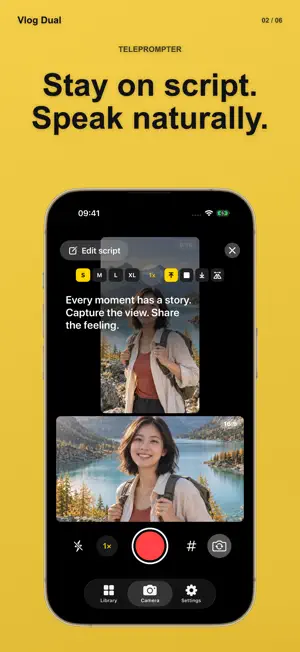
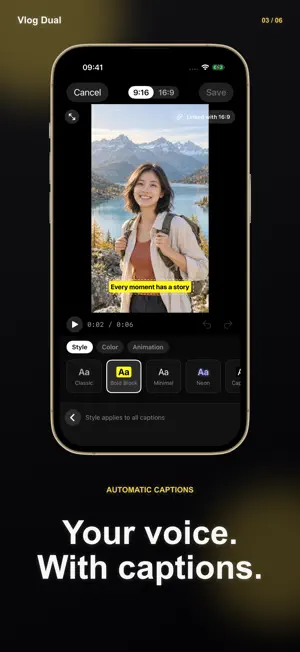
One take. Two videos: portrait 9:16 and landscape 16:9. Film your vlog, follow your script and add automatic captions in one place. Vlog Dual turns one camera capture into 9:16 and 16:9 versions, so the same story can work in both formats. Capture photos or video, check both views and shape your edit on iPhone or iPad. ONE TAKE, TWO FORMATS Preview portrait and landscape side by side or in picture-in-picture. Choose your main view, set a grid or countdown, and pause and resume video recording when you need a moment. STAY ON SCRIPT Read from the built-in teleprompter while filming. Adjust text size, scroll speed, position and mirroring. Your script stays on the screen and out of the recording. MAKE THE EDIT YOURS Trim and split clips, combine recordings from your library, add text and music, and choose from 56 filters. Use undo and redo while refining your project. FILTERS, ADJUSTMENTS AND BEAUTY Explore 56 filters with adjustable strength, seven manual adjustments and six beauty controls in the camera and editor. Fine-tune brightness, blur, softness, glow, grain, saturation and temperature; adjust smoothing, whitening, face slimming, eye size, lipstick and blush. Original, 3 filters, all 7 adjustments, smoothing and whitening are free. Pro unlocks 53 filters, face slimming, bigger eyes, lipstick and blush. All effects can be previewed for free and are processed on your device. Edit photos with the same filters, adjustments and beauty tools. Saving edited photos to the in-app library is free. Saving edited photos to Photos or sharing them requires Pro. Unedited photos or photos fully restored to the original can be saved and shared for free. CAPTIONS ON YOUR DEVICE Generate captions with supported on-device speech recognition. Review the words, adjust timing and choose caption styles and word animations. Choose a supported recognition language and regenerate captions when needed. EXPORT BOTH VERSIONS Save separate portrait and landscape videos. Choose 1080p, 2K or 4K export, with H.264 or HEVC options, then save to Photos or use the system share sheet. YOUR WORK, CLOSE AT HAND Keep projects on your device or record to a selected external-drive folder on compatible hardware. Choose from 17 interface languages in Settings or follow your system language. For iPhone and iPad running iOS 17 or later. Capture quality, HDR, caption recognition and external-drive support depend on your device, system and available language resources. Automatic captions, all text and caption styles, and animations are free to use. The editor’s Save button saves your edited project and its portrait and landscape videos to your library for free, without automatically saving them to Photos. Pro is required to save edited videos from your library to Photos or share them, and to use 2K/4K, 60 FPS or HDR output on supported devices. Unedited 1080p/30 FPS/SDR videos can be saved and shared for free. Available plans and prices are shown before purchase. Vlog Dual Pro Choose a monthly or yearly subscription, or lifetime access with a one-time purchase. Monthly and yearly subscriptions renew automatically unless canceled through your App Store account. Lifetime access does not renew. Your local price is shown before purchase. Create your next story in both formats with Vlog Dual. Privacy Policy: http://vlogdual.musicgo.cc/privacy Terms of Use: http://vlogdual.musicgo.cc/terms
What’s new
Version 1.0.5 · Updated October 23, 2026
Vlog Dual now adapts to iPhone Duo, with camera and editing layouts that adjust as you unfold or partially fold the display. • Use the outer display, fully open layout, book-like fold or tabletop fold. Recording controls stay clear of the fold so you can pause, resume and stop. • Keep your edits, aspect ratio, effects and undo/redo history as you fold or rotate. The teleprompter keeps your reading position when text reflows. • Improved layouts for the library, photo and video editors, purchase screen and onboarding across screen sizes. • Fixed camera readiness and capture-start issues during rapid folding or posture changes while authorization is pending.
App privacy
The developer, 鹏飞 周, reported these privacy practices to Apple.
Data Not Collected
The developer does not collect any data from this app.
Alternatives to Vlog Dual - Video Camera
Looking for apps like Vlog Dual - Video Camera? Here are 6 similar apps on the App Store. The highest rated is PixToy: AI Toy Image Maker (5.0/5), and all 6 are free to download.
-
 MITO CAM - Retro Digicam
-
 PixToy: AI Toy Image Maker
5.0
-
 Captionry: Auto Captions
5.0
-
 Rxframe - Frames & Watermarks
-
 Repic: AI Photo & Video Editor
5.0
-
 WiSaw - What I Saw Today
4.6
| App | Rating | Price | Last updated | Compare |
|---|---|---|---|---|
| Vlog Dual - Video Camera | – | Free | October 23, 2026 | |
| MITO CAM - Retro Digicam | – | Free | Oct 26, 2026 | Compare |
| PixToy: AI Toy Image Maker | 5.0 / 5 (2) | Free | Jul 8, 2025 | Compare |
| Captionry: Auto Captions | 5.0 / 5 (2) | Free | Oct 28, 2026 | Compare |
| Rxframe - Frames & Watermarks | – | Free | Sep 17, 2026 | Compare |
| Repic: AI Photo & Video Editor | 5.0 / 5 (3) | Free | Jul 3, 2026 | Compare |
| WiSaw - What I Saw Today | 4.6 / 5 (10) | Free | Aug 25, 2026 | Compare |