

Watermark & Remover - MarkOff
Ben Does Apps Ltd Photo & Video iPhoneiPadiPod touch
Watermark & Remover - MarkOff is a free Photo & Video app for iPhone and iPad by Ben Does Apps Ltd. Rated 3.6/5 from 8 ratings. Requires iOS 18.4.
- Rating
- 3.6
- 8 ratings
- Price
- Free
- on the App Store
- Size
- 156 MB
- Age 4+
- Updated
- Sep 25
- 2026 · v15
Screenshots


About Watermark & Remover - MarkOff
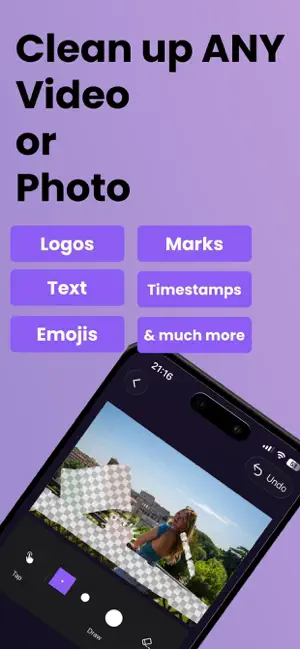
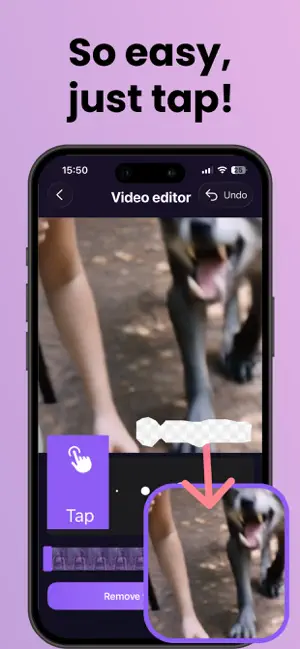
MarkOff is the best way to remove distractions from your photos and videos! • Uses the latest in AI technology and can handle even large and complex objects without blur! • Works on any video or photo. • No need for drawing, just tap the area with the distraction and we will find it for you. • Save your TikTok videos with a link. • Handle moving objects on videos with frame-by-frame removal. • You can also add watermarks to your content whether it's videos or photos. FAQs Can I remove unwanted distractions from my photography? Yes our latest AI can handle even the largest and most complex objects. Can I remove distractions from my photos and videos downloaded from social media? Yes you can. For TikTok videos you can save the video using a link. For the others you can select the unwanted area to erase by tapping or drawing and it will be removed using AI so it looks natural (no blur). Can I remove distractions from my AI generated videos? Yes absolutely. Whether they're from Sora, Veo, or any other generator, you can select the area to erase by tapping or drawing and it will be removed using AI so it looks natural (no blur). Can I remove distractions from outputs of my video editing software? Yes, we can handle these easily. Just tap on the unwanted area. Can I remove distractions from my AI generated photos? Yes, just tap on things you want to remove, or draw over them. It gets removed perfectly as if it was never there. Does MarkOff blur the removed area of the video like other apps? No, other object removers, especially video ones, just blur the area which looks bad. We use AI for incredible, non-blurry results. Can Markoff handle distractions in videos that move to different places? Yes you can have tap/draw different areas to remove for different parts of the video, so you can get rid of things even if it they move or change shape. Is MarkOff free? You can try out the app for free to see if it works for you, but to continue to use it you'll need to subscribe to pro. How can I find out more about MarkOff and how to use it? Go to our website: https://MarkOff.app Pro: • You can subscribe to unlock Pro, which gives you unlimited free access to removing distractions from photos and videos. • Subscriptions auto-renew at the end of current period, unless cancelled 24-hours in advance prior to the end of the current period. The subscription fee is charged to your iTunes account at confirmation of purchase. You may manage your subscription and turn off auto-renewal by going to your Account Settings after purchase. Per Apple policy, no cancellation of the current subscription is allowed during active subscription period. Once purchased, refunds will not be provided for any unused portion of the term. Terms of use: https://www.apple.com/legal/internet-services/itunes/dev/stdeula/ Privacy policy: https://bendoesapps.com/privacy Contact us: [email protected] Disclaimer This App is not affiliated with or endorsed by any app, platform, product or organisation mentioned. Any violations of intellectual property rights is the sole responsibility of the user. Before editing content, you must make sure to have the permission to edit that content from all copyright owners.
Ratings & reviews
3.6
8 ratings
What’s new
Version 15 · Updated September 25, 2026
We continue to make MarkOff the best app for removing video and photo annoyances
App privacy
The developer, Ben Does Apps Ltd, reported these privacy practices to Apple.
Data Not Linked to You
The following data, which may be collected but is not linked to your identity, may be used for the following purposes:
- Purchases: Purchase History
- Identifiers: User ID, Device ID
- Usage Data: Product Interaction
- Diagnostics: Crash Data
- User Content: Photos or Videos
Used for: Analytics, App Functionality
Alternatives to Watermark & Remover - MarkOff
Looking for apps like Watermark & Remover - MarkOff? Here are 6 similar apps on the App Store. The highest rated is Watermark Remover AI Eraser (4.5/5), and all 6 are free to download.
-
 No Watermark: Save Your Videos
4.0
No Watermark: Save Your Videos
4.0
-
 Watermark Remover Photo Video
4.3
Watermark Remover Photo Video
4.3
-
 Watermark Remover: Eraser AI
4.2
Watermark Remover: Eraser AI
4.2
-
 Watermark Remover AI Eraser
4.5
Watermark Remover AI Eraser
4.5
-
 Video Eraser: AI Remove Object
1.0
Video Eraser: AI Remove Object
1.0
-
 AI Videos Text Remover
4.4
AI Videos Text Remover
4.4
| App | Rating | Price | Last updated | Compare |
|---|---|---|---|---|
| Watermark & Remover - MarkOff | 3.6 / 5 (8 ratings) | Free | September 25, 2026 | |
| No Watermark: Save Your Videos | 4.0 / 5 (4) | Free | Jul 5, 2026 | Compare |
| Watermark Remover Photo Video | 4.3 / 5 (6) | Free | Oct 24, 2026 | Compare |
| Watermark Remover: Eraser AI | 4.2 / 5 (5) | Free | Oct 19, 2026 | Compare |
| Watermark Remover AI Eraser | 4.5 / 5 (119) | Free | Oct 4, 2026 | Compare |
| Video Eraser: AI Remove Object | 1.0 / 5 (1) | Free | Aug 20, 2025 | Compare |
| AI Videos Text Remover | 4.4 / 5 (258) | Free | Jun 19, 2026 | Compare |