

Document Scanner - Docu Scan
RICKHIL PUNEET PRAKASH Utilities iPhoneiPadiPod touch
Document Scanner - Docu Scan is a free Utilities app for iPhone and iPad by RICKHIL PUNEET PRAKASH. Requires iOS 17.5. Updated December 16, 2025.
- Price
- Free
- on the App Store
- Size
- 21 MB
- Age 4+
- Updated
- Dec 16
- 2025 · v1.0
Screenshots


About Document Scanner - Docu Scan
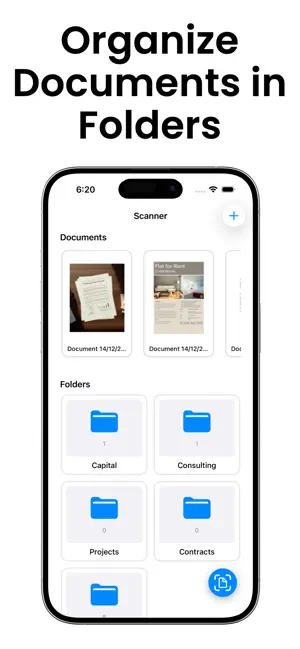
Transform any document into a professional PDF in seconds. Scan receipts, contracts, notes, whiteboards, and more with automatic edge detection and crystal-clear results. SMART SCANNING Capture multi-page documents in one session with intelligent edge detection and automatic perspective correction. Import from your photo library or files, and watch as your scans are instantly enhanced. PROFESSIONAL QUALITY Choose from Color, Grayscale, or Black & White modes. Fine-tune your scans with adjustable sharpening, contrast, and exposure controls. Export at up to 300 DPI for print-ready documents. STAY ORGANIZED Create custom folders to sort your documents. Add titles and tags for instant search. View recent scans at a glance with thumbnail previews. Everything syncs seamlessly across your devices with iCloud. POWERFUL FEATURES Multi-page scanning in one go Automatic noise reduction and enhancement Multiple page sizes (A4, Letter, Legal) Reorder, add, or delete pages before saving Share PDFs instantly via email or apps Secure iCloud backup and sync SIMPLE & FAST No complicated menus or settings. Point your camera, tap to scan, and you're done. Perfect for students, professionals, and anyone who needs quick, reliable document scanning. Download now and digitize your paperwork effortlessly! You may purchase an auto-renewing subscription through an In-App Purchase. • Auto-renewable subscription • Your subscription will be charged to your iTunes account at confirmation of purchase and will automatically renew (at the duration selected) unless auto-renew is turned off at least 24 hours before the end of the current period. • Current subscription may not be cancelled during the active subscription period; however, you can manage your subscription and/or turn off auto-renewal by visiting your iTunes Account Settings after purchase https://documentscannerdocuscan.wordpress.com/privacy-policy https://documentscannerdocuscan.wordpress.com/terms-of-service
App privacy
The developer, RICKHIL PUNEET PRAKASH, reported these privacy practices to Apple.
Data Not Linked to You
The following data, which may be collected but is not linked to your identity, may be used for the following purposes:
- Financial Info: Payment Info
- Identifiers: Device ID
- Usage Data: Product Interaction
- Diagnostics: Crash Data, Performance Data
Used for: Analytics, App Functionality
Alternatives to Document Scanner - Docu Scan
Looking for apps like Document Scanner - Docu Scan? Here are 6 similar apps on the App Store. The highest rated is Documint (5.0/5), and all 6 are free to download.
-
 PDFlyer – Scan to PDF & sign
-
 Boxie: Storage Organizer
-
 BluQ
-
 Documint
5.0
-
 VaultPony: Encrypted Vaults
-
 PDF Editor: Converter & Merger
5.0
| App | Rating | Price | Last updated | Compare |
|---|---|---|---|---|
| Document Scanner - Docu Scan | – | Free | December 16, 2025 | |
| PDFlyer – Scan to PDF & sign | – | Free | Dec 17, 2025 | Compare |
| Boxie: Storage Organizer | – | Free | Oct 27, 2026 | Compare |
| BluQ | – | Free | May 18, 2026 | Compare |
| Documint | 5.0 / 5 (3) | Free | Nov 24, 2025 | Compare |
| VaultPony: Encrypted Vaults | – | Free | Sep 26, 2026 | Compare |
| PDF Editor: Converter & Merger | 5.0 / 5 (3) | Free | Jul 15, 2026 | Compare |