

iSquiggle
Manuel Minelle Graphics & Design iPhoneiPadiPod touch
iSquiggle is a free Graphics & Design app for iPhone and iPad by Manuel Minelle. Requires iOS 17.6. Updated July 22, 2026.
- Price
- Free
- on the App Store
- Size
- 53 MB
- Age 4+
- Updated
- Jul 22
- 2026 · v2.0
Screenshots


About iSquiggle
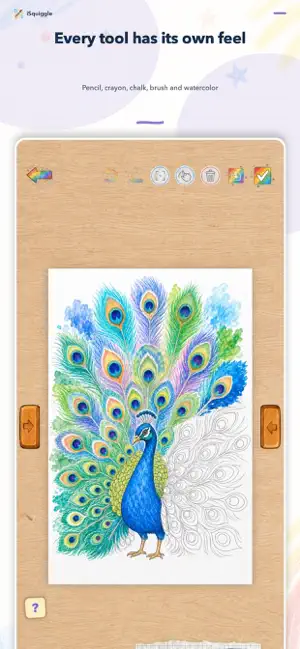
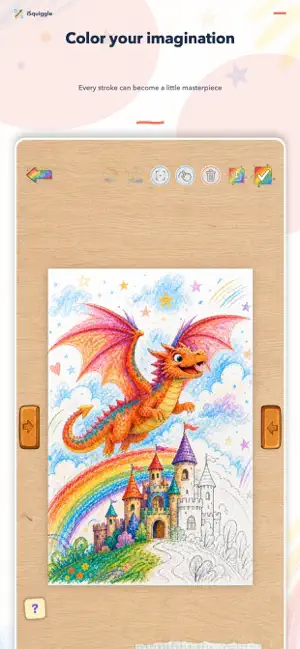
et imagination run free with iSquiggle, the drawing and coloring app made for kids. Choose from 67 coloring pages or start with a blank sheet. Draw with markers, pencils, crayons, chalk, brushes and watercolor, then add extra sparkle with spray and glitter. Fill colors an area with a tap, while Stay Inside the Lines helps younger artists create with confidence. A GALLERY READY FOR CREATIVITY • 67 pictures organized by category and difficulty • Blank sheets for unlimited imagination • Automatic saving and instant resume • A personal gallery for every masterpiece FUN, NATURAL DRAWING TOOLS • Marker, chalk, pencil, crayon, brush and watercolor • Spray, glitter and one-tap fill • Colors, shades, eyedropper and adjustable stroke size • Undo, redo, zoom, pan and two-finger rotation • Finger and Apple Pencil support on iPad MADE FOR KIDS AND PARENTS • A clear, colorful and accessible interface • A protected parents area for importing photos, exporting, sharing or printing • Recoverable trash and safe artwork management • English and Italian, VoiceOver and Reduce Motion support PRIVACY COMES FIRST iSquiggle requires no account and does not track users. Drawings and imported images stay on the device; only a parent can choose to export them through the protected parents area. iSquiggle 2.0 is universal for iPhone and iPad and requires iOS 17.6 or later.
What’s new
Version 2.0 · Updated July 22, 2026
iSquiggle 2.0 is our biggest update yet: • Now available on iPhone and iPad, with controls optimized for fingers and Apple Pencil. • A new gallery with 67 coloring pages, categories, difficulty levels and blank sheets. • New creative modes: Fill, Stay Inside the Lines, Spray and Glitter. • Improved drawing tools with dedicated sizes, more faithful colors and new effects. • Two-finger gestures to pan, zoom and rotate the page. • Automatic saving, a masterpiece gallery, duplication, reset and recoverable trash. • A new protected parents area for importing photos, exporting, sharing and printing. • English and Italian interface, VoiceOver and Reduce Motion support. • Drawings created with iSquiggle 1.x are recovered automatically.
App privacy
The developer, Manuel Minelle, reported these privacy practices to Apple.
Data Not Collected
The developer does not collect any data from this app.
Alternatives to iSquiggle
Looking for apps like iSquiggle? Here are 6 similar apps on the App Store. The highest rated is Pick-to-Draw: Photo Palette (5.0/5), and all 6 are free to download.
-
 VibeSketch - AI Mood Canvas
-
 Pick-to-Draw: Photo Palette
5.0
Pick-to-Draw: Photo Palette
5.0
-
 Sketchpad Pro: AR Draw & Trace
-
 AuniDraw: Drawing App
5.0
AuniDraw: Drawing App
5.0
-
 Colorpik Canvas
-
 Trazu: Paint, Sketch, Draw
| App | Rating | Price | Last updated | Compare |
|---|---|---|---|---|
| iSquiggle | – | Free | July 22, 2026 | |
| VibeSketch - AI Mood Canvas | – | Free | Nov 11, 2025 | Compare |
| Pick-to-Draw: Photo Palette | 5.0 / 5 (1) | Free | Aug 26, 2026 | Compare |
| Sketchpad Pro: AR Draw & Trace | – | Free | Sep 8, 2026 | Compare |
| AuniDraw: Drawing App | 5.0 / 5 (3) | Free | Jul 13, 2026 | Compare |
| Colorpik Canvas | – | Free | Dec 24, 2025 | Compare |
| Trazu: Paint, Sketch, Draw | – | Free | Oct 24, 2026 | Compare |
Compare iSquiggle with the top alternatives: ratings, updates, ASO score and keyword gaps →