

Share Times • Easy Scheduling
OmarKnows LLC Productivity iPhoneiPadiPod touch
Share Times • Easy Scheduling is a free Productivity app for iPhone and iPad by OmarKnows LLC. Requires iOS 26.0. Updated October 19, 2026.
- Price
- Free
- on the App Store
- Size
- 13 MB
- Age 4+
- Updated
- Oct 19
- 2026 · v1.3
Screenshots


About Share Times • Easy Scheduling
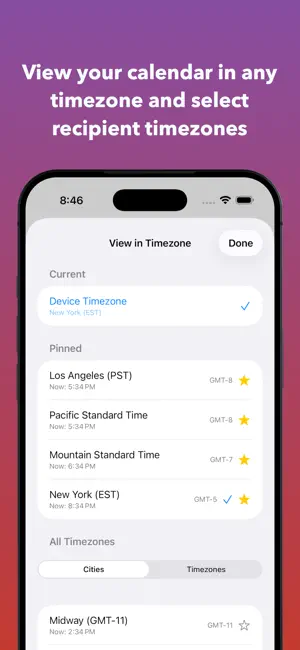
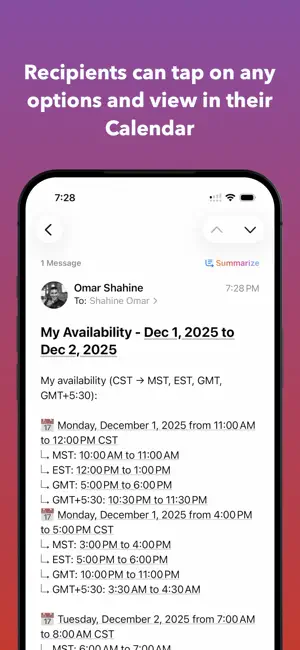
Share Times helps you share your availability in seconds—no more back-and-forth scheduling emails. Designed for speed, clarity, and a beautiful experience that turns chaos into calm. No account required. No spam emails. No ads. ► VISUAL AVAILABILITY SELECTION See your calendar events at a glance and tap to select when you're free—like painting your schedule. - Tap or drag to select time blocks - Navigate between days seamlessly - End-of-selection preview with formatted output - Configurable block sizes (15, 30, or 60 minutes) - Set your working hours to focus on what matters - iOS 26 Liquid Glass design throughout ► SHARE IN SECONDS Stop the endless email chains. Share your availability instantly. - Clean, formatted text ready for any app - Copy to clipboard with one tap - Share directly to Messages, Mail, Slack, and more - Calendar-detection formatting for smart scheduling - Include or exclude app branding ► TIMEZONE CONVERSION (PREMIUM) Scheduling across time zones? We've got you covered. - Add recipient timezones for instant conversion - See your availability in their local time - Perfect for remote teams and international meetings ► MULTIPLE CALENDARS (PREMIUM) See all your schedules in one place. - Combine work, personal, and shared calendars - Accurate availability across your entire life - No more double-bookings ► HOME SCREEN WIDGETS (PREMIUM) Keep your schedule visible without opening the app. - Today widget: a compact view of today's events at a glance - Calendar widget: see one, two, or three days side by side - Available in small, medium, and large sizes - Timed events, all-day events, and multi-day spanning events - Tap any day to jump straight into the app - Configurable calendars and all-day event visibility ► PRIVACY-FIRST Your calendar never leaves your device—processing happens locally. Anonymous, privacy-preserving analytics help guide development. - No accounts required - No uploads of your calendar data - No tracking across apps or websites - No spam or marketing emails ► WHAT'S FREE? Use the app for free with single-calendar support. - Full calendar integration - Tap and drag selection - Block size customization - Working hours configuration - Dark mode support - Siri Shortcuts integration ► WHAT'S PREMIUM? Upgrade to unlock the full experience. - Multiple calendar integration - Timezone conversion for recipients - Home Screen calendar widgets - Remove app branding from shares - Support ongoing development Share Times turns scheduling chaos into calm—one tap, one share, done. ► SUBSCRIPTION DETAILS Premium is available as a Yearly Subscription at $4.99 per year (auto-renewable), or as a one-time Lifetime purchase at $19.99. Payment is charged to your Apple Account at confirmation of purchase. A subscription renews automatically unless it is cancelled at least 24 hours before the end of the current period. Manage or cancel anytime in Settings > Apple Account > Subscriptions. Privacy Policy: https://omarknows.app/share-times/privacy/ Terms of Use (EULA): https://www.apple.com/legal/internet-services/itunes/dev/stdeula/
What’s new
Version 1.3 · Updated October 19, 2026
See two days side by side in wider windows. On iPhone Duo, your selected times and Share draft stay with you as you open or close the device. Widget fixes: changing how many days the widget shows takes effect right away, the large widget uses its full height, and the widget rolls over to the new day at midnight. Sharing across time zones is cleaner. When you share times converted to someone else's time zone, a line only gets a date when its day differs from the header. Your working-hours end time now sticks, and weekday letters follow your language and the first day of your week.
App privacy
The developer, OmarKnows LLC, reported these privacy practices to Apple.
Data Not Collected
The developer does not collect any data from this app.
Alternatives to Share Times • Easy Scheduling
Looking for apps like Share Times • Easy Scheduling? Here are 6 similar apps on the App Store. The highest rated is EstateHelm (5.0/5), and 5 of the 6 are free to download.
-
 EstateHelm
5.0
-
 Cat Scratches
4.0
-
 CAPTURR for Roam Research
5.0
-
 freewrite.
-
 Gravity – Minimal Notes
5.0
-
 SMART ServiceCheck
5.0
| App | Rating | Price | Last updated | Compare |
|---|---|---|---|---|
| Share Times • Easy Scheduling | – | Free | October 19, 2026 | |
| EstateHelm | 5.0 / 5 (9) | Free | Feb 13, 2026 | Compare |
| Cat Scratches | 4.0 / 5 (4) | Free | Jul 11, 2026 | Compare |
| CAPTURR for Roam Research | 5.0 / 5 (4) | Free | Sep 9, 2026 | Compare |
| freewrite. | – | Free | Apr 27, 2026 | Compare |
| Gravity – Minimal Notes | 5.0 / 5 (9) | 9.99 USD | Oct 8, 2026 | Compare |
| SMART ServiceCheck | 5.0 / 5 (1) | Free | Apr 28, 2026 | Compare |