

Fetch - Finance Assistant
BlueHealthUS, Inc. Finance iPhoneiPadiPod touch
Fetch - Finance Assistant is a free Finance app for iPhone and iPad by BlueHealthUS, Inc. Requires iOS 17.6. Updated October 17, 2026.
- Price
- Free
- on the App Store
- Size
- 50 MB
- Age 4+
- Updated
- Oct 17
- 2026 · v1.5
Screenshots


About Fetch - Finance Assistant
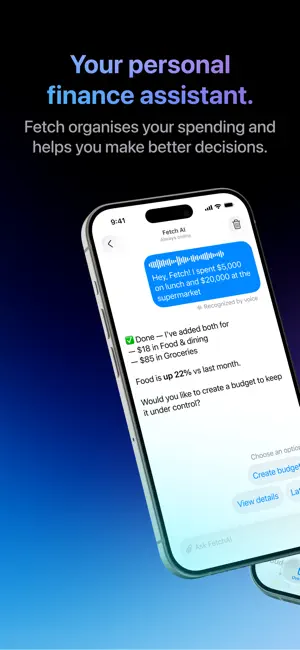
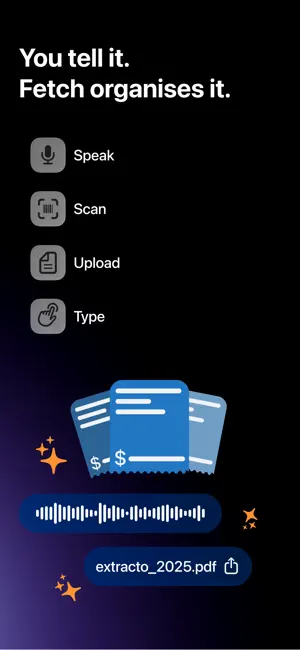
Tracking expenses takes work — that's why most people quit. MoneyFetch does it in 5 seconds. No setup. No learning curve. Just add. You have four ways to log an expense: - Take a photo of a receipt - Speak out loud: "$12 lunch, $45 groceries" - Send a bank statement as PDF - Or simply type it It doesn't matter which way you choose — it takes seconds. AI categorizes everything automatically. Most people quit tracking expenses within days. Not because they don't care, but because it takes too much work. MoneyFetch removes that effort completely. That's why people actually keep using it, and finally understand where their money goes. WHAT THE AI DOES FOR YOU Ask FetchAI about your spending: "Where did I overspend this week?" "What changed this month?" Get answers based on your real data. Not generic advice. Spending pace. See if you're overspending this week — not at the end of the month, when it's too late. Smart alerts. Get notified before you blow your budget, not after. Recurring expenses. Track subscriptions and fixed bills automatically. Budgets by category. Set limits per spending type. AI suggests values based on your income. Detailed analysis. See exactly where your money is going, month by month, week by week. WHY MONEYFETCH 5 seconds instead of 15 minutes in a spreadsheet. AI that actually does the work — not gives you more work. No mandatory subscription. Pay only for what you use. No ads. Ever. Full focus on privacy. Your data is not sold. Works offline. Log anywhere, sync when you're back online. Start free with 10 tokens. Add one expense, and see right away where your money is going. Privacy Policy: https://moneyfetch.app/privacy.html Terms of Use: https://moneyfetch.app/terms.html
What’s new
Version 1.5 · Updated October 17, 2026
NEW IN THIS VERSION Installments, finally sorted. - Track your installment purchases and always know what's left to pay. - See how all your monthly payments add up in one place. Save expenses automatically, for free. - Log spending hands-free with Apple Shortcuts. Set it up once and it just works.
App privacy
The developer, BlueHealthUS, Inc., reported these privacy practices to Apple.
Data Linked to You
The following data, which may be collected and linked to your identity, may be used for the following purposes:
- Financial Info: Other Financial Info, Payment Info
- Contact Info: Email Address
- Identifiers: User ID, Device ID
- Usage Data: Product Interaction
Used for: Analytics, Product Personalization, App Functionality
Alternatives to Fetch - Finance Assistant
Looking for apps like Fetch - Finance Assistant? Here are 6 similar apps on the App Store. The highest rated is Summa: Budget, Expense Tracker (5.0/5), and all 6 are free to download.
-
 Cabe Budget
-
 Summa: Budget, Expense Tracker
5.0
Summa: Budget, Expense Tracker
5.0
-
 BudgetAlly: Budget Planner
5.0
BudgetAlly: Budget Planner
5.0
-
 Kontto: Personal Finance
-
 Em Dia - Finanças Pessoais
-
 Bruce: Money Manager
| App | Rating | Price | Last updated | Compare |
|---|---|---|---|---|
| Fetch - Finance Assistant | – | Free | October 17, 2026 | |
| Cabe Budget | – | Free | Oct 18, 2026 | Compare |
| Summa: Budget, Expense Tracker | 5.0 / 5 (2) | Free | Oct 13, 2026 | Compare |
| BudgetAlly: Budget Planner | 5.0 / 5 (5) | Free | Mar 19, 2026 | Compare |
| Kontto: Personal Finance | – | Free | Oct 19, 2026 | Compare |
| Em Dia - Finanças Pessoais | – | Free | Jul 14, 2026 | Compare |
| Bruce: Money Manager | – | Free | Oct 4, 2026 | Compare |