

Budget & Subscriptions Kirum
Jerome Sasan Bieler Finance iPhoneiPadiPod touch
Budget & Subscriptions Kirum is a free Finance app for iPhone and iPad by Jerome Sasan Bieler. Rated 5.0/5 from 1 ratings. Requires iOS 18.6.
- Rating
- 5.0
- 1 ratings
- Price
- Free
- on the App Store
- Size
- 60 MB
- Age 4+
- Updated
- Nov 9
- 2026 · v1.7
Screenshots
Save to Pinterest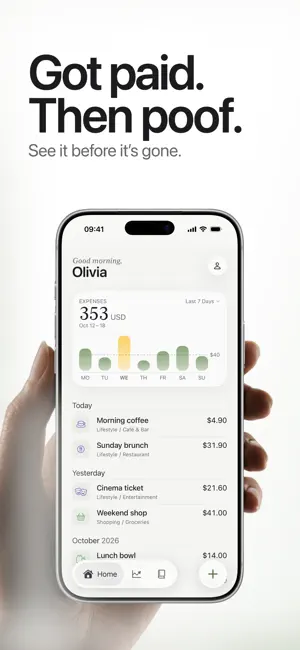


About Budget & Subscriptions Kirum
Know what's left until your next paycheck. Log spending and income in seconds, and Kirum works out the rest. No bank login, no account, pay once. Kirum is a private budget app and expense tracker for iPhone. There's no budget to build: it works out what's left from your income, your fixed costs and what you spend. WHAT'S LEFT UNTIL PAYDAY Kirum knows when you get paid. It takes off the fixed costs still due before your next paycheck and shows you what's left – as one number, and as what's left for today. Your month runs from payday to payday, not from the 1st. All of this is free. LOGGED IN SECONDS Amount, description, category, done – in under 10 seconds, straight from your Lock Screen, Control Center or the Action Button. Apple Pay payments are logged automatically. Income works the same way: salary, investments, gifts, each with its own categories. FIXED COSTS AND SUBSCRIPTIONS IN ONE PLACE Rent, streaming, insurance: recurring entries keep every fixed cost in view, so you know what's still coming before payday. Insights by category – per week, month, year or pay period – show where your money goes. PRIVATE BY DESIGN No bank connection. No account. No ads, no ad tracking, no data brokers. Your spending and income stay on your device and sync through your private iCloud. Kirum never sees a single amount. Lock the app with Face ID if you like. PAY ONCE Kirum is free to download, and what's left until payday is part of the free version. Premium Lifetime is a one-time purchase that stays yours forever – no subscription required. Try Premium free for 7 days. It simply ends, so there's nothing to cancel. QUESTIONS PEOPLE ASK Do I need to connect my bank? No. You log what you spend, and Apple Pay payments are logged automatically – no bank connection involved. Is Kirum a subscription? No subscription required. Premium Lifetime is a one-time purchase. If you'd rather pay monthly, you can. I get paid on the 25th. Does that work? Yes. Kirum runs your month from the 25th to the 24th. Can I bring my data with me – and take it out again? Yes. Import your history from a CSV file, and export all your entries to one CSV file for Numbers, Excel or Google Sheets any time. Does it work with other currencies? Yes. Over 60 currencies, each converted to your main currency. Log your first expense and see what's left until your next paycheck.
What’s new
Version 1.7 · Updated November 9, 2026
Apple Pay v2 is here: more reliable and even easier. Payments are now logged in the background, Kirum no longer has to open, and one notification shows what was saved. Already set up? Tap the banner on Home to switch. It takes 2 minutes. Also in this release: • Export all your entries to one CSV file for Numbers, Excel or Google Sheets • New step-by-step guides for Apple Pay and widgets • Stability improvements and bug fixes Thanks for tracking with Kirum. If it helps you stay on top of things, a quick review means a lot. Jerome
App privacy
The developer, Jerome Sasan Bieler, reported these privacy practices to Apple.
Data Not Linked to You
The following data, which may be collected but is not linked to your identity, may be used for the following purposes:
- Purchases: Purchase History
- Usage Data: Product Interaction, Advertising Data
Used for: Analytics
Alternatives to Budget & Subscriptions Kirum
Looking for apps like Budget & Subscriptions Kirum? Here are 6 similar apps on the App Store.
-
 Em Dia - Finanças Pessoais
-
 Moondane: Expense Tracker
-
 MoneyZ - Finanças Pessoais
-
 APP Financeiro
-
 Kontto: Personal Finance
-
 Óbolo: Controle Financeiro
| App | Rating | Price | Last updated | Compare |
|---|---|---|---|---|
| Budget & Subscriptions Kirum | 5.0 / 5 (1 rating) | Free | November 9, 2026 | |
| Em Dia - Finanças Pessoais | – | Free | Jul 14, 2026 | Compare |
| Moondane: Expense Tracker | – | Free | Nov 11, 2026 | Compare |
| MoneyZ - Finanças Pessoais | – | Free | Nov 12, 2026 | Compare |
| APP Financeiro | – | Free | Aug 3, 2026 | Compare |
| Kontto: Personal Finance | – | Free | Nov 11, 2026 | Compare |
| Óbolo: Controle Financeiro | – | Free | Aug 13, 2026 | Compare |