

iDrop Ultra – AI Color Palette
Emre Oner Graphics & Design iPhoneiPadiPod touch
iDrop Ultra – AI Color Palette is a free Graphics & Design app for iPhone and iPad by Emre Oner. Requires iOS 26.0. Updated March 12, 2026.
- Price
- Free
- on the App Store
- Size
- 8 MB
- Age 4+
- Updated
- Mar 12
- 2026 · v1.0.2
Screenshots


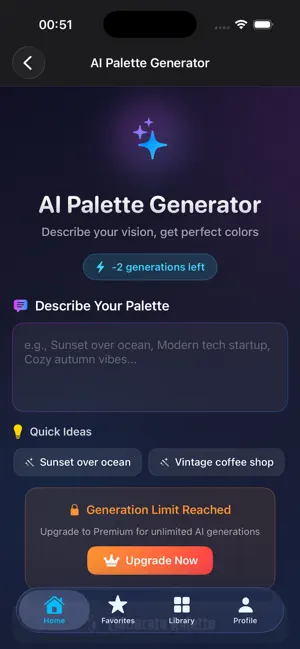

About iDrop Ultra – AI Color Palette
iDrop Ultra is a professional color palette manager built for designers, developers, and creative teams. Turn inspiration into perfectly organized color systems. Extract colors from photos, generate palettes with AI, and export them instantly into the formats you actually use. - Powerful Color Tools Extract colors from photos or camera Tap any pixel to get its exact color Build palettes manually or automatically - AI-Powered Palette Generation Create color palettes from text prompts Generate mood-based and theme-based color sets Perfect for branding, UI, illustrations, and games - Smart Palette Management Organize palettes with tags and favorites Search and filter your entire library Sync palettes across devices (Premium) - Developer & Designer Exports Export palettes to: CSS / SCSS Swift XML JSON Adobe ASE Image formats - Widgets & Quick Access Home Screen & Lock Screen widgets Instantly view and copy your favorite colors - Free & Premium Free Up to 3 palettes Basic AI generation Essential export formats Premium Unlimited palettes Unlimited AI generation Cloud sync Advanced export formats Widget customization Whether you're designing an app, building a brand, or creating a game UI, iDrop Ultra helps you move from idea to implementation faster. Terms of Use (EULA): https://www.apple.com/legal/internet-services/itunes/dev/stdeula/
What’s new
Version 1.0.2 · Updated March 12, 2026
Added password reset to the login flow. Added loading indicators for sign in, sign up, and password reset actions. Improved keyboard handling on login and sign up screens so forms stay accessible while typing. Fixed profile and settings account state issues after creating a new account. Improved AI Palette Generator loading behavior to prevent blocking wait states while the model is preparing. Expanded localization coverage and cleaned up more user-facing text across the app. Google Sign-In is now available. We also improved account deletion, fixed logout and onboarding flow issues, corrected free palette limits for new users, removed default sample palettes, and improved loading and authentication state handling throughout the app.
App privacy
The developer, Emre Oner, reported these privacy practices to Apple.
Data Not Linked to You
The following data, which may be collected but is not linked to your identity, may be used for the following purposes:
- Contact Info: Name, Email Address
Used for: Analytics, App Functionality
Alternatives to iDrop Ultra – AI Color Palette
Looking for apps like iDrop Ultra – AI Color Palette? Here are 6 similar apps on the App Store. The highest rated is Simple Color Palette (5.0/5), and all 6 are free to download.
-
 Prism: Color Studio
-
 neoColors
-
 Pigment: Colors
-
 Layerz App Designer
-
 Simple Color Palette
5.0
-
 Color Picker & Palette: Luca
| App | Rating | Price | Last updated | Compare |
|---|---|---|---|---|
| iDrop Ultra – AI Color Palette | – | Free | March 12, 2026 | |
| Prism: Color Studio | – | Free | Jul 20, 2026 | Compare |
| neoColors | – | Free | Oct 21, 2026 | Compare |
| Pigment: Colors | – | Free | Oct 17, 2026 | Compare |
| Layerz App Designer | – | Free | Oct 26, 2026 | Compare |
| Simple Color Palette | 5.0 / 5 (3) | Free | Apr 12, 2026 | Compare |
| Color Picker & Palette: Luca | – | Free | Oct 15, 2026 | Compare |