

Cam2PDF Pro
Roongrunchai Chongolnee Productivity iPhoneiPadiPod touch
Cam2PDF Pro is a free Productivity app for iPhone and iPad by Roongrunchai Chongolnee. Rated 5.0/5 from 2 ratings. Requires iOS 16.0.
- Rating
- 5.0
- 2 ratings
- Price
- Free
- on the App Store
- Size
- 19 MB
- Age 12+
- Updated
- Dec 1
- 2025 · v1.0
Screenshots



About Cam2PDF Pro
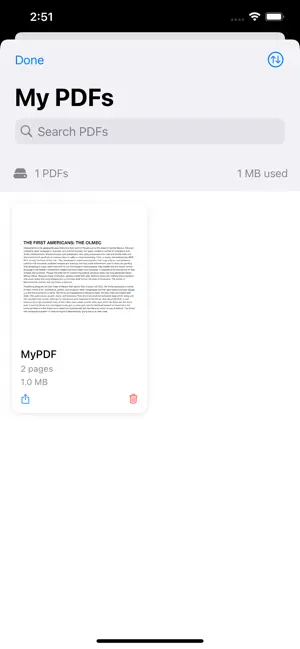
Transform your photos into professional PDFs and chat with an intelligent AI assistant - all in one powerful app! CAM2PDF PRO makes PDF creation simple and intuitive. Whether you're scanning documents, creating photo albums, or organizing receipts, our app delivers professional results every time. KEY FEATURES: SMART PDF CREATION • Capture photos directly with your camera or select from your library • Add up to 3 images per PDF with easy rotation and editing • Create up to 2 PDFs per day • Professional watermarked PDFs ready to share • Automatic organization and storage AI-POWERED ASSISTANT • Chat with "Ask Jennie" - your intelligent PDF companion • Ask questions about your PDFs and get instant answers • Up to 10 AI conversations per day • Attach PDFs for context-aware responses • Natural voice input and text-to-speech output VOICE INTEGRATION • Speak your questions with advanced speech recognition • Listen to AI responses with natural text-to-speech • Customizable voice settings (rate, pitch) • Hands-free operation for maximum convenience SEAMLESS EXPERIENCE • Works instantly - no account required • Optional cloud sync across devices • Face ID and Touch ID support for quick sign-in • Clean, intuitive interface designed for iOS • Dark mode support PDF LIBRARY MANAGEMENT • View all your created PDFs in one place • Search, preview, and share PDFs instantly • Automatic cleanup after 7 days to save space • Quick access to recent documents PRIVACY & SECURITY • Voice processing happens on your device • Secure credential storage with iOS Keychain • Optional biometric authentication • No third-party tracking or analytics PERFECT FOR: • Students scanning notes and assignments • Professionals digitizing documents • Small business owners managing receipts • Anyone who needs quick PDF creation • Users who want AI assistance with documents WHY CAM2PDF PRO? Simple & Fast: Create PDFs in seconds with just a few taps. No complicated settings or confusing interfaces. AI-Enhanced: Our intelligent assistant helps you understand, organize, and work with your PDFs more effectively. Privacy-First: Your data stays secure with on-device voice processing and encrypted credential storage. Always Available: Use the app without creating an account, or sign in to sync across devices. USAGE LIMITS: • PDF Creation: 3 images per PDF, 2 PDFs per day • AI Chat: 10 messages per day • Storage: PDFs automatically deleted after 7 days Get started with Cam2PDF Pro today and experience the easiest way to create PDFs and chat with AI! Questions or feedback? Contact us at [email protected]
App privacy
The developer, Roongrunchai Chongolnee, reported these privacy practices to Apple.
Data Linked to You
The following data, which may be collected and linked to your identity, may be used for the following purposes:
- Contact Info: Email Address
Used for: App Functionality
Data Not Linked to You
The following data, which may be collected but is not linked to your identity, may be used for the following purposes:
- User Content: Photos or Videos, Audio Data, Other User Content
- Identifiers: User ID
Used for: App Functionality
Alternatives to Cam2PDF Pro
Looking for apps like Cam2PDF Pro? Here are 6 similar apps on the App Store. The highest rated is Date & Time Calculator(Finder) (4.8/5), and 5 of the 6 are free to download.
-
 ScanFlow: PDF Scanner & OCR
-
 Chekk
Chekk
-
 SpeechBoard: Voice Typing
-
 Date & Time Calculator(Finder)
4.8
Date & Time Calculator(Finder)
4.8
-
 PDF Editor: Fill, Sign & Scan
4.0
PDF Editor: Fill, Sign & Scan
4.0
-
 GPS Fields & Land Area Measure
| App | Rating | Price | Last updated | Compare |
|---|---|---|---|---|
| Cam2PDF Pro | 5.0 / 5 (2 ratings) | Free | December 1, 2025 | |
| ScanFlow: PDF Scanner & OCR | – | Free | May 28, 2026 | Compare |
| Chekk | – | Free | Dec 9, 2023 | Compare |
| SpeechBoard: Voice Typing | – | Free | Mar 27, 2026 | Compare |
| Date & Time Calculator(Finder) | 4.8 / 5 (32) | 0.99 USD | Aug 26, 2026 | Compare |
| PDF Editor: Fill, Sign & Scan | 4.0 / 5 (2) | Free | Oct 19, 2026 | Compare |
| GPS Fields & Land Area Measure | – | Free | Sep 1, 2026 | Compare |
Compare Cam2PDF Pro with the top alternatives: ratings, updates, ASO score and keyword gaps →