

Diluta:To do List & Calendar
ThinkAhead Corporation Productivity iPhoneiPadiPod touchMac
Diluta:To do List & Calendar is a free Productivity app for iPhone and iPad by ThinkAhead Corporation. Rated 5.0/5 from 5 ratings. Requires iOS 16.0.
- Rating
- 5.0
- 5 ratings
- Price
- Free
- on the App Store
- Size
- 22 MB
- Age 12+
- Updated
- Sep 27
- 2026 · v2.0.4
Screenshots


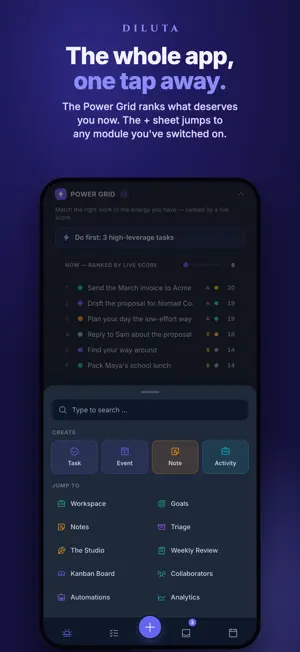
About Diluta:To do List & Calendar
The list isn't the point. Your life is. Diluta manages your to-do list to help you decide, not just remember. Diluta gives every task the context that answers the only question that matters — what should I do next? Most productivity apps are built for people whose Monday looks the same every week. Yours doesn't. Diluta is for solo operators, parents, and anyone running a life and a workload at the same time. Add what you need to do. Get on with your day. When the day takes a left turn — a meeting moves, a kid gets sick, a deadline lands early — Diluta keeps up with what actually happened, instead of shaming you for falling behind. Our purpose, and the original thesis: close the gap between productivity and the human factor. The Diluta lifecycle is Capture → Triage → Prioritize → Execute → Reflect. You don't need a new productivity system. You need one that survives Tuesday. In addition, Diluta provides several features and customizations to help enhance your productivity, with themes you'll actually want to look at. Diluta also offers a simplified way to combine and view all your tasks, calendar, meetings, appointments, events and notes across your Apple ecosystem. WHAT'S INSIDE • A place for the deep work — The Studio is Diluta's focus zone, with a Pomodoro timer, a quiet workspace, and a notepad for the ideas that show up uninvited. • Calendar + tasks together — Your to-do list and your calendar in one place, so you stop double-booking your attention and finally see what "today" actually contains. • Plan together. In real time. — Hand the school run, the grocery list, or the swim-practice carpool to whoever's actually doing it. Updates land instantly, and messages stay attached to the task they're about — so "who's picking up the kids?" doesn't get lost in a group chat three days later. • Work the way that makes sense to you — Some work is a checklist. Some is a kanban board. Some belongs on a calendar. Diluta gives you all of them on top of one set of tasks — pick the view that fits, and switch when the work changes. • Templates for the repeatable — Trips, projects, weekly routines. Duplicate what works and stop rebuilding the same plan from scratch every time. • Diluta surfaces what needs you now, maps your week by decision and energy, and shows how every project and goal is really tracking. AI assistant can also help with tasks when the need surfaces. DILUTA · FREE ACCESS Start with 80 tasks, free, for as long as you like. No trial clock, no lockout. Free access includes: • Calendar with your device's calendar events — month, week, day and schedule • Six views — Dashboard, Tasks, Notes, Kanban, Calendar and Workspace • The Studio — Pomodoro, ambient soundscapes and a focus shield • Universal Inbox — capture by email, share or quick-add • Analytics — completion trends, activity breakdowns and focus stats DILUTA · FULL ACCESS Every feature. Every platform. One price. $7.99 / month — billed monthly, cancel anytime, try it free first. One subscription covers iPhone, iPad and Mac. • Unlimited tasks, activities & goals • AI assistant that sees your tasks & notes — no copy-paste • Media storage — save files or images for later reference • Family & team collaboration, built in Everything about pricing: https://diluta.com/pricing.html SUBSCRIPTION TERMS Subscriptions will automatically renew unless canceled within 24 hours before the end of the current period. You can cancel anytime with your iTunes account settings. Any unused portion of a free trial will be forfeited if you purchase a subscription. Payment will be charged to your Apple ID account at confirmation of purchase. Subscription automatically renews unless canceled at least 24 hours before the end of the current billing period. Terms of Use: https://www.apple.com/legal/internet-services/itunes/dev/stdeula/ Privacy Policy: https://thinkahead.tech/legal/privacy.html
Ratings & reviews
5.0
5 ratings
What’s new
Version 2.0.4 · Updated September 27, 2026
Performance improvements and bug fixes.
App privacy
The developer, ThinkAhead Corporation, reported these privacy practices to Apple.
Data Not Collected
The developer does not collect any data from this app.
Alternatives to Diluta:To do List & Calendar
Looking for apps like Diluta:To do List & Calendar? Here are 6 similar apps on the App Store. The highest rated is Remica (5.0/5), and all 6 are free to download.
-
 Swipe Calendar
-
 Feats: Calm To-Do List
-
 Remica
5.0
-
 Sagely - Calm To-Dos
-
 Planzer
-
 Nonne · To-Do List & Planner
| App | Rating | Price | Last updated | Compare |
|---|---|---|---|---|
| Diluta:To do List & Calendar | 5.0 / 5 (5 ratings) | Free | September 27, 2026 | |
| Swipe Calendar | – | Free | Aug 18, 2026 | Compare |
| Feats: Calm To-Do List | – | Free | Sep 1, 2026 | Compare |
| Remica | 5.0 / 5 (1) | Free | Jul 9, 2026 | Compare |
| Sagely - Calm To-Dos | – | Free | May 25, 2026 | Compare |
| Planzer | – | Free | Oct 2, 2026 | Compare |
| Nonne · To-Do List & Planner | – | Free | Sep 29, 2026 | Compare |