

PhotoTrans - 圖像轉換大師
Chin-Yuan Cheng Utilities iPhoneiPadiPod touch
PhotoTrans - 圖像轉換大師 is a free Utilities app for iPhone and iPad by Chin-Yuan Cheng. Requires iOS 16. Updated November 15, 2025.
- Price
- Free
- on the App Store
- Size
- 497 MB
- Age 4+
- Updated
- Nov 15
- 2025 · v1.2
Screenshots
About PhotoTrans - 圖像轉換大師
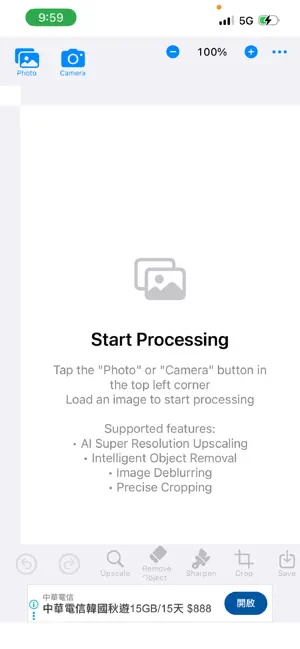
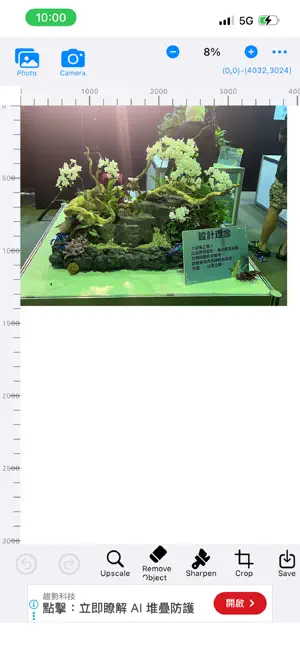
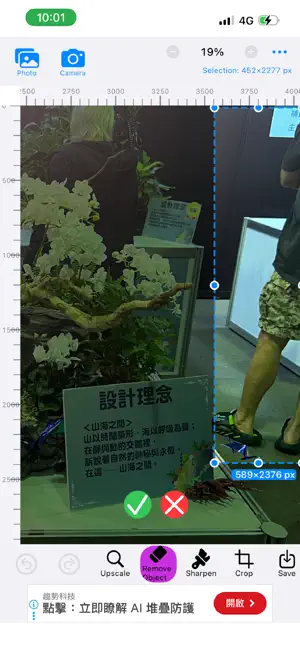
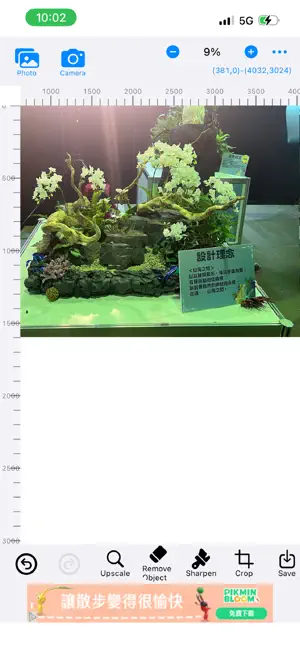
PhotoTrans - Image Transformation Master Your on-device AI photo processing expert! Completely free, no ads. Privacy protected - all processing runs locally. Why Choose PhotoTrans? • Completely Free - No payment, no ads, pure experience • Privacy Protected - All AI processing on your iPhone • Fully Offline - Process photos anywhere, no internet needed • Professional Quality - Real-ESRGAN, LaMa, NAFnet technology • Fast & Efficient - Apple Neural Engine acceleration Core Features [AI Super-Resolution Upscaling] • 2x, 4x, 6x, 8x, 16x upscaling with Real-ESRGAN • Ultra-smooth, no grain, preserves edge details for all scenes • Perfect for old photos, screenshots, blurry images, and various scenes • AI Inpainting fills backgrounds naturally • Precise selection with content-aware filling • One-tap processing, professional quality [Intelligent Object & Watermark Removal] • LaMa technology with Fast Fourier Convolution • Removes objects and watermarks without traces • Natural background filling, realistic results • Handles complex scenes, large-area removal • One-tap professional editing [AI Image Enhancement] • NAFNET professional deblurring • Intelligent denoising eliminates noise • Handles motion blur and camera shake • Preserves details and colors • One-tap quality optimization Use Cases [Old Photo Restoration] • Upscale low-resolution photos • Repair cracks and creases • Remove stains and debris [Social Media] • Enhance quality for more likes • Upscale screenshots • Remove objects and watermarks [Daily Photography] • Improve underexposed photos • Correct color deviations • Remove debris and watermarks Privacy & Security • All AI processing on device • No data collection or tracking • Clear records anytime • Completely free, no ads Performance • Metal & Neural Engine acceleration • Memory optimized for large photos • Low power design System Requirements • iOS 16.0 or later • iPhone 12 Pro or newer recommended • 2GB storage required • Multi-language: Traditional/Simplified Chinese, English, Japanese, Korean Contact: [email protected] | https://phototrans.ofuyuan.com/ Legal: For lawful use only. Ensure you have rights to photos you process.
What’s new
Version 1.2 · Updated November 15, 2025
. Support full upscale image . Select all support for clear function
App privacy
The developer, Chin-Yuan Cheng, reported these privacy practices to Apple.
Data Not Collected
The developer does not collect any data from this app.
Alternatives to PhotoTrans - 圖像轉換大師
Looking for apps like PhotoTrans - 圖像轉換大師? Here are 6 similar apps on the App Store. The highest rated is ToolboxAI: AI Photo Tools (5.0/5), and 5 of the 6 are free to download.
-
 ToolboxAI: AI Photo Tools
5.0
ToolboxAI: AI Photo Tools
5.0
-
 Offline AI Photo Fix Studio
1.0
Offline AI Photo Fix Studio
1.0
-
 Photo Resizer - Batch Compress
4.0
Photo Resizer - Batch Compress
4.0
-
 FastSox
-
 Procure 3D
-
 ReviewMiner - App Review Tool
| App | Rating | Price | Last updated | Compare |
|---|---|---|---|---|
| PhotoTrans - 圖像轉換大師 | – | Free | November 15, 2025 | |
| ToolboxAI: AI Photo Tools | 5.0 / 5 (1) | Free | Aug 28, 2026 | Compare |
| Offline AI Photo Fix Studio | 1.0 / 5 (1) | Free | Nov 10, 2025 | Compare |
| Photo Resizer - Batch Compress | 4.0 / 5 (2) | Free | Jul 1, 2026 | Compare |
| FastSox | – | Free | May 12, 2026 | Compare |
| Procure 3D | – | 0.99 USD | Mar 3, 2026 | Compare |
| ReviewMiner - App Review Tool | – | Free | Jan 20, 2026 | Compare |