

Procure 3D
Polymorphic Applications LLC Utilities iPhoneiPadiPod touch
Procure 3D is a paid Utilities app for iPhone and iPad by Polymorphic Applications LLC. Requires iOS 17.1. Updated March 3, 2026.
- Price
- 0.99 USD
- on the App Store
- Size
- 1 MB
- Age 4+
- Updated
- Mar 3
- 2026 · v1.0
Screenshots

About Procure 3D
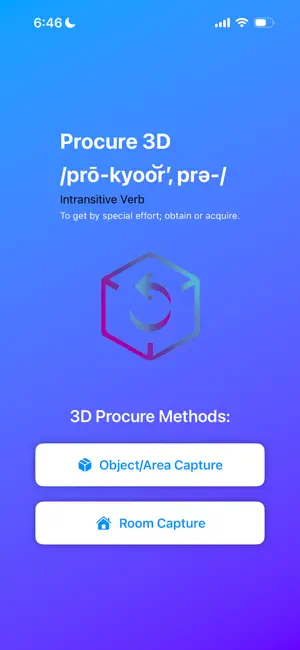
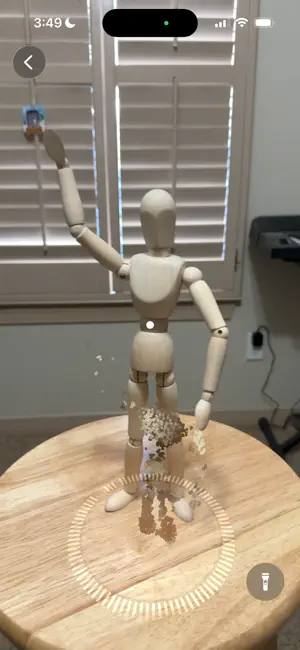
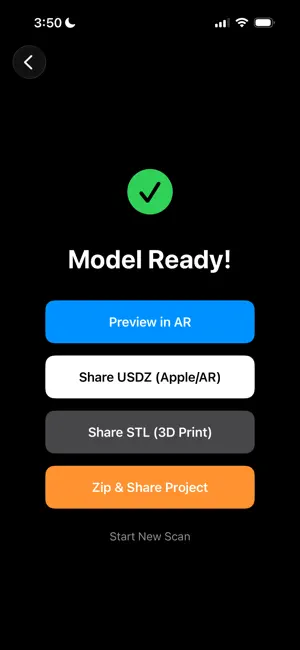
Procure3D Obtain the real world in 3D. Note: This app requires an iPhone or iPad with a LiDAR Scanner (iPhone 12 Pro/Max or newer, iPad Pro 2020 or newer) to perform 3D object captures. Transform your iPhone or iPad into a pocket-sized 3D scanner. Whether you are a 3D printing enthusiast, a spatial designer, a real estate professional, or just someone who loves capturing the world in a new dimension, Procure3D makes it easy to digitize objects, areas, and rooms. Built on Apple's spatial technologies, Procure3D processes scans entirely on-device, delivering 3D models in minutes. Key Features: Object and Area Capture Scan objects of all sizes. Use the guided AR bounding box to capture every angle. Need more detail? Our multi-pass feature lets you flip the object to seamlessly scan the bottom and hidden crevices for a more complete model. Room Capture Digitize your physical space. Walk around your room and watch as walls, windows, doors, and furniture are mapped in real-time to create a precise 3D floor plan. STL Generation Procure3D automatically generates STL files alongside your scan. AR Preview Bring your digital models back into the real world. Instantly preview your finished scans in your physical space using our built-in Augmented Reality viewer. Note the scans keep the real world physical dimensions of the object and room that was scanned. Seamless Exporting and Sharing Share your 3D assets your way. Send USDZ files to other Apple users or for AR previews. Share STL files directly to your 3D printing workflow. Want to process your raw image data on a desktop? One tap zips your entire session, including raw photos and checkpoints, so you can easily transfer it to your Mac. Advanced Scanning Controls Dark room? No problem. Procure3D features built-in, multi-level flashlight controls to ensure your scans are bright, clear, and perfectly textured regardless of your environment. Requirements: Procure3D utilizes advanced photogrammetry and spatial mapping. Room Capture and optimal Object Capture performance require an iOS device equipped with a LiDAR Scanner, such as an iPhone 12 Pro or newer, or an iPad Pro 2020 or newer.
App privacy
The developer, Polymorphic Applications LLC, reported these privacy practices to Apple.
Data Not Collected
The developer does not collect any data from this app.
Alternatives to Procure 3D
Looking for apps like Procure 3D? Here are 6 similar apps on the App Store. The highest rated is Airtool Pi (5.0/5), and 3 of the 6 are free to download.
-
 TXTCrypt - Hash & Encrypt Tool
-
 CLX Scan
-
 Airtool Pi
5.0
Airtool Pi
5.0
-
 SilverGear Print
-
 Spooly App for CC1
5.0
Spooly App for CC1
5.0
-
 ProxMate Pro
5.0
ProxMate Pro
5.0
| App | Rating | Price | Last updated | Compare |
|---|---|---|---|---|
| Procure 3D | – | 0.99 USD | March 3, 2026 | |
| TXTCrypt - Hash & Encrypt Tool | – | 1.99 USD | Apr 17, 2026 | Compare |
| CLX Scan | – | Free | Apr 3, 2025 | Compare |
| Airtool Pi | 5.0 / 5 (6) | 14.99 USD | Sep 9, 2026 | Compare |
| SilverGear Print | – | Free | Jul 27, 2026 | Compare |
| Spooly App for CC1 | 5.0 / 5 (3) | Free | May 4, 2026 | Compare |
| ProxMate Pro | 5.0 / 5 (2) | 12.99 USD | Oct 3, 2026 | Compare |
Compare Procure 3D with the top alternatives: ratings, updates, ASO score and keyword gaps →