

Wurstfinger
Akator GmbH Utilities iPhoneiPadiPod touch
Wurstfinger is a free Utilities app for iPhone and iPad by Akator GmbH. Rated 4.9/5 from 9 ratings. Requires iOS 17.0. Updated August 11, 2026.
- Rating
- 4.9
- 9 ratings
- Price
- Free
- on the App Store
- Size
- 7 MB
- Age 4+
- Updated
- Aug 11
- 2026 · v1.4.1
Screenshots


About Wurstfinger
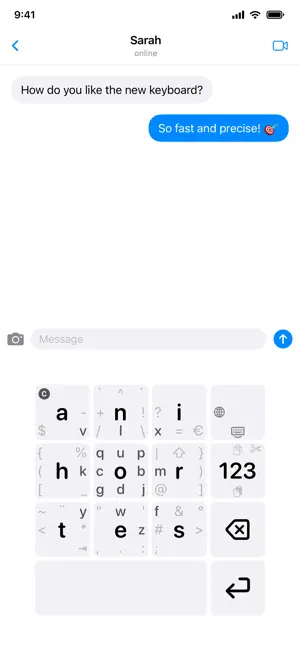
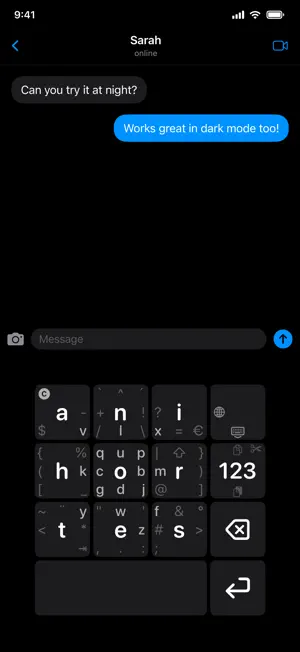
Wurstfinger - The Keyboard for Fat Fingers Tired of typos? Wurstfinger is a privacy-conscious keyboard with large keys and swipe gestures. Based on the proven MessagEase layout, it replaces the cramped QWERTY grid with a 3x3 layout optimized for thumb typing. Unlike mainstream keyboards, Wurstfinger doesn't rely on invasive word prediction - instead, it achieves accuracy through ergonomic design. Large, well-spaced keys mean fewer missed taps, and the gesture system lets you access all characters without hunting for tiny buttons. FEATURES: • Large 3x3 Key Grid - Optimized for thumbs, not precision pointers • Swipe Gestures - Access 8 additional characters per key by swiping • 26 Keyboard Layouts - Arabic, Croatian, English, Estonian-Finnish, Finnish, French, German, Greek, Hebrew, Hindi, Italian, Japanese (Hiragana), Japanese (Katakana), Korean, Persian, Polish, Portuguese, Russian, Spanish, Spanish-Catalan, Swedish, Tagalog, Thai, Ukrainian, Urdu, and Vietnamese (with Telex input) • Compose Rules - Create accents through combinations (e.g. ' + a = á) • Circular Gestures - Draw a circle for uppercase letters • Cursor Control - Drag on the space bar to move the cursor, drag on the delete key to erase continuously • Haptic Feedback - Customizable vibration intensity • Fully Adjustable - Scale keyboard size to your preference PRIVACY FIRST: • No data collection • No network access • No word prediction tracking • All processing happens locally on your device Wurstfinger requires training - expect a few days to build muscle memory. But once you've crossed that threshold, you'll never want to go back to a standard keyboard. The gestures become second nature, and you'll type faster and with fewer errors than ever before. Your fingers will thank you!
Ratings & reviews
4.9
9 ratings
What’s new
Version 1.4.1 · Updated August 11, 2026
Version 1.4.1 New: • Optional gesture trail — a soft stroke follows your finger while you swipe and fades out when you lift it. Off by default, under Settings › Gestures • New app icon: Liquid Glass on iOS 26, with depth on the Home Screen Improved: • Fast flicks are recognized as swipes again instead of typing the key's center letter • Characters that could not be typed at all on the new layouts: Thai ฬ ฒ ฑ ฏ and ฿, the Japanese 、 and 。 with the small kana, the half-space in Persian and Urdu, Arabic-script punctuation, the Hindi ₹, the Hebrew ׳ and ״, and the voiced kana iteration marks ゞ and ヾ • č ď ě ň ř š ť ž are directly reachable: the caron now sits on the return swipe of the ^ key, replacing the stand-alone circumflex accent that swipe used to type (the ^ itself is unchanged) • Diagonal drags on the delete key delete instead of doing nothing • A long press held across a mode or language switch no longer types the old key's digit • Double-space types a period only on two consecutive spaces, and inserts the sentence mark of the script you are typing • Forward-delete and capitalize-word respect an active selection • Coming back from another app applies settings changed in the meantime before the first keystroke, and the app switcher no longer shows an empty gap where the keyboard was • VoiceOver reaches the shift, punctuation and mode keys, and offers swipe-only actions such as copy, cut, paste and hide keyboard through the rotor • Key labels stay inside their key at the smallest keyboard sizes • Size & Position was shown in English whatever the app language, and is translated now, along with 70 corrected translations • Leaner rendering leaves the keyboard more memory headroom
App privacy
The developer, Akator GmbH, reported these privacy practices to Apple.
Data Not Collected
The developer does not collect any data from this app.
Alternatives to Wurstfinger
Looking for apps like Wurstfinger? Here are 6 similar apps on the App Store. The highest rated is MergeKey (5.0/5), and all 6 are free to download.
-
 MergeKey
5.0
MergeKey
5.0
-
 Swipeys Keyboard
-
 MessagEase Keyboard
4.0
MessagEase Keyboard
4.0
-
 zellopon keyboard
3.8
zellopon keyboard
3.8
-
 Colemak
2.9
Colemak
2.9
-
 EFKey – Swipe & AI Keyboard
4.7
EFKey – Swipe & AI Keyboard
4.7
| App | Rating | Price | Last updated | Compare |
|---|---|---|---|---|
| Wurstfinger | 4.9 / 5 (9 ratings) | Free | August 11, 2026 | |
| MergeKey | 5.0 / 5 (3) | Free | Oct 14, 2026 | Compare |
| Swipeys Keyboard | – | Free | Aug 8, 2026 | Compare |
| MessagEase Keyboard | 4.0 / 5 (97) | Free | Oct 21, 2026 | Compare |
| zellopon keyboard | 3.8 / 5 (4) | Free | Jan 21, 2026 | Compare |
| Colemak | 2.9 / 5 (20) | Free | Feb 25, 2025 | Compare |
| EFKey – Swipe & AI Keyboard | 4.7 / 5 (35) | Free | Oct 21, 2026 | Compare |
Compare Wurstfinger with the top alternatives: ratings, updates, ASO score and keyword gaps →