

Swiply: Photo & Video Cleaner
Studio Ray Inc. Utilities iPhoneiPadiPod touch
Swiply: Photo & Video Cleaner is a free Utilities app for iPhone and iPad by Studio Ray Inc. Requires iOS 16.4. Updated July 16, 2026.
- Price
- Free
- on the App Store
- Size
- 135 MB
- Age 4+
- Updated
- Jul 16
- 2026 · v1.3.0
Screenshots
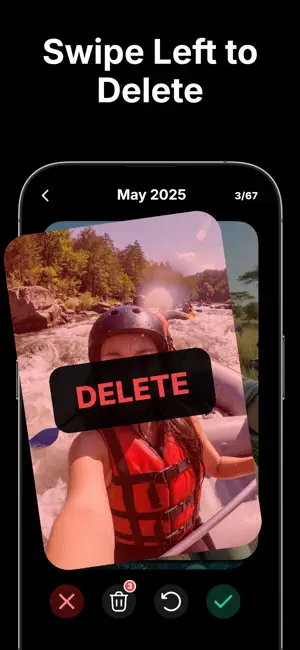

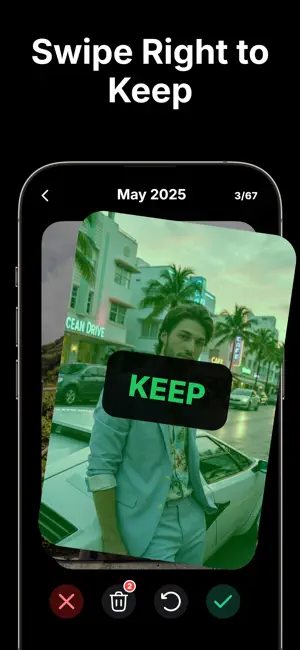
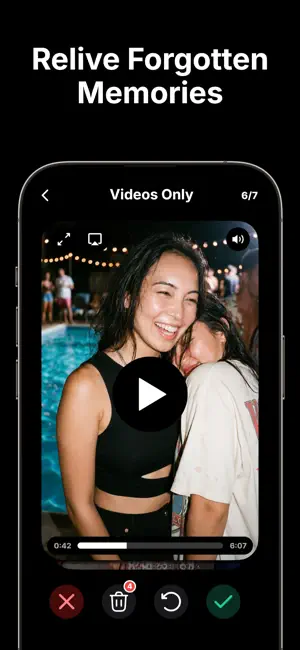
About Swiply: Photo & Video Cleaner
Turn a crowded camera roll into quick, confident decisions. Swipe through photos and videos, keep what matters, and reclaim storage without losing control. Make progress in short sessions or focus on a specific album, date range, or media type. Every item marked for deletion stays in a review list until you confirm. SWIPE TO CLEAN Turn an overwhelming gallery into quick, simple decisions. Review one photo or video at a time, swipe left to mark clutter for deletion, or swipe right to keep it. Prefer buttons? Tap delete or keep instead. REVIEW BEFORE YOU DELETE Nothing is removed the moment you swipe. Items marked for deletion go to a review list first. Inspect your choices, remove individual items, clear the list, undo recent decisions, and confirm only when you are ready. CLEAN YOUR WAY Choose the part of your library you want to tackle: • All media • Photos only • Videos only • The last month or year • On This Day memories • A specific month, year, or album PRIVATE, ON-DEVICE CLEANUP Your photos and videos are processed on your device for cleanup and are not uploaded for processing. You decide what stays and what goes. No account is required. TOOLS THAT KEEP YOU IN CONTROL • Bookmark photos and videos you want to revisit • Share rediscovered memories • View filenames, dimensions, dates, file sizes, video duration, and available location details • Track total swipes, kept items, deleted media, and estimated storage saved • Choose light or dark mode SEE THE SPACE YOU RECLAIM After each confirmed cleanup, view a summary of the photos and videos deleted and the estimated storage saved. Lifetime statistics help you see your progress over time. HOW IT WORKS 1. Choose a cleanup mode. 2. Swipe or tap to mark each item to keep or delete. 3. Review your deletion list and confirm. Keep memories. Delete clutter. Reclaim storage. Start cleaning your camera roll one thoughtful swipe at a time. Terms of Use: https://www.apple.com/legal/internet-services/itunes/dev/stdeula/ Privacy Policy: https://studioray.co/privacy
What’s new
Version 1.3.0 · Updated July 16, 2026
The cleanup flow is now more direct, keeping the focus on sorting photos and videos.
Alternatives to Swiply: Photo & Video Cleaner
Looking for apps like Swiply: Photo & Video Cleaner? Here are 6 similar apps on the App Store. The highest rated is FlickClean: Photo Cleaner App (5.0/5), and all 6 are free to download.
-
 Photo Delete Swipe: Swipelio
4.5
Photo Delete Swipe: Swipelio
4.5
-
 FlickClean: Photo Cleaner App
5.0
FlickClean: Photo Cleaner App
5.0
-
 Clean my Gallery
5.0
Clean my Gallery
5.0
-
 Photo Cleaner - Swipli
5.0
Photo Cleaner - Swipli
5.0
-
 Gallery Swipe: Photo Cleanup
-
 PicSwipe - Swipe & Clean
| App | Rating | Price | Last updated | Compare |
|---|---|---|---|---|
| Swiply: Photo & Video Cleaner | – | Free | July 16, 2026 | |
| Photo Delete Swipe: Swipelio | 4.5 / 5 (6) | Free | Oct 7, 2026 | Compare |
| FlickClean: Photo Cleaner App | 5.0 / 5 (5) | Free | Oct 7, 2026 | Compare |
| Clean my Gallery | 5.0 / 5 (1) | Free | Apr 16, 2025 | Compare |
| Photo Cleaner - Swipli | 5.0 / 5 (4) | Free | Sep 19, 2026 | Compare |
| Gallery Swipe: Photo Cleanup | – | Free | Sep 21, 2026 | Compare |
| PicSwipe - Swipe & Clean | – | Free | Mar 12, 2026 | Compare |