

LucidAR
OBX Software Corporation Utilities iPhoneiPadiPod touch
LucidAR is a free Utilities app for iPhone and iPad by OBX Software Corporation. Requires iOS 18.6. Updated October 6, 2026.
- Price
- Free
- on the App Store
- Size
- 86 MB
- Age 12+
- Updated
- Oct 6
- 2026 · v1.2
Screenshots


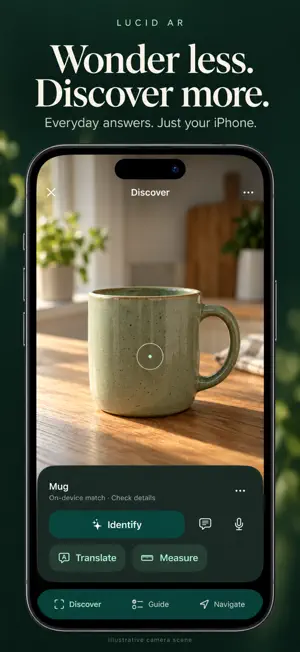

About LucidAR
Your camera can do more than take pictures. LucidAR helps you understand what you see, work through everyday tasks and find your way—all on the iPhone you already own. No smart glasses required. IDENTIFY WHAT'S IN FRONT OF YOU Get automatic on-device matches for familiar objects. Tap Identify or ask a question for more detail. With your permission, uncertain matches and questions can use an AI snapshot. Type or speak, then save useful answers. READ SIGNS, LABELS AND MENUS Capture visible text and translate it into your selected language. Review the original and keep the translation for later. Translation runs on your device; supported language downloads may be needed first. CHECK THE SIZE Estimate the width and length of a flat face, such as a book or box. Add depth when suitable evidence is available, or use the point-to-point ruler. Save a photo with the dimensions. Measurements are approximate: check with a physical ruler before fitting or cutting. GET A FOOD CALORIE ESTIMATE Show food or a readable nutrition label for an estimate with portion assumptions. Photos cannot establish exact calories, ingredients or allergens. Estimates are not nutrition labels or medical advice. KNOW WHAT TO DO NEXT Create a practical step-by-step guide. Mark progress, listen with read-aloud and use hands-free commands. Pause and pick up where you left off. Export guide PDFs with Lucid Pro. FIND YOUR WAY—AND YOUR WAY BACK Follow walking directions over your camera view, with a map a tap away. Explore nearby places, reopen recent destinations and remember a parking or meeting spot. HELP THE NEXT VISITOR Share how busy a place feels when you arrive, plus observed waits and entrance details. Report path issues from navigation. Community observations show their age and expire. Coverage depends on contributions; reports are not verified occupancy or accessibility guarantees. KEEP WHAT HELPS Save answers, guides, translations, measurement photos and places in a private library on this device. Rename items, add notes and favorites, and find them with search. Saved text and guide progress remain available offline. START FREE. SAVE MORE WITH PRO. Free includes 10 saved items, 10 Discovery AI answers and 3 Guide answers per day, plus local tools, navigation and community reporting. Pro includes up to 500 saved items, 100 Discovery AI answers and 30 Guide answers per day, guide PDF export and more camera captures. AI answers can be wrong. Cloud AI and community features require internet access and are subject to availability and usage limits. Daily AI allowances reset at midnight UTC. Measurements and navigation depend on camera, location and sensor conditions. Pro is an auto-renewing monthly or annual subscription. See the purchase screen for your local price and renewal period. Manage or cancel in your App Store account settings. Privacy: https://lucidar-7f9d0.web.app/privacy Terms: https://www.apple.com/legal/internet-services/itunes/dev/stdeula/
What’s new
Version 1.2 · Updated October 6, 2026
A clearer view of everyday life. • A refreshed camera experience with compact controls for Discover, Guide and Navigate. • On-device object matches, camera text translation, measurement tools and food calorie estimates. • A saved library with search, editable names, notes, favorites and measurement photos. • Guides you can pause, resume and follow with read-aloud or hands-free commands. Export PDFs with Pro. • Walking directions, recent destinations, remembered spots and community updates about busyness, waits, entrances and path issues. • Light and dark appearance options and a redesigned Lucid lens icon.
App privacy
The developer, OBX Software Corporation, reported these privacy practices to Apple.
Data Linked to You
The following data, which may be collected and linked to your identity, may be used for the following purposes:
- Purchases: Purchase History
- Location: Coarse Location, Precise Location
- Identifiers: Device ID, User ID
- Usage Data: Product Interaction
- User Content: Photos or Videos, Other User Content
- Surroundings: Environment Scanning
Used for: Analytics, App Functionality
Data Not Linked to You
The following data, which may be collected but is not linked to your identity, may be used for the following purposes:
- Diagnostics: Other Diagnostic Data
Used for: Analytics, App Functionality
Alternatives to LucidAR
Looking for apps like LucidAR? Here are 6 similar apps on the App Store. The highest rated is Fuse 3d (5.0/5), and all 6 are free to download.
-
 Parking Lot Reminder
-
 EMF Scope
-
 InfoQueries: Smart AI Search
-
 Fuse 3d
5.0
-
 LiDAR Depth Map 3D Scanner
5.0
-
 QR Code Scanner | Bar Reader
4.4
| App | Rating | Price | Last updated | Compare |
|---|---|---|---|---|
| LucidAR | – | Free | October 6, 2026 | |
| Parking Lot Reminder | – | Free | Feb 2, 2025 | Compare |
| EMF Scope | – | Free | Jan 21, 2026 | Compare |
| InfoQueries: Smart AI Search | – | Free | Aug 28, 2026 | Compare |
| Fuse 3d | 5.0 / 5 (2) | Free | Sep 30, 2026 | Compare |
| LiDAR Depth Map 3D Scanner | 5.0 / 5 (1) | Free | Sep 14, 2026 | Compare |
| QR Code Scanner | Bar Reader | 4.4 / 5 (84) | Free | Dec 27, 2023 | Compare |
Compare LucidAR with the top alternatives: ratings, updates, ASO score and keyword gaps →