

Yakki: Voice to Text Keyboard
Julio Imazio Productivity iPhoneiPadiPod touch
Yakki: Voice to Text Keyboard is a free Productivity app for iPhone and iPad by Julio Imazio. Rated 5.0/5 from 1 ratings. Requires iOS 18.0.
- Rating
- 5.0
- 1 ratings
- Price
- Free
- on the App Store
- Size
- 8 MB
- Age 4+
- Updated
- Jul 1
- 2026 · v1.0.7
Screenshots



About Yakki: Voice to Text Keyboard
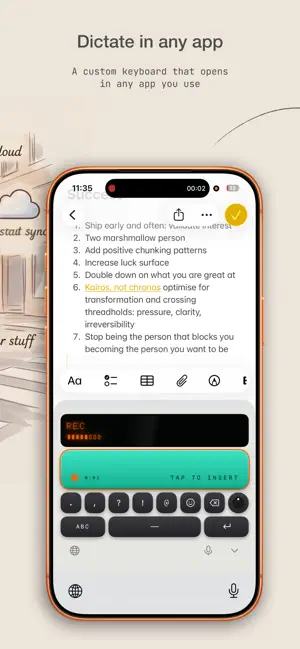
Speak. Yakki types it out, perfectly formatted. Yakki is a privacy-first voice-to-text app you can use two ways: as a keyboard that dictates into any app, and as a full voice recorder and transcription studio with searchable history, playback, speaker-labeled meetings, and translation. As a keyboard, tap the mic anywhere you type (Messages, Mail, Notes, WhatsApp, Slack, Docs), talk naturally, and your words appear punctuated and formatted. In the app, record audio of any length and get a clean transcript you can search, replay, re-format into a new style, and translate to another language. WHY YAKKI • Works in every app: a full iOS keyboard, so you dictate right where you're already typing. No copy-paste, no app-switching. • AI formatting modes: pick how your words come out: General, Email, Chat, Docs, Notes, Code, or Meeting. Yakki cleans up filler, adds punctuation, and structures the text for you. • Private by design: your transcripts and recordings sync through YOUR iCloud, never our servers. No ad trackers, no selling your voice. • Speaker labels for meetings: meeting mode separates who said what, so conversations and interviews come out organized. • Translate on the fly: turn any recording into another language with one tap. • Record anything, any length, Stream-to-disk recording with a Live Activity in the Dynamic Island keeps long captures alive in the background. • Mac + iPhone sync. Start on your Mac, finish on your iPhone. Your modes, history, and settings follow you. • Playback & history. Every recording is saved with its transcript so you can re-listen, re-format, and reuse. GREAT FOR • Firing off emails and replies while your hands are busy • Capturing notes, ideas, and to-dos the second they hit • Turning meetings, lectures, and interviews into clean transcripts • Drafting long messages and documents 3x faster than thumb-typing • Anyone who finds talking faster than typing PRICING Yakki is free to start. Upgrade to Pro for unlimited dictation and every formatting mode: • Monthly or Annual subscription • One-time Lifetime purchase: own it forever, no subscription Privacy Policy: https://yakki.ai/privacy Terms of Use: https://yakki.ai/terms Questions? https://yakki.ai/contact
App privacy
The developer, Julio Imazio, reported these privacy practices to Apple.
Data Linked to You
The following data, which may be collected and linked to your identity, may be used for the following purposes:
- Purchases: Purchase History
- Contact Info: Email Address, Name
- User Content: Audio Data, Other User Content
- Identifiers: User ID, Device ID
Used for: App Functionality
Alternatives to Yakki: Voice to Text Keyboard
Looking for apps like Yakki: Voice to Text Keyboard? Here are 6 similar apps on the App Store. The highest rated is Offeline: Private AI Assistant (5.0/5), and all 6 are free to download.
-
 Offeline: Private AI Assistant
5.0
-
 Wi-Meter
1.1
-
 Pagi - Morning Pages & Diary
4.5
-
 Vagent.io
5.0
-
 Pomodoro Timer: Tempo Focus
5.0
-
 Lekh AI - Local AI Studio
4.0
| App | Rating | Price | Last updated | Compare |
|---|---|---|---|---|
| Yakki: Voice to Text Keyboard | 5.0 / 5 (1 rating) | Free | July 1, 2026 | |
| Offeline: Private AI Assistant | 5.0 / 5 (2) | Free | Aug 9, 2026 | Compare |
| Wi-Meter | 1.1 / 5 (7) | Free | Oct 13, 2025 | Compare |
| Pagi - Morning Pages & Diary | 4.5 / 5 (10) | Free | Jul 18, 2025 | Compare |
| Vagent.io | 5.0 / 5 (1) | Free | Sep 28, 2024 | Compare |
| Pomodoro Timer: Tempo Focus | 5.0 / 5 (6) | Free | Oct 13, 2026 | Compare |
| Lekh AI - Local AI Studio | 4.0 / 5 (66) | Free | Oct 14, 2026 | Compare |