

IPTV Player M3U Xtream NextGen
ERHAN AKSU Entertainment iPhoneiPadiPod touchMac
IPTV Player M3U Xtream NextGen is a free Entertainment app for iPhone and iPad by ERHAN AKSU. Rated 3.5/5 from 22 ratings. Requires iOS 17.0.
- Rating
- 3.5
- 22 ratings
- Price
- Free
- on the App Store
- Size
- 171 MB
- Age 4+
- Updated
- Oct 24
- 2026 · v3.5.2
Screenshots



About IPTV Player M3U Xtream NextGen
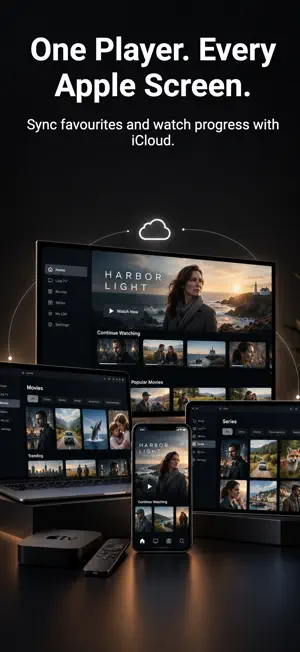
NextGen IPTV Player is a native media player and playlist organiser for iPhone and iPad. Connect your own M3U/M3U8 playlist or Xtream-compatible source to browse and play content you are authorised to access. NextGen does not supply channels, movies, series, playlists or IPTV subscriptions. A compatible content source is required. Purchasing NextGen Pro unlocks app features; it does not include media content or a content subscription. LIVE TV AND PROGRAMME GUIDE Browse channels by category, switch between List, Grid and EPG views, and open streams in full screen. View Now and Next information, browse schedules and create programme reminders where supported. Guide availability and accuracy depend on your provider or compatible XMLTV source. MULTIVIEW WITH NEXTGEN PRO Watch up to four live channels at once on iPhone and iPad. Switch audio between channels, replace streams and expand a channel to full screen, with layouts for portrait and landscape. Multiview requires compatible streams and enough simultaneous connections from your content service, typically one per channel. Your provider's connection limits still apply. With fewer connections, streams may buffer or pause while NextGen reconnects them. MOVIES, SERIES AND PLAYBACK Browse movies, seasons and episodes with available artwork and metadata. Resume unfinished content through Continue Watching and keep track of playback progress and watched status. Choose automatic playback-engine selection with fallback or a manual engine preference. Select available audio and subtitle tracks, seek supported on-demand streams and use Picture in Picture with compatible playback. Formats, tracks, seeking, PiP and up to 4K playback depend on the stream, device and network. SEARCH AND ORGANISATION Search Live TV, movies and series. Manage favourites, custom names, hidden content, playlists and profiles. Adjust playlist and EPG refresh settings. Additional playlist, profile, favourite and content-management capabilities require NextGen Pro. OPTIONAL ICLOUD SYNC With NextGen Pro and iCloud Sync enabled, sync supported app data, including playlist connections, profiles, favourites, hidden content and playback progress, across your Apple devices. Availability depends on your Apple ID, iCloud settings and network. Media files are not included in this sync. FREE AND NEXTGEN PRO Free access includes core playlist browsing and a cumulative two-hour playback evaluation. NextGen Pro removes the playback evaluation limit and unlocks Multiview and additional app features described above. Available packages, local prices and billing periods are shown before purchase. Restore Purchases is available inside the app. Auto-renewable subscriptions renew unless cancelled. Manage or cancel subscriptions in your Apple Account settings. CONTENT RESPONSIBILITY Use only sources you are authorised to access. Your content service's terms, rights and connection limits apply. NextGen does not grant rights to third-party content or bypass access restrictions. Terms: https://nextgeniptvplayer.com/terms Privacy: https://nextgeniptvplayer.com/privacy Support: https://nextgeniptvplayer.com/support
Ratings & reviews
3.5
22 ratings
What’s new
Version 3.5.2 · Updated October 24, 2026
What's new in version 3.5.2: • New Live Favorites widgets let you browse favorite channels from your Home Screen and tap to watch. • Find recently watched live channels across saved playlists without switching playlists. • Reorder Live TV, Movie and Series Favorites from an item’s long-press menu. • Clearer Recent and Favorites lists with improved channel logos and names.
App privacy
The developer, ERHAN AKSU, reported these privacy practices to Apple.
Data Not Linked to You
The following data, which may be collected but is not linked to your identity, may be used for the following purposes:
- Purchases: Purchase History
- Location: Coarse Location
- Identifiers: Device ID
- Usage Data: Product Interaction
- Diagnostics: Other Diagnostic Data, Crash Data
Used for: Analytics, App Functionality
Alternatives to IPTV Player M3U Xtream NextGen
Looking for apps like IPTV Player M3U Xtream NextGen? Here are 6 similar apps on the App Store. The highest rated is Vireko IPTV Player (4.9/5), and all 6 are free to download.
-
 TivEPG: IPTV Player Sports Hub
3.3
TivEPG: IPTV Player Sports Hub
3.3
-
 YES IPTV Player
4.4
YES IPTV Player
4.4
-
 OneTV Connect: IPTV Player
4.2
OneTV Connect: IPTV Player
4.2
-
 IPTV Smart Player – STRIMIX
4.4
IPTV Smart Player – STRIMIX
4.4
-
 Vireko IPTV Player
4.9
Vireko IPTV Player
4.9
-
 Aerial TV: IPTV Player
2.0
Aerial TV: IPTV Player
2.0
| App | Rating | Price | Last updated | Compare |
|---|---|---|---|---|
| IPTV Player M3U Xtream NextGen | 3.5 / 5 (22 ratings) | Free | October 24, 2026 | |
| TivEPG: IPTV Player Sports Hub | 3.3 / 5 (9) | Free | Oct 9, 2026 | Compare |
| YES IPTV Player | 4.4 / 5 (59) | Free | Oct 3, 2026 | Compare |
| OneTV Connect: IPTV Player | 4.3 / 5 (8) | Free | Oct 29, 2026 | Compare |
| IPTV Smart Player – STRIMIX | 4.4 / 5 (40) | Free | Oct 23, 2026 | Compare |
| Vireko IPTV Player | 4.9 / 5 (44) | Free | Oct 28, 2026 | Compare |
| Aerial TV: IPTV Player | 2.0 / 5 (1) | Free | Oct 29, 2026 | Compare |