

G Keyboard: Rewrite Text
VIIONR INFOTECH PRIVATE LIMITED Productivity iPhoneiPadiPod touch
G Keyboard: Rewrite Text is a free Productivity app for iPhone and iPad by VIIONR INFOTECH PRIVATE LIMITED. Rated 5.0/5 from 1 ratings. Requires iOS 17.0.
- Rating
- 5.0
- 1 ratings
- Price
- Free
- on the App Store
- Size
- 10 MB
- Age 4+
- Updated
- Oct 3
- 2026 · v3.3
Screenshots


About G Keyboard: Rewrite Text
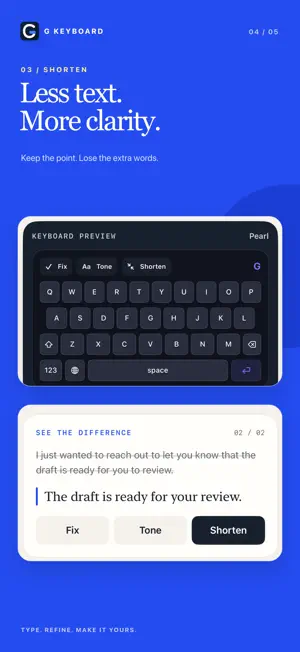
Write more clearly without leaving the app you are using. G Keyboard puts focused writing tools directly above a familiar iPhone and iPad keyboard. TYPE NORMALLY, ANYWHERE • Use the custom QWERTY keyboard in Mail, Messages, Notes, and other text fields • Standard typing works without Full Access or a network connection after a subscription is active • Choose from eight keyboard finishes FIX THE TEXT BEFORE YOUR CURSOR • Fix corrects grammar, spelling, and punctuation • Tone rewrites your text in a polished, professional style • Shorten keeps the meaning while removing extra words • Undo is available after a successful rewrite AI ONLY WHEN YOU REQUEST IT G Keyboard does not send ordinary keystrokes to an AI service. When you deliberately tap Fix, Tone, or Shorten, the relevant text before your cursor is sent through the G Keyboard Cloudflare Worker to Google Gemini for processing. See the Privacy Policy for details about provider handling. YOU CONTROL ACCESS Keep Private typing selected to use the standard keyboard without cloud actions. If you choose Cloud AI actions, iOS requires Full Access before a third-party keyboard can make the requested network call. G KEYBOARD PRO A paid monthly or annual auto-renewing subscription is required after onboarding. There is no free tier or trial. Localized prices are loaded directly from the App Store and shown before purchase. Restore Purchases is available in the app. Payment is charged to your Apple Account at confirmation. Subscriptions renew automatically unless canceled at least 24 hours before the end of the current period. Manage or cancel your subscription in Apple Account settings. Privacy policy: https://photorevive-api.oneiro-app.workers.dev/keybored/privacy Terms of use: https://www.apple.com/legal/internet-services/itunes/dev/stdeula/ Support: https://photorevive-api.oneiro-app.workers.dev/keybored
What’s new
Version 3.3 · Updated October 3, 2026
G Keyboard 3.3 refreshes the writing desk and keyboard experience. • Redesigned Home and keyboard previews • Eight keyboard finishes, including Rose and Matcha • Improved iPhone and iPad layouts • Clearer subscription, privacy, and setup information
App privacy
The developer, VIIONR INFOTECH PRIVATE LIMITED, reported these privacy practices to Apple.
Data Linked to You
The following data, which may be collected and linked to your identity, may be used for the following purposes:
- User Content: Other User Content
Used for: App Functionality
Alternatives to G Keyboard: Rewrite Text
Looking for apps like G Keyboard: Rewrite Text? Here are 6 similar apps on the App Store.
-
 Grammar AI : Keyboard & Writer
-
 MasjidZone Studio
-
 DoekLeun
-
 SweetCue: Couples Keyboard
-
 Aerodocs - Document Scanner
-
 Cherify: AI Voice Keyboard Pro
| App | Rating | Price | Last updated | Compare |
|---|---|---|---|---|
| G Keyboard: Rewrite Text | 5.0 / 5 (1 rating) | Free | October 3, 2026 | |
| Grammar AI : Keyboard & Writer | – | Free | Aug 28, 2024 | Compare |
| MasjidZone Studio | – | Free | Jun 8, 2026 | Compare |
| DoekLeun | – | Free | Apr 19, 2026 | Compare |
| SweetCue: Couples Keyboard | – | Free | Oct 19, 2026 | Compare |
| Aerodocs - Document Scanner | – | Free | Jul 9, 2026 | Compare |
| Cherify: AI Voice Keyboard Pro | – | Free | Oct 14, 2026 | Compare |