

Signature Maker: Signora
Dogancan Mavideniz Utilities iPhoneiPadiPod touch
Signature Maker: Signora is a free Utilities app for iPhone and iPad by Dogancan Mavideniz. Rated 5.0/5 from 1 ratings. Requires iOS 17.0.
- Rating
- 5.0
- 1 ratings
- Price
- Free
- on the App Store
- Size
- 39 MB
- Age 4+
- Updated
- Dec 2
- 2025 · v1.0.5
Screenshots
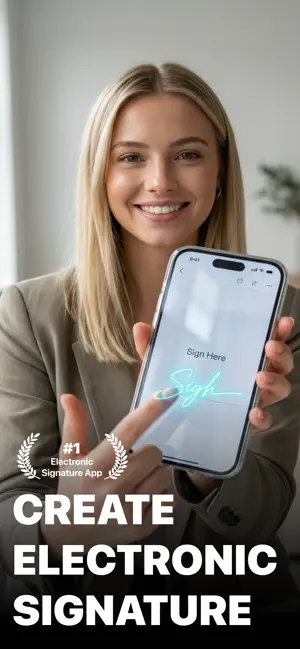

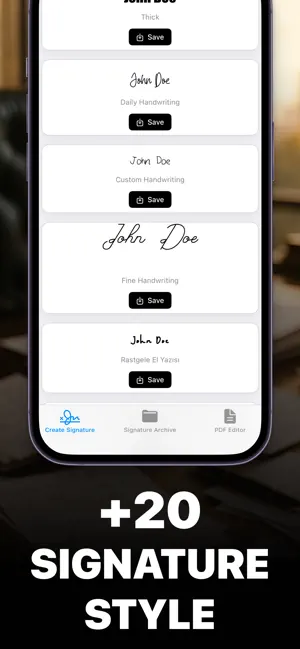

About Signature Maker: Signora
Create professional digital signatures and sign your PDF documents instantly with our powerful signature creation app. Whether you need to sign business contracts, legal documents, or personal paperwork, our app makes it quick and easy to add your authentic digital signature to any PDF file. Our intelligent signature generator allows you to create beautiful, personalized signatures by simply typing your name. The app automatically generates multiple signature styles using over 15 different fonts including elegant, vintage, professional, modern, cursive, and handwritten options. You can also draw your signature directly on the screen using your finger for a more personal touch. The built-in PDF editor lets you import any PDF document and add your signature exactly where you need it. Simply drag and drop your signature to the desired location, resize it with pinch gestures, and save your signed document in high quality. You can save signed PDFs to your device or share them instantly via email, messaging, or cloud storage. All your created signatures are automatically saved in your personal signature library where you can organize, duplicate, and manage them easily. The app supports both text-based signatures with customizable fonts and hand-drawn signatures for maximum flexibility. Premium features include unlimited signature creation, access to all font styles, high-quality export options in PNG and PDF formats, and an ad-free experience. The app offers a 3-day free trial so you can explore all premium features before subscribing. Perfect for business professionals, freelancers, students, and anyone who regularly deals with digital documents. The intuitive interface makes signature creation and PDF signing accessible to users of all technical levels. Your signatures are stored securely on your device and never shared with third parties. Transform your document workflow today and never print, sign, and scan paperwork again. Download now and start signing your PDFs digitally with professional-looking signatures in minutes. Privacy Policy: https://www.koza.works/privacy-policy Terms of Use: https://www.apple.com/legal/internet-services/itunes/dev/stdeula/
What’s new
Version 1.0.5 · Updated December 2, 2025
Our new mascot, Calligraph Signora, can't wait to meet you.
App privacy
The developer, Dogancan Mavideniz, reported these privacy practices to Apple.
Data Not Collected
The developer does not collect any data from this app.
Alternatives to Signature Maker: Signora
Looking for apps like Signature Maker: Signora? Here are 6 similar apps on the App Store. The highest rated is Humanize AI Text & AI Detector (4.6/5), and all 6 are free to download.
-
 Signature maker - Digital sign
-
 Signature Maker Pro
-
 Signature Maker - Signature
2.5
Signature Maker - Signature
2.5
-
 Signature Maker・Sign Documents
4.3
Signature Maker・Sign Documents
4.3
-
 eSign Fill & Sign PDF Document
4.4
eSign Fill & Sign PDF Document
4.4
-
 Humanize AI Text & AI Detector
4.6
Humanize AI Text & AI Detector
4.6
| App | Rating | Price | Last updated | Compare |
|---|---|---|---|---|
| Signature Maker: Signora | 5.0 / 5 (1 rating) | Free | December 2, 2025 | |
| Signature maker - Digital sign | – | Free | Nov 30, 2025 | Compare |
| Signature Maker Pro | – | Free | Nov 21, 2025 | Compare |
| Signature Maker - Signature | 2.5 / 5 (6) | Free | Sep 18, 2026 | Compare |
| Signature Maker・Sign Documents | 4.3 / 5 (27) | Free | May 19, 2026 | Compare |
| eSign Fill & Sign PDF Document | 4.4 / 5 (132) | Free | Oct 7, 2026 | Compare |
| Humanize AI Text & AI Detector | 4.6 / 5 (701) | Free | Apr 25, 2026 | Compare |