

Parkingwhere: Find My Car
QuadNightVision Productivity iPhoneiPadiPod touch
Parkingwhere: Find My Car is a free Productivity app for iPhone and iPad by QuadNightVision. Requires iOS 17.0. Updated October 3, 2026.
- Price
- Free
- on the App Store
- Size
- 74 MB
- Age 4+
- Updated
- Oct 3
- 2026 · v1.7.0
Screenshots
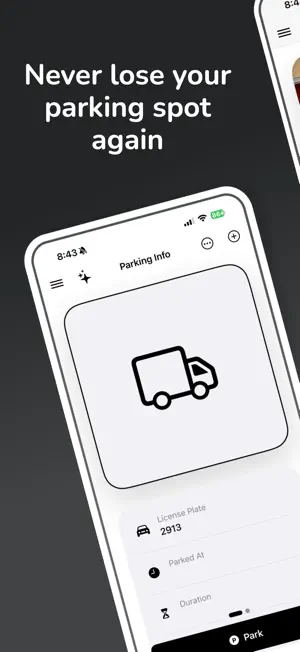


About Parkingwhere: Find My Car
Never lose your car again. One photo saves everything — time, location, and parking details — instantly. No signup. No login. No storage wasted. Just open, snap, and go. ■ Save parking details with one shot Open the camera, take a photo, and your parking status — time, location, and photo — is saved instantly. ■ No storage wasted in your Photos app All images are compressed and managed inside the app, so your Photos app stays clean. ■ View all parking details at a glance Parking photo, plate number, parking time, elapsed time, memo, and map are neatly organized on one screen. ■ See your exact location on the map Check your precise parking spot instantly. ■ Find My Car with compass navigation See the direction and distance to your parked car in real time. Navigate back effortlessly, even in the largest parking lots. ■ Zoom for clearer details Tap the photo to zoom in and check surroundings in detail. ■ Manage multiple vehicles Save different plate numbers and nicknames, and switch between vehicles easily. ■ Home Screen widgets supported Park or unpark directly from your Home Screen without opening the app. ■ Automate with Shortcuts Set up Bluetooth or CarPlay automations to get parking reminders or auto check-out when you leave or return to your car. ■ No login required Install and start recording immediately. No extra steps needed. ■ All photos and data are stored only on your device. ■ All parking data is automatically deleted when you unpark. Terms of Use: https://www.apple.com/legal/internet-services/itunes/dev/stdeula/ Privacy Policy: https://www.quadnightvision.com/parkingwhere/privacy-policy
What’s new
Version 1.7.0 · Updated October 3, 2026
• We'll notify you when your car has been parked for a week, and remind you periodically after that. • Improved app stability.
App privacy
The developer, QuadNightVision, reported these privacy practices to Apple.
Data Used to Track You
The following data may be used to track you across apps and websites owned by other companies:
- Purchases: Purchase History
- Identifiers: User ID, Device ID
- Usage Data: Product Interaction, Advertising Data, Other Usage Data
- Diagnostics: Crash Data, Performance Data, Other Diagnostic Data
Data Not Linked to You
The following data, which may be collected but is not linked to your identity, may be used for the following purposes:
- Identifiers: User ID, Device ID
- Purchases: Purchase History
- Usage Data: Product Interaction, Advertising Data, Other Usage Data
- Diagnostics: Performance Data, Crash Data, Other Diagnostic Data
Used for: Third-Party Advertising, Analytics, App Functionality
Alternatives to Parkingwhere: Find My Car
Looking for apps like Parkingwhere: Find My Car? Here are 6 similar apps on the App Store. The highest rated is Eisenhower To-Do - MellowTask (5.0/5), and all 6 are free to download.
-
 Eisenhower To-Do - MellowTask
5.0
Eisenhower To-Do - MellowTask
5.0
-
 LookCalendar
-
 Routine Island
-
 Essential: Calendar
-
 Quick Memo+ToDo - PinDeck
-
 Tickku
| App | Rating | Price | Last updated | Compare |
|---|---|---|---|---|
| Parkingwhere: Find My Car | – | Free | October 3, 2026 | |
| Eisenhower To-Do - MellowTask | 5.0 / 5 (3) | Free | Oct 21, 2026 | Compare |
| LookCalendar | – | Free | Sep 9, 2026 | Compare |
| Routine Island | – | Free | Oct 18, 2026 | Compare |
| Essential: Calendar | – | Free | Oct 26, 2026 | Compare |
| Quick Memo+ToDo - PinDeck | – | Free | Oct 26, 2026 | Compare |
| Tickku | – | Free | Aug 28, 2026 | Compare |