

Vizura
Viktor Grishutkin Graphics & Design iPhoneiPadiPod touch
Vizura is a free Graphics & Design app for iPhone and iPad by Viktor Grishutkin. Requires iOS 18.0. Updated November 5, 2025.
- Price
- Free
- on the App Store
- Size
- 113 MB
- Age 12+
- Updated
- Nov 5
- 2025 · v1.0.1
Screenshots

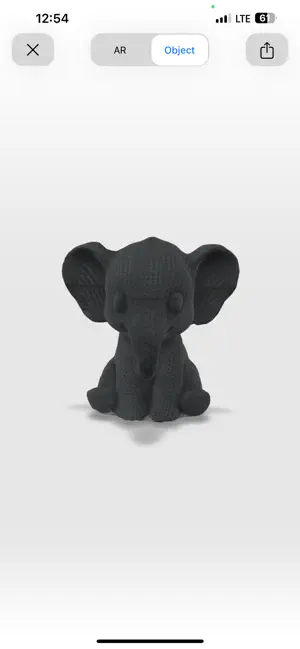
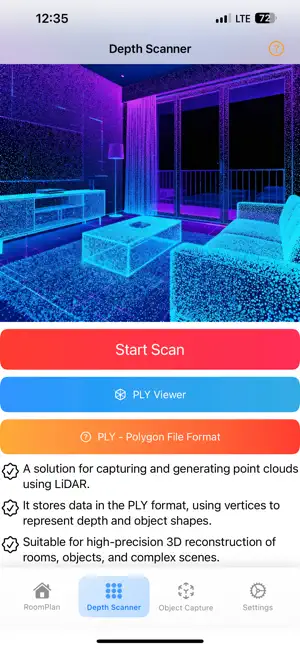
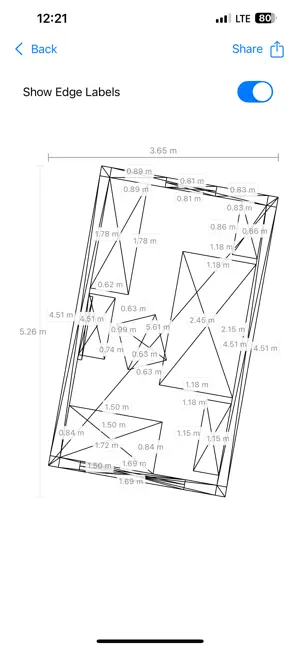
About Vizura
Vizura is a professional 3D scanning tool that turns your iPhone or iPad into a fast, precise LiDAR scanner. Create accurate room plans, point clouds, and photorealistic 3D models in seconds. Cut field measuring time and get data ready for drawing and modeling right away. Key benefits • Accuracy down to an inch for rooms and entire buildings. • Instant on‑site documentation of existing conditions. • Frictionless export to USDZ and PLY. • Fits seamlessly into existing measuring and modeling workflows. Scanning modes • Room Plan - Fast, accurate 3D reconstruction of interiors using LiDAR. - Automatic detection of walls, floors, and openings. - Ideal for inventories, takeoffs, and pre‑design measurements. • Depth Scanner - Capture point clouds with LiDAR. - Export PLY where vertices encode depth and shape. - Great for scene analysis, measurements, and later reconstruction. • Object Capture - Photogrammetry from a photo set for detailed 3D models. - Realistic textures for presentations and AR. - Reliable results in normal lighting on mobile. Who it’s for • Field specialists and technicians: fast measurements and as‑is capture. • On‑site teams: progress tracking and scope documentation. • Designers and 3D creators: realistic object and interior models. Export and compatibility • USDZ: perfect for AR, sharing, and viewing on Apple devices. • PLY: point clouds for analysis, modeling, and conversion. Supported devices • iPhone Pro and Pro Max starting with the iPhone 12 series. • iPad Pro: 11‑inch (2nd gen+) and 12.9‑inch (4th gen+). • Requires a device with LiDAR. Good lighting is recommended for photogrammetry. Get started • Pick a mode: Room Plan, Depth Scanner, or Object Capture. • Scan the space or object following the on‑screen tips. • Review the result and export to USDZ or PLY. You can contact us via Email: [email protected] or on the website: https://sites.google.com/view/vizura/contacts
What’s new
Version 1.0.1 · Updated November 5, 2025
Added localization for Russian language and add link to feedback website in setting tab
App privacy
The developer, Viktor Grishutkin, reported these privacy practices to Apple.
Data Used to Track You
The following data may be used to track you across apps and websites owned by other companies:
- Identifiers: Device ID
- Usage Data: Advertising Data, Other Usage Data
Data Linked to You
The following data, which may be collected and linked to your identity, may be used for the following purposes:
- Identifiers: Device ID
- Usage Data: Advertising Data, Other Usage Data
Used for: Third-Party Advertising, Analytics, Product Personalization
Alternatives to Vizura
Looking for apps like Vizura? Here are 6 similar apps on the App Store. The highest rated is Pixel Scaler (3.0/5), and 5 of the 6 are free to download.
-
 Nur – Empowering Creativity
-
 ScanMyPlan
-
 EchoOrb
-
 Pixel Scaler
3.0
Pixel Scaler
3.0
-
 3D Object Easy
-
 Depth3D Object Scanner
| App | Rating | Price | Last updated | Compare |
|---|---|---|---|---|
| Vizura | – | Free | November 5, 2025 | |
| Nur – Empowering Creativity | – | Free | Jan 5, 2025 | Compare |
| ScanMyPlan | – | Free | Jul 21, 2026 | Compare |
| EchoOrb | – | Free | Jul 7, 2026 | Compare |
| Pixel Scaler | 3.0 / 5 (2) | 1.99 USD | Mar 2, 2026 | Compare |
| 3D Object Easy | – | Free | Nov 12, 2025 | Compare |
| Depth3D Object Scanner | – | Free | Jul 12, 2026 | Compare |
Compare Vizura with the top alternatives: ratings, updates, ASO score and keyword gaps →