

ScanPal - PDF Doc Scanner
Shenzhen Cx Interactive Technology Co., Ltd. Productivity iPhoneiPadiPod touch
ScanPal - PDF Doc Scanner is a free Productivity app for iPhone and iPad by Shenzhen Cx Interactive Technology Co., Ltd. Requires iOS 15.6.
- Price
- Free
- on the App Store
- Size
- 77 MB
- Age 4+
- Updated
- Mar 6
- 2026 · v1.2
Screenshots

About ScanPal - PDF Doc Scanner
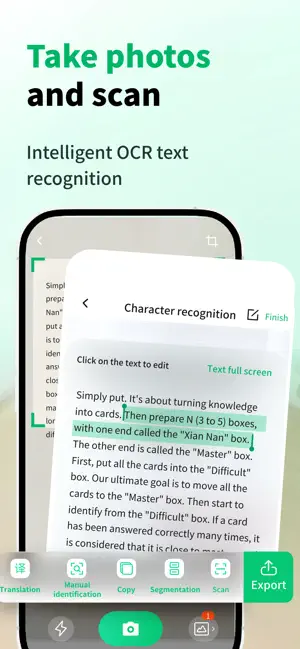
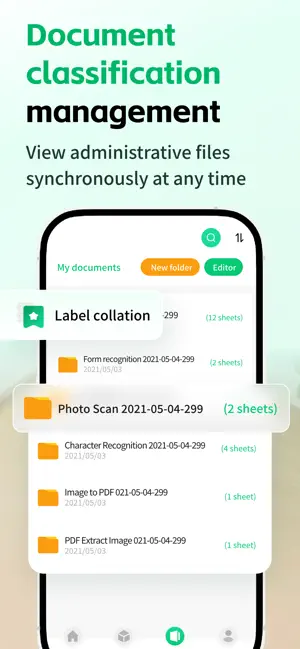
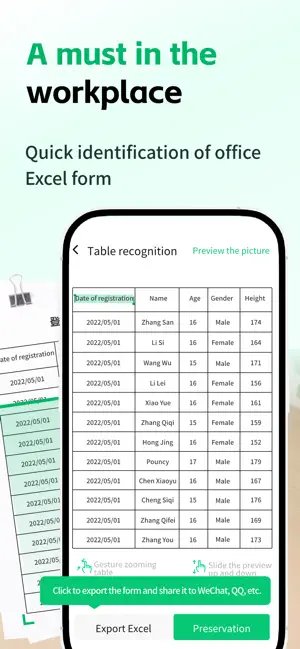
ScanPal: Your versatile office partner, making efficiency within reach. Say goodbye to bulky scanners and cluttered files, portable scanners, translators, and document managers are professional scanning tools. Whether for office, study or daily use, it is the best choice for you to improve productivity. [Core Function] Intelligent document scanning Scan any paper document, contract, book, or note with just one click. Intelligent cropping, removing cluttered backgrounds and enhancing image quality, generating clear PDF or JPG files as if printed. Powerful OCR text recognition and extraction Using high-precision OCR technology to accurately recognize text in images. One click quick text extraction, easy copying, editing, sharing, or saving, bidding farewell to the hassle of manual input. Photo translation and image translation Encountering foreign menus, logos, or documents? Just take a photo and we will scan and translate it for you immediately. Supporting multiple languages, it is your portable translator for traveling, reading foreign materials, and learning. Professional ID scanning Safely and conveniently scan and manage your important documents such as ID card, passport, driver's license, etc. Automatic calibration, generating flat and professional scanned documents, supporting encrypted storage to protect privacy. Advanced Table Recognition Intelligent text recognition converts it into Excel format, making data organization twice as efficient. Subscription Instructions Subscription: Weekly Membership/$4.99 Payment: After the user confirms the purchase and makes the payment, it will be credited to their iTunes account Renewal: The Apple iTunes account will be charged within 24 hours before expiration. After successful charging, the subscription period will be extended by one subscription period Turn off service: Click on "AppleID" in "iTunes Store and AppStore", select "View AppleID", enter the "Account Settings" page, click "Subscription", and manage the automatic subscription service If cancellation is required, it can be closed 24 hours before the end of each billing cycle, and no charges will be deducted within 24 hours before expiration Privacy Policy: https://www.kdocs.cn/l/cncDxPKRcVyL User Agreement: https://www.kdocs.cn/l/cqqRJS55kyQK
What’s new
Version 1.2 · Updated March 6, 2026
Fix bugs and optimize
App privacy
The developer, Shenzhen Cx Interactive Technology Co., Ltd., reported these privacy practices to Apple.
Data Linked to You
The following data, which may be collected and linked to your identity, may be used for the following purposes:
- User Content: Photos or Videos
- Other Data: Other Data Types
Used for: App Functionality
Alternatives to ScanPal - PDF Doc Scanner
Looking for apps like ScanPal - PDF Doc Scanner? Here are 6 similar apps on the App Store. The highest rated is Pocket Scan: Offline Scanner (5.0/5), and all 6 are free to download.
-
 Scanner: PDF OCR Document Scan
-
 FlashScan - Simple doc scanner
-
 手机扫描仪-智能测距&文档扫描&OCR识别、文档处理
-
 Pocket Scan: Offline Scanner
5.0
Pocket Scan: Offline Scanner
5.0
-
 BaiPDF: Scan & PDF Convert
-
 扫描全能助手-手机拍照扫描文件识别PDF图片文字软件
| App | Rating | Price | Last updated | Compare |
|---|---|---|---|---|
| ScanPal - PDF Doc Scanner | – | Free | March 6, 2026 | |
| Scanner: PDF OCR Document Scan | – | Free | Sep 30, 2026 | Compare |
| FlashScan - Simple doc scanner | – | Free | Oct 26, 2026 | Compare |
| 手机扫描仪-智能测距&文档扫描&OCR识别、文档处理 | – | Free | Jul 23, 2026 | Compare |
| Pocket Scan: Offline Scanner | 5.0 / 5 (2) | Free | Oct 10, 2026 | Compare |
| BaiPDF: Scan & PDF Convert | – | Free | Aug 27, 2026 | Compare |
| 扫描全能助手-手机拍照扫描文件识别PDF图片文字软件 | – | Free | Jan 20, 2026 | Compare |