

CapCut Pad
Bytedance Pte. Ltd Photo & Video iPad
CapCut Pad is a free Photo & Video app for iPad by Bytedance Pte. Ltd. Rated 4.3/5 from 1,159 ratings. Requires iOS 14.0. Updated September 18, 2026.
- Rating
- 4.3
- 1.1K ratings
- Price
- Free
- on the App Store
- Size
- 1.3 GB
- Age 4+
- Updated
- Sep 18
- 2026 · v9.5.0
Screenshots
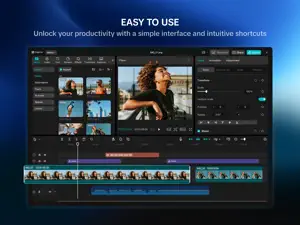


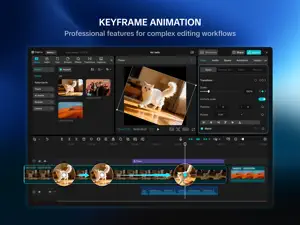
About CapCut Pad
Try out CapCut Pad version! CapCut Pad brings desktop-level editing power to your fingertips. Enjoy precise multi-track timeline editing, smooth performance, and a creative workspace designed for touch. CapCut offers easy-to-use video and photo editing tools, a wide range of in-app fonts and effects, and powerful features like keyframe animation, smooth slow motion, chroma key, and video stabilization—everything you need to capture and refine your moments. Create high-quality videos with other unique features: auto captions, text-to-speech, motion tracking, and background removal. Show your personality and go viral on TikTok, YouTube, Instagram, WhatsApp, and Facebook! FEATURES Basic Video Editing • Trim and shorten clips, and split or merge videos. • Adjust video speed from 0.1x to 100x, and apply smooth speed curves. • Animate video clips with zoom in/out effects. • Highlight your best moments with the freeze frame feature. • Add creative transitions between clips. Advanced Video Editing • Keyframe animation supported for all settings. • Create smooth slow motion with optical flow and speed curves. • Use chroma key to remove specific colors. • Arrange and preview multiple clips on a multi-track timeline. • Apply stabilization to keep your footage steady. Intelligent Features • Auto captions: generate subtitles automatically using speech recognition. • Text-to-speech: convert text into voice in multiple languages and tones. • Background removal: remove backgrounds automatically with one click. Text & Stickers • Add text with diverse fonts and styles, or use creative templates. • Subtitles can be directly adjusted on the video timeline. Trending Effects & Filters • Explore weekly updated filters that match trending styles. • Apply hundreds of visual effects including Glitch, Blur, and 3D. • Adjust brightness, contrast, and saturation freely. Music & Sound Effects • Add music tracks or sound effects to your videos. • Extract audio, clips, or recordings from existing footage. Easy to Share • Export videos up to 4K 60fps with smart HDR. • Customize resolution and format, then share directly to social platforms. CapCut is a all-in-one video editor and video maker application with everything you need to create stunning, high-quality videos. Beginners can get started with CapCut in a matter of seconds, while advanced users can enjoy all the functions they need to edit videos. Express your individuality with exclusive video editor and video maker functions. After your video is created, you can share it across social media with one click, accruing everyone's likes, comments and attention. Terms of Service — https://www.capcut.net/clause/user-agreement?region=us Privacy Policy — https://www.capcut.net/clause/privacy?region=us Contact Us Any questions about CapCut? Please contact us at [email protected]. Facebook: https://www.facebook.com/capcutapp/ Instagram: https://www.instagram.com/capcutapp/ YouTube: https://www.youtube.com/c/capcutofficial TikTok: https://www.tiktok.com/@capcut
Ratings & reviews
4.3
1.1K ratings
What’s new
Version 9.5.0 · Updated September 18, 2026
- Fixed some known issues and improved the trimming experience. We thank you for supporting CapCut and look forward to creating beautiful moments together.
App privacy
The developer, Bytedance Pte. Ltd, reported these privacy practices to Apple.
Data Used to Track You
The following data may be used to track you across apps and websites owned by other companies:
- Identifiers: Device ID
Data Linked to You
The following data, which may be collected and linked to your identity, may be used for the following purposes:
- Identifiers: Device ID
Used for: Analytics, App Functionality
Data Not Linked to You
The following data, which may be collected but is not linked to your identity, may be used for the following purposes:
- Identifiers: User ID
- Diagnostics: Crash Data, Performance Data, Other Diagnostic Data
- Location: Coarse Location
- User Content: Photos or Videos, Audio Data
- Contact Info: Email Address
Used for: Analytics, Product Personalization, App Functionality, Other Purposes
Alternatives to CapCut Pad
Looking for apps like CapCut Pad? Here are 6 similar apps on the App Store. The highest rated is Evoto: Photo Editor & Retouch (4.9/5), and all 6 are free to download.
-
 DaVinci Resolve for iPad
4.5
-
 Adobe Lightroom for iPad
4.8
-
 Adobe Premiere AI Video Editor
4.8
-
 Evoto: Photo Editor & Retouch
4.9
-
 Alight Motion
4.4
-
 Blurrr-Music video editor
4.6
| App | Rating | Price | Last updated | Compare |
|---|---|---|---|---|
| CapCut Pad | 4.3 / 5 (1,159 ratings) | Free | September 18, 2026 | |
| DaVinci Resolve for iPad | 4.5 / 5 (2,966) | Free | Oct 2, 2026 | Compare |
| Adobe Lightroom for iPad | 4.8 / 5 (50,918) | Free | Sep 30, 2026 | Compare |
| Adobe Premiere AI Video Editor | 4.8 / 5 (25,976) | Free | Sep 30, 2026 | Compare |
| Evoto: Photo Editor & Retouch | 4.9 / 5 (2,918) | Free | Sep 29, 2026 | Compare |
| Alight Motion | 4.4 / 5 (78,195) | Free | Oct 2, 2026 | Compare |
| Blurrr-Music video editor | 4.6 / 5 (9,541) | Free | Nov 11, 2025 | Compare |
Compare CapCut Pad with the top alternatives: ratings, updates, ASO score and keyword gaps →