

FlashDrop - file sharing
ButterFalcon Utilities iPhoneiPadiPod touch
FlashDrop - file sharing is a free Utilities app for iPhone and iPad by ButterFalcon. Requires iOS 13.0. Updated December 19, 2025.
- Price
- Free
- on the App Store
- Size
- 50 MB
- Age 4+
- Updated
- Dec 19
- 2025 · v1.4.0
Screenshots

About FlashDrop - file sharing
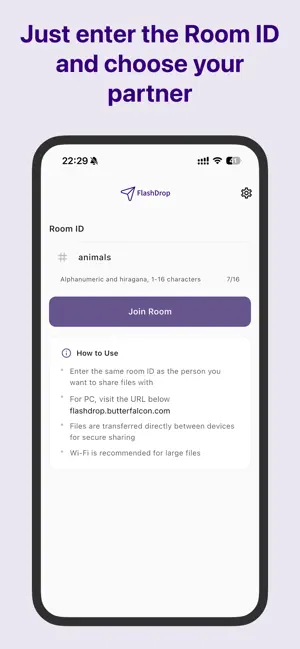
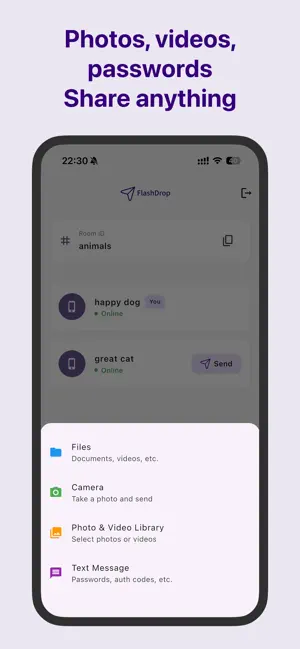
FlashDrop is a simple, secure, and fast file-sharing app. Just enter the same Room ID to instantly share any file—photos, videos, documents, and more. 【Key Features】 Simple sharing via Room ID - Just enter a Room ID of 1 to 16 characters - Share files with anyone who enters the same ID - Automatically saves previously used Room IDs P2P (Peer-to-Peer) Connection - Direct data transfer between devices - High speed since it bypasses servers - Emphasizes privacy and security Supports Diverse File Formats - Photos/Videos: Automatically saved to your camera roll - Documents: Saved to your download folder - Text messages: Securely send sensitive info like passwords Real-time transfer status display - Check transfer progress in real time - Shows file size and transfer speed - Includes cancel function Batch send multiple files - Select up to 20 files simultaneously - Supports drag-and-drop - Instantly share photos taken with your camera 【Useful Scenarios】 • Sharing photos and videos with friends and family • Quickly distributing meeting materials • Transferring files between devices • Sharing large files • Securely sending passwords and authentication codes 【Reliable Privacy Protection】 - Files are never stored on servers - Direct peer-to-peer transfers between devices - Room IDs persist after use for easy future access - All communications are encrypted for secure transfer 【Supported File Formats】 Images: JPEG, PNG, GIF, HEIC, etc. Videos: MP4, MOV, AVI, etc. Documents: PDF, DOCX, XLSX, PPTX, etc. Others: ZIP, TXT, CSV, etc. - All file formats supported 【How to Use】 1. Launch the app and enter the Room ID 2. Have the recipient enter the same Room ID 3. Select files and tap the Send button 4. Transfer starts automatically once the recipient approves 【Recommended Environment】 - Recommended for use on Wi-Fi (for large files) - Compatible with iOS 14.0 or later - Available on both iPad and iPhone Terms of Service: https://flash-drop.web.app/terms_en.html Privacy Policy: https://flash-drop.web.app/privacy_en.html
What’s new
Version 1.4.0 · Updated December 19, 2025
English support is now available.
App privacy
The developer, ButterFalcon, reported these privacy practices to Apple.
Data Used to Track You
The following data may be used to track you across apps and websites owned by other companies:
- Identifiers: User ID
Data Not Linked to You
The following data, which may be collected but is not linked to your identity, may be used for the following purposes:
- Identifiers: User ID
Used for: Third-Party Advertising, Analytics, App Functionality
Alternatives to FlashDrop - file sharing
Looking for apps like FlashDrop - file sharing? Here are 6 similar apps on the App Store. The highest rated is 広告ダメです (1.0/5), and all 6 are free to download.


| App | Rating | Price | Last updated | Compare |
|---|---|---|---|---|
| FlashDrop - file sharing | – | Free | December 19, 2025 | |
| FlashDrop | – | Free | May 12, 2026 | Compare |
| 広告ダメです | 1.0 / 5 (1) | Free | Jan 2, 2026 | Compare |
| DigiBag - File & Data Manager | – | Free | Apr 5, 2026 | Compare |
| Coding Keyboard | – | Free | Aug 18, 2026 | Compare |
| FileBus | – | Free | Feb 9, 2026 | Compare |
| SMB Server - ファイル共有 | – | Free | Sep 22, 2026 | Compare |