

Flowodo: Daily To-Do Flow
Petr Betak Productivity iPhoneiPadiPod touch
Flowodo: Daily To-Do Flow is a free Productivity app for iPhone and iPad by Petr Betak. Requires iOS 18.1. Updated August 11, 2026.
- Price
- Free
- on the App Store
- Size
- 2 MB
- Age 4+
- Updated
- Aug 11
- 2026 · v1.2
Screenshots


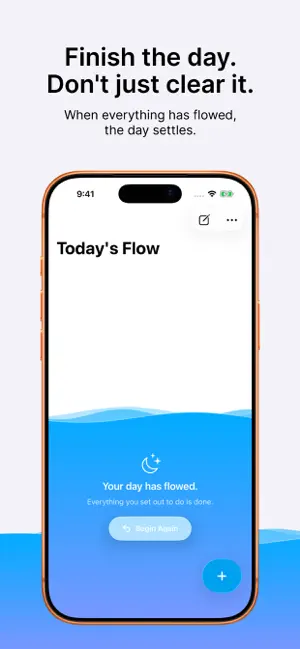
About Flowodo: Daily To-Do Flow
Flowodo is the list you write for yourself. Deadlines remind you. Meetings remind you. The things you decided actually matter have nobody to remind you, so they are the ones that quietly slip. Flowodo holds those few things in front of you, every day. Finish one and it flows out of the way. Finish them all and the day settles - an ending, not an empty list. THE SAME LIST, EVERY DAY Your list stays exactly as you built it. When you are ready for the next day, Begin Again returns every task to it. You never retype what you already decided matters. EVERYTHING ON THE TASK ITSELF Swipe right to complete. Swipe left to edit or delete. Hold for the rest. Drag to reorder. No edit modes, no menus to hunt for. TASKS THAT CARRY SOMETHING A task can hold a link, a photo or a video, so the thing you meant to get to is right there when you get to it. YOUR DAYS, KEPT Every day is recorded as it ended up. Look back at a calendar of full days and streaks, and at what you actually got done. ON YOUR HOME SCREEN The widget shows how far today has got, and lets you finish tasks without opening the app. YOURS ALONE This list lives on your iPhone and nowhere else. No account, no email, no cloud, no analytics. The app makes no network requests at all. That is the point: a list you write for yourself should not be read by anyone else. Export it as Markdown or JSON whenever you like, or erase all of it in two taps.
What’s new
Version 1.2 · Updated August 11, 2026
- Your day as a flow: tasks float above the surface, and completing one sends a drop into the water - Home screen widget: see the whole day and tick tasks off without opening the app - Share sheet: send a link, a photo or a video straight into tomorrow - Tasks can carry a link, a photo or a video - Your Days: a calendar of how every day went, with streaks and full days - Drag to reorder, swipe to complete, hold for everything else - A new first run that shows the flow instead of describing it
App privacy
The developer, Petr Betak, reported these privacy practices to Apple.
Data Not Collected
The developer does not collect any data from this app.
Alternatives to Flowodo: Daily To-Do Flow
Looking for apps like Flowodo: Daily To-Do Flow? Here are 6 similar apps on the App Store. The highest rated is Dayfold: Planner & Journal (5.0/5), and all 6 are free to download.
-
 NinetyDay
-
 TasksDeck
-
 CallyList: Calendar & Tasks
-
 Today - A Daily To do List
-
 Dayfold: Planner & Journal
5.0
-
 Work Life Panda Tasks Calendar
5.0
| App | Rating | Price | Last updated | Compare |
|---|---|---|---|---|
| Flowodo: Daily To-Do Flow | – | Free | August 11, 2026 | |
| NinetyDay | – | Free | May 14, 2026 | Compare |
| TasksDeck | – | Free | Aug 9, 2024 | Compare |
| CallyList: Calendar & Tasks | – | Free | Sep 18, 2026 | Compare |
| Today - A Daily To do List | – | Free | Apr 12, 2026 | Compare |
| Dayfold: Planner & Journal | 5.0 / 5 (4) | Free | Sep 20, 2026 | Compare |
| Work Life Panda Tasks Calendar | 5.0 / 5 (3) | Free | Oct 20, 2026 | Compare |