

Camera to Clipboard: Transfer
MOHD AZRIN BIN MD SANI Utilities iPhoneiPadiPod touch
Camera to Clipboard: Transfer is a free Utilities app for iPhone and iPad by MOHD AZRIN BIN MD SANI. Requires iOS 15.0. Updated October 12, 2026.
- Price
- Free
- on the App Store
- Size
- 74 MB
- Age 4+
- Updated
- Oct 12
- 2026 · v1.0.28
Screenshots

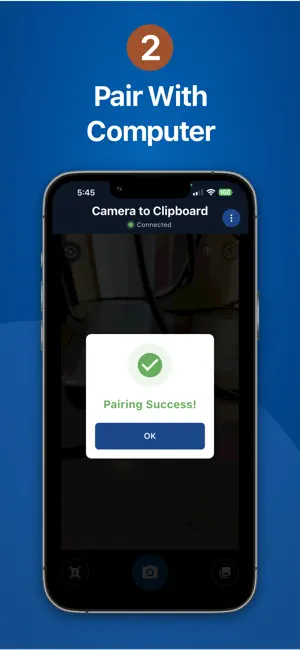
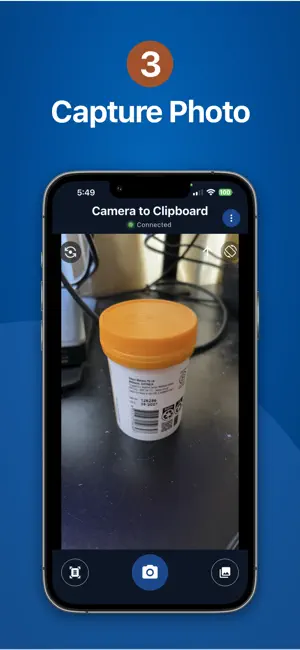

About Camera to Clipboard: Transfer
Transfer photos and videos from your phone straight to your computer's clipboard, instantly. No cables, no cloud, no account - just paste. Works with both Windows and Mac. Camera to Clipboard is the fastest way to get an image or clip off your phone and onto your PC or Mac. Snap a photo or pick a video, and it is ready to paste into any app on your computer in seconds, all over your own Wi-Fi. Think of it as the AirDrop experience, without the Apple-only limit. PERFECT FOR PROFESSIONALS - Capture receipts, whiteboards, or documents with your phone - Paste instantly into emails, documents, or design tools on your computer - Save time by eliminating manual file transfers HOW IT WORKS 1. Pair your phone with the desktop app via QR code (one-time setup) 2. Take a photo or choose a video on your phone 3. It appears instantly in your computer's clipboard 4. Paste directly into any application KEY FEATURES - Lightning-fast Wi-Fi Direct transfer for photos and videos - Works with both Windows PCs and Macs - End-to-end AES-256 encryption - No cloud storage - your files stay private - Zero learning curve - just snap and paste SECURITY AND PRIVACY - Photos and videos never leave your local Wi-Fi network - Military-grade AES-256-GCM encryption - No cloud uploads or server storage - Completely private workflow IDEAL USE CASES - Accountants and office workers sharing documents quickly - Technicians photographing and posting problems on forums - Designers transferring reference photos - Students capturing lecture slides or notes - E-commerce sellers uploading product photos - Real estate agents transferring property images - Anyone tired of emailing photos to themselves REQUIREMENTS - This app on your phone - The free desktop app (download at camera-to-clipboard.com) - Both devices on the same Wi-Fi network FREEMIUM MODEL - 3-day full-feature trial - Upgrade for unlimited ad-free transfers Transform your phone-to-computer workflow today. SUBSCRIPTION INFORMATION - Pro Monthly: auto-renewable monthly subscription - Pro Annual: auto-renewable yearly subscription - Pro Lifetime: one-time purchase - Payment will be charged to your Apple ID account at confirmation of purchase - Subscription automatically renews unless canceled at least 24 hours before the end of the current period - You can manage and cancel subscriptions in your Account Settings on the App Store Terms of Use: https://camera-to-clipboard.com/terms/en Privacy Policy: https://camera-to-clipboard.com/privacy/en
What’s new
Version 1.0.28 · Updated October 12, 2026
Thanks for using Camera-to-Clipboard! What's new in this update: • Document scan now draws a live outline around the page, so you can see exactly what will be cropped. • New "Auto crop" checkbox in document scan mode: turn it off to keep the whole photo. • Fixed pages scanned with the phone held sideways or upside down coming out turned the wrong way. • General performance and stability improvements.
App privacy
The developer, MOHD AZRIN BIN MD SANI, reported these privacy practices to Apple.
Data Used to Track You
The following data may be used to track you across apps and websites owned by other companies:
- Identifiers: Device ID
Data Not Linked to You
The following data, which may be collected but is not linked to your identity, may be used for the following purposes:
- Identifiers: Device ID
- Usage Data: Product Interaction
- Diagnostics: Crash Data, Performance Data
- Purchases: Purchase History
Used for: Third-Party Advertising, Analytics, App Functionality
Alternatives to Camera to Clipboard: Transfer
Looking for apps like Camera to Clipboard: Transfer? Here are 6 similar apps on the App Store.
-
 CrossDrop: Camera & File Share
-
 Ruler: On Screen Tape Measure
-
 GLB Viewer – 3D Model Viewer
-
 Clipp.net
-
 THEMIS Lite
-
 iScanBrowser
| App | Rating | Price | Last updated | Compare |
|---|---|---|---|---|
| Camera to Clipboard: Transfer | – | Free | October 12, 2026 | |
| CrossDrop: Camera & File Share | – | Free | Apr 16, 2026 | Compare |
| Ruler: On Screen Tape Measure | – | Free | Aug 15, 2026 | Compare |
| GLB Viewer – 3D Model Viewer | – | Free | Aug 22, 2026 | Compare |
| Clipp.net | – | Free | Jul 27, 2026 | Compare |
| THEMIS Lite | – | Free | Oct 15, 2026 | Compare |
| iScanBrowser | – | Free | Jul 2, 2026 | Compare |