

Sunrise Alarm for Smart Lights
Evan Michael James Blanke Health & Fitness iPhoneiPadiPod touch
Sunrise Alarm for Smart Lights is a paid Health & Fitness app for iPhone and iPad by Evan Michael James Blanke. Rated 4.6/5 from 13 ratings.
- Rating
- 4.6
- 13 ratings
- Price
- 4.99 USD
- on the App Store
- Size
- 7 MB
- Age 4+
- Updated
- Sep 20
- 2026 · v1.4.2
Screenshots

About Sunrise Alarm for Smart Lights
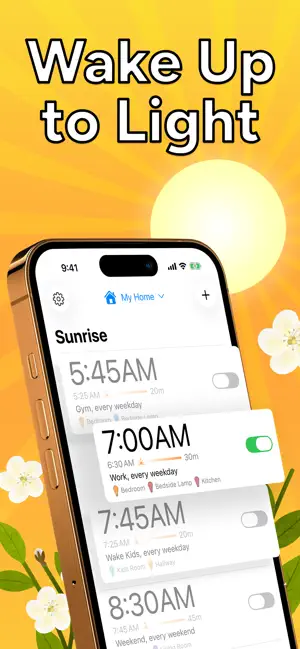
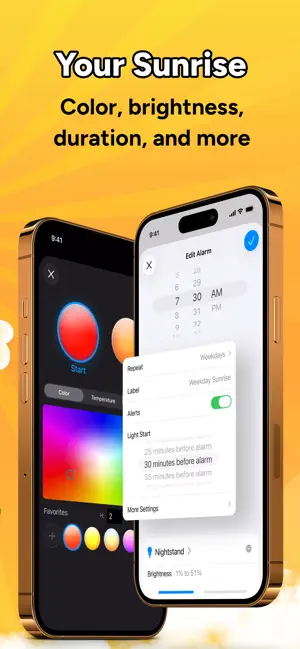
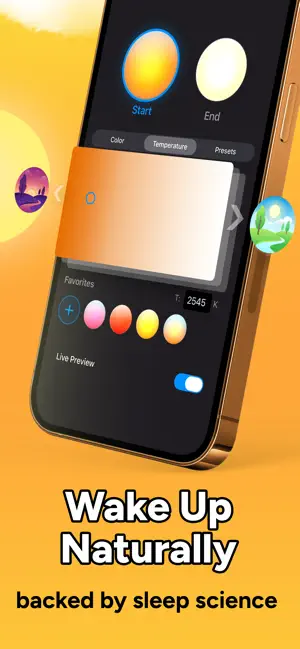
Sunrise Alarm turns the HomeKit lights you already own into a gradual sunrise in the morning and a slow sunset at night. Most people wake up more alert and sleep better in as few as six days. One-time purchase, no subscription, no new hardware. Sleep research explains why: light, not sound, is what tells your body it’s time to wake up. A gradual rise from dark to bright works with your biology in a way a loud alarm never can. Your sunrise runs directly on your Home hub, so it wakes you even if your phone is off or out of battery. You’ll need an Apple Home hub (a HomePod or an Apple TV) and at least one HomeKit-enabled light to get started. Works with Philips Hue, Nanoleaf, LIFX, and all other HomeKit-certified devices, including bulbs, strips, blinds, shades, plugs, switches, and more. If it’s a light, blind, plug, or switch in Apple Home, it works. No account, no cloud, no tracking. Your alarm data stays on your device and within Apple Home. Your body already knows how to wake up. Now your lights do too. FEATURES - Sequence lights across a room or your whole home, each fading in on its own schedule so the sunrise builds around you - Wind down at night with sunset alarms that gradually dim your lights to help you ease into sleep - Open blinds, shades, and window coverings on your sunrise schedule, so real daylight, not just your lights, joins your wake-up - Customize color, brightness, and fade duration to match your sleep environment - Create different schedules for weekdays, weekends, or any routine - Turn plugs on or off when your alarm runs (fan, heater, coffee maker) REQUIREMENTS - Apple Home hub (a HomePod, Apple TV, or an iPad set up as a hub) and at least one HomeKit-enabled device
Ratings & reviews
4.6
13 ratings
What’s new
Version 1.4.2 · Updated September 20, 2026
Sunset Alarms Create a sunset alarm that gradually dims your lights to help you ease into sleep. Just pick Sunset when you create a new alarm, and the app takes care of the rest. Also in this update - Bug fixes and accessibility improvements
App privacy
The developer, Evan Michael James Blanke, reported these privacy practices to Apple.
Data Not Collected
The developer does not collect any data from this app.
Alternatives to Sunrise Alarm for Smart Lights
Looking for apps like Sunrise Alarm for Smart Lights? Here are 6 similar apps on the App Store. The highest rated is Trackables: Health Dashboard (4.9/5), and all 6 are free to download.
-
 AwakeSync
3.7
-
 Glow Alarm - Wake Up Light
4.3
-
 Sunrise Alarm Clock -
3.9
-
 Trackables: Health Dashboard
4.9
-
 The Outsiders Fitness Tracker
4.6
-
 FitBee Calorie & Macro Counter
4.8
| App | Rating | Price | Last updated | Compare |
|---|---|---|---|---|
| Sunrise Alarm for Smart Lights | 4.6 / 5 (13 ratings) | 4.99 USD | September 20, 2026 | |
| AwakeSync | 3.7 / 5 (6) | Free | Oct 12, 2026 | Compare |
| Glow Alarm - Wake Up Light | 4.3 / 5 (38) | Free | Sep 1, 2026 | Compare |
| Sunrise Alarm Clock - | 3.9 / 5 (37) | Free | Sep 10, 2026 | Compare |
| Trackables: Health Dashboard | 4.9 / 5 (47) | Free | Sep 28, 2026 | Compare |
| The Outsiders Fitness Tracker | 4.6 / 5 (129) | Free | Oct 12, 2026 | Compare |
| FitBee Calorie & Macro Counter | 4.8 / 5 (2,902) | Free | Oct 12, 2026 | Compare |