

Quick Scan And Share
Aleksander Lurie Productivity iPhoneiPadiPod touch
Quick Scan And Share is a free Productivity app for iPhone and iPad by Aleksander Lurie. Rated 5.0/5 from 2 ratings. Requires iOS 17.
- Rating
- 5.0
- 2 ratings
- Price
- Free
- on the App Store
- Size
- 3 MB
- Age 4+
- Updated
- Oct 11
- 2025 · v1.2.3
Screenshots



About Quick Scan And Share
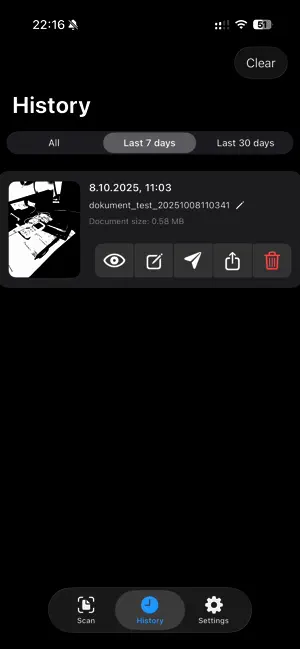
Quick Scan and Share makes organizing paperwork fast and effortless, and 1.2.3 supercharges the editor. Capture invoices, receipts, and notes - or import existing documents and photos - then refine every page before you export a polished PDF you can share instantly. Why You’ll Love It Edit as You Go — Rename the document, reorder or delete pages, and tweak quality, format, and style right inside the editor. Live Previews — Page thumbnails now show the processed result of your chosen filter, resolution, and layout in real time. Flexible Scan or Import — Capture new documents with auto edge detection or bring in existing PDFs and images. Create PDFs Instantly — Combine multiple pages into a single, ready-to-share file without leaving the editor. Share Your Way — Email via Gmail/Outlook presets, AirDrop to teammates, drop into Messages, or save to Files and Photos. Optimized for Every Screen — The layout shines on iPhone, iPad, and large displays with multitasking-friendly controls. Now Multilingual — Enjoy the full editing and sending experience in 38 languages, including English, Spanish, Japanese, and Arabic. Fully Customizable — Control PDF quality, color mode, and resolution limits; tailor email templates; automate SMTP sending or keep full manual review. Smarter Performance — History refreshes instantly, temporary files stay tidy, and navigation stays smooth even with large edits. Stay Organized Built-in history keeps every document at your fingertips with thumbnails, scan dates, and delivery logs. Preview, rename, resend, share, or delete - every action is just a tap away. Quick Scan and Share turns your device into a smart document workspace that’s always ready to scan, edit, and deliver.
What’s new
Version 1.2.3 · Updated October 11, 2025
• Meet the new Document Editor: review every capture before export, drag pages into the perfect order, delete with a quick swipe, and tweak quality, format, and filters on one screen. • Rename as you refine - set the final file name right inside the editor while the original scans stay untouched. • Processed thumbnails keep pace with your choices, so filters, resolution limits, and page size changes appear instantly. • Close PDF previews with the new button, watch history refresh immediately after every edit, and enjoy polished copy across all 38 localizations.
App privacy
The developer, Aleksander Lurie, reported these privacy practices to Apple.
Data Not Collected
The developer does not collect any data from this app.
Alternatives to Quick Scan And Share
Looking for apps like Quick Scan And Share? Here are 6 similar apps on the App Store.


| App | Rating | Price | Last updated | Compare |
|---|---|---|---|---|
| Quick Scan And Share | 5.0 / 5 (2 ratings) | Free | October 11, 2025 | |
| Safelop | – | Free | Mar 19, 2026 | Compare |
| Mionitors | – | Free | Apr 4, 2026 | Compare |
| Notelocked | – | Free | Apr 10, 2026 | Compare |
| Caply | – | 4.99 USD | Mar 7, 2026 | Compare |
| MyAdvo – Private AI Advisers | – | Free | Apr 7, 2026 | Compare |
| MyMark – Sign PDF | – | Free | Jul 27, 2026 | Compare |