

PearPass
Tether Data Productivity iPhoneiPadiPod touch
PearPass is a free Productivity app for iPhone and iPad by Tether Data. Rated 3.4/5 from 7 ratings. Requires iOS 15.1. Updated May 20, 2026.
- Rating
- 3.4
- 7 ratings
- Price
- Free
- on the App Store
- Size
- 113 MB
- Age 4+
- Updated
- May 20
- 2026 · v2.1.0
Screenshots


About PearPass
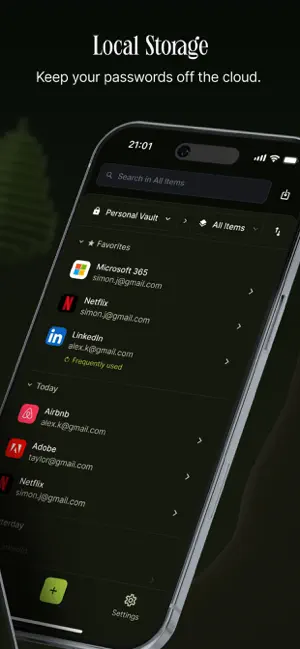
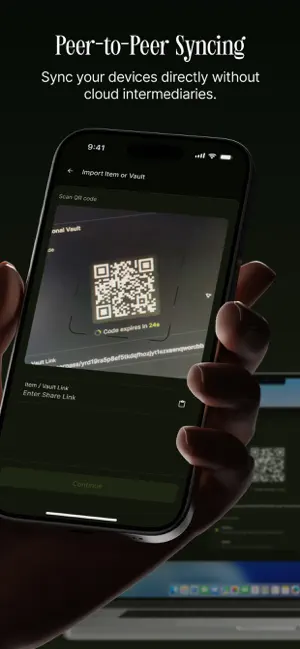
PearPass – A fully local, open-source password manager. PearPass is a fully local, open-source password manager designed for complete privacy and control. Unlike traditional cloud-based managers, PearPass never sends your data to external servers. All credentials are stored and encrypted directly on your device using strong end-to-end encryption. Whether you’re syncing between your phone and laptop or managing hundreds of logins, PearPass gives you full ownership of your digital identity. There is no central infrastructure to target, no hidden storage, and no third-party access. Key Features Device-Only Storage Your passwords are stored locally on your devices, not in the cloud. You decide which devices have access. PearPass never uploads or stores your data externally. Peer-to-Peer Sync Secure syncing between your own devices without using a central server. Your data moves directly and securely between devices you control. End-to-End Encryption All data is encrypted using proven cryptographic primitives from Libsodium. No one else can access or read your vault—not even us. Open Source and Independently Audited PearPass is fully open source and has been independently reviewed by Secfault Security, a respected firm specializing in cryptography and offensive security. Offline-First Design Works without an internet connection. Your password vault is available at all times, even during outages or when you’re traveling. Password Generator Generate strong, unique passwords with one tap. Reduce the risks of reused or weak credentials. Minimal and Fast PearPass is lightweight, efficient, and designed for users who value both privacy and simplicity. Why Local Storage Matters In 2025, a single data breach leaked over 16 billion credentials. Cloud-based password managers, regardless of their security, rely on centralized systems that remain high-value targets for attackers. PearPass removes this risk entirely. With no cloud storage and no backend infrastructure, your data stays where it belongs—on your devices. PearPass is free to use, fully transparent, and built for users who demand control over their digital security. Your passwords are yours. Keep them safe, private, and fully in your hands. Download now and take your passwords off the cloud.
Ratings & reviews
3.4
7 ratings
What’s new
Version 2.1.0 · Updated May 20, 2026
- 2FA & TOTP Support - Generate and store your two-factor authentication codes directly within the app. - Vault Deletion - You can now completely delete a vault and wipe it across paired devices. - Smoother Imports - Improved the encrypted import process from other password managers. - In-App Diagnostics - Added a new troubleshooting tool to help identify and resolve app issues faster, optionally. - Bug Fixes - Under-the-hood polish for a smoother, more reliable experience.
App privacy
The developer, Tether Data, reported these privacy practices to Apple.
Data Not Collected
The developer does not collect any data from this app.
Alternatives to PearPass
Looking for apps like PearPass? Here are 6 similar apps on the App Store. The highest rated is Echos AI Transcription (5.0/5), and all 6 are free to download.
-
 Maple Research: Private AI
4.7
-
 Echos AI Transcription
5.0
-
 IdeAI
4.7
-
 MindNote - Mind Map&Notes
4.6
-
 Pallas Chat
-
 Bramble: Password Manager
4.7
| App | Rating | Price | Last updated | Compare |
|---|---|---|---|---|
| PearPass | 3.4 / 5 (7 ratings) | Free | May 20, 2026 | |
| Maple Research: Private AI | 4.7 / 5 (34) | Free | Oct 12, 2026 | Compare |
| Echos AI Transcription | 5.0 / 5 (3) | Free | Apr 29, 2026 | Compare |
| IdeAI | 4.7 / 5 (3) | Free | Mar 27, 2026 | Compare |
| MindNote - Mind Map&Notes | 4.6 / 5 (5) | Free | Aug 11, 2026 | Compare |
| Pallas Chat | – | Free | Jun 26, 2025 | Compare |
| Bramble: Password Manager | 4.7 / 5 (6) | Free | Oct 13, 2026 | Compare |
Compare PearPass with the top alternatives: ratings, updates, ASO score and keyword gaps →