

Pixel Swap
Michael Elmer Graphics & Design iPhoneiPadiPod touch
Pixel Swap is a free Graphics & Design app for iPhone and iPad by Michael Elmer. Requires iOS 18.5. Updated October 13, 2025.
- Price
- Free
- on the App Store
- Size
- 6 MB
- Age 4+
- Updated
- Oct 13
- 2025 · v1.0.2
Screenshots


About Pixel Swap
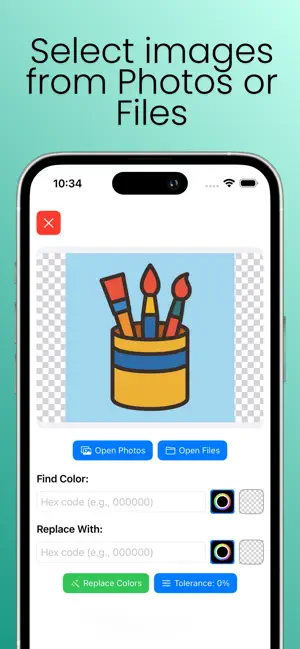
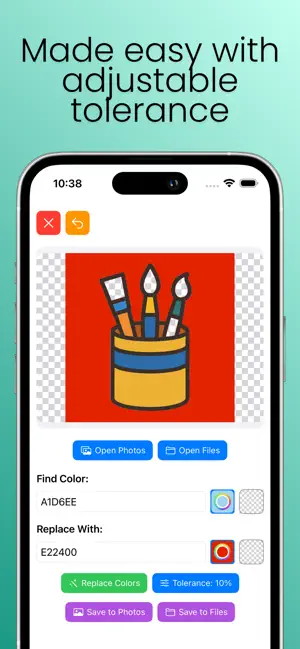
PixelSwap - Color Replacement Tool Transform your images with precision color replacement in seconds! PixelSwap is the ultimate photo editing app for anyone who needs to change colors in their images with professional accuracy. Whether you're a designer, photographer, or just want to experiment with your photos, PixelSwap makes color replacement simple and powerful. Key Features: Precise Color Matching * Select any color in your image with the intuitive color picker * Replace it with any color you choose * Advanced tolerance settings (0-10%) for perfect color matching * Support for transparent backgrounds Professional Tools * Undo/Redo functionality for non-destructive editing * Real-time preview of changes * High-quality image processing * Support for all common image formats Easy to Use * Import from Photos or Files * Simple, intuitive interface * One-tap color selection * Instant processing Perfect For: * Graphic designers changing brand colors * Photographers adjusting image tones * Social media creators customizing content * Anyone who wants to experiment with colors Why Choose PixelSwap? Accuracy: Our advanced color matching algorithm ensures precise replacements while preserving image quality. Speed: Process images in seconds, not minutes. No complex software required. Flexibility: Adjust tolerance levels to match similar colors or stick to exact matches. Quality: Professional-grade results that maintain your image's integrity. Transform your images today with PixelSwap - the smart way to change colors!
What’s new
Version 1.0.2 · Updated October 13, 2025
Added Marketing URL
App privacy
The developer, Michael Elmer, reported these privacy practices to Apple.
Data Linked to You
The following data, which may be collected and linked to your identity, may be used for the following purposes:
- Location: Coarse Location
- Identifiers: Device ID
- Usage Data: Advertising Data
Used for: Third-Party Advertising
Data Not Linked to You
The following data, which may be collected but is not linked to your identity, may be used for the following purposes:
- Usage Data: Advertising Data
- Diagnostics: Crash Data, Performance Data
- Location: Coarse Location
- Identifiers: Device ID
Used for: Analytics, App Functionality
Alternatives to Pixel Swap
Looking for apps like Pixel Swap? Here are 6 similar apps on the App Store.


| App | Rating | Price | Last updated | Compare |
|---|---|---|---|---|
| Pixel Swap | – | Free | October 13, 2025 | |
| DotChroma | – | Free | Sep 1, 2026 | Compare |
| Pickalator | – | Free | Oct 24, 2026 | Compare |
| Black N Blue | – | Free | May 8, 2025 | Compare |
| Pixel-A | – | Free | Oct 16, 2026 | Compare |
| Sketchbook Studio | – | Free | Jul 8, 2026 | Compare |
| Palette Studio+ | – | Free | Oct 28, 2026 | Compare |
Compare Pixel Swap with the top alternatives: ratings, updates, ASO score and keyword gaps →