

Pixel-A
Abraham Munguia Graphics & Design iPhoneiPadiPod touch
Pixel-A is a free Graphics & Design app for iPhone and iPad by Abraham Munguia. Requires iOS 16.4. Updated October 16, 2026.
- Price
- Free
- on the App Store
- Size
- 67 MB
- Age 4+
- Updated
- Oct 16
- 2026 · v1.0.6
Screenshots


About Pixel-A
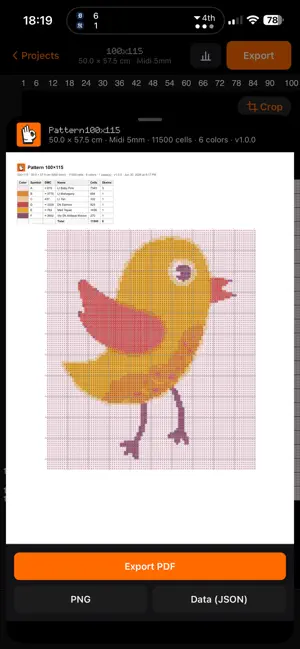
Your photo, turned into a pattern you can actually make. Pixela turns any picture into a crisp pixel grid with a tidy color palette and a printable chart — so you can recreate it however you like: • Perler / Hama beads — get the bead-by-bead layout for your next fuse-bead art. • Cross-stitch & embroidery — symbols per color and a printable chart to stitch from. • Knitting & crochet — color-work charts (intarsia, tapestry, C2C, jacquard): one square per stitch/block. • Quilting & patchwork — each pixel becomes a fabric square. • Pixel art, sprites & icons — turn a photo or your own drawing/sketch into true pixels with a controlled palette; export a clean PNG. • Event & stadium mosaics — plan "pixel performances" and card stunts, seat by seat, sized in meters. • Wall decor & murals — set the centimeters per tile and get the real wall size to paint or tile. • LEGO & brick mosaics — each pixel is one brick on the baseplate. • LED matrices & low-res screens — a pixel map to wire or program each LED. • Gifts & keepsakes — turn a pet, a portrait, or a logo into a handmade piece. • Drawings, coloring pages & templates — a ready-made grid to trace, color, or hand off. WHY YOU'LL LOVE IT • Pick a photo — Pixela builds the pattern in seconds. • Control the look — set the number of columns and palette colors with live sliders. • Color symbols — every color gets a letter so it's easy to follow (great for color-vision needs). • Printable PDF — a clean legend plus the full symbol chart, ready to print or share. • Export a clean PNG — the pure pixel art with no grid or symbols, ready to use as a sprite, sticker, or poster. • Real thread colors — see the nearest DMC floss for every color, and swap any color for the one you prefer. • Real finished size at any scale — stitches (Aida), beads, or big tiles; shown in cm or meters, so you can size a wall mural or a whole stadium mosaic. • Track your progress — mark finished cells and watch your % climb. • Pinch to zoom, tap "1:1" to see the whole thing — built for big, detailed pieces. • Works offline — everything is processed on your device. Your photos never leave it. FAIR PRICING Unlock everything with a single one-time purchase — no subscription, ever. Private by design: your photos are processed on-device and are never uploaded.
What’s new
Version 1.0.6 · Updated October 16, 2026
Now supporting brick patterns.
App privacy
The developer, Abraham Munguia, reported these privacy practices to Apple.
Data Not Linked to You
The following data, which may be collected but is not linked to your identity, may be used for the following purposes:
- Purchases: Purchase History
- Identifiers: User ID
Used for: App Functionality
Alternatives to Pixel-A
Looking for apps like Pixel-A? Here are 6 similar apps on the App Store. The highest rated is PinD Pixel Beads (5.0/5), and all 6 are free to download.


| App | Rating | Price | Last updated | Compare |
|---|---|---|---|---|
| Pixel-A | – | Free | October 16, 2026 | |
| FlossDraft | – | Free | Sep 3, 2026 | Compare |
| MotifChart | – | Free | Aug 30, 2026 | Compare |
| Pick to Pixel: Photo-Pixel Art | – | Free | Aug 26, 2026 | Compare |
| KeKe Art | – | Free | Aug 17, 2026 | Compare |
| myKando Pixel | – | Free | Apr 30, 2026 | Compare |
| PinD Pixel Beads | 5.0 / 5 (1) | Free | Oct 7, 2026 | Compare |
Compare Pixel-A with the top alternatives: ratings, updates, ASO score and keyword gaps →