

Coax - Surf your Plex Server
Out to Lunch Productions, LLC Entertainment iPhoneiPadiPod touchMac
Coax - Surf your Plex Server is a free Entertainment app for iPhone and iPad by Out to Lunch Productions, LLC. Rated 4.2/5 from 41 ratings.
- Rating
- 4.2
- 41 ratings
- Price
- Free
- on the App Store
- Size
- 57 MB
- Age 17+
- Updated
- Oct 13
- 2026 · v1.5
Screenshots



About Coax - Surf your Plex Server
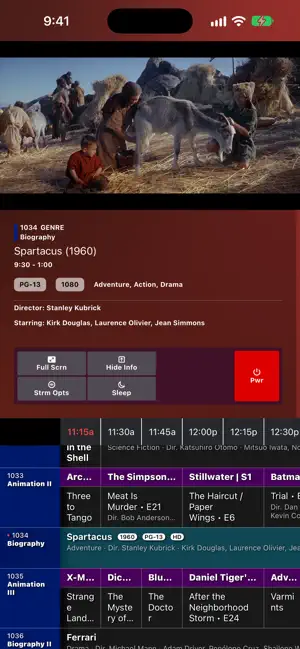
Demolish the tyranny of too much choice, say "NO" to BigAlgo, and just Relax with Coax. Within seconds, you'll be flipping through a schedule made entirely of your own home media server content. Jump right in with the on-screen cable guide and watch whatever's on, just like the old days. You can't pause, you can't skip forward, you can't rewind - all you can do is change the channel. Experience the joy of randomly happening upon a great scene in a movie you forgot you had, or a TV show marathon for an old favorite. Coax requires no setup at all - it uses the metadata your media library already has. If you want, you can create your own custom Lineups, with all sorts of simple yet powerful scheduling rules - create a Saturday Morning Cartoons Lineup for your inner (or actual) child, or a Late Night Thrillers Lineup for date night. Important: This app requires a Plex account and access to a Plex Media Server (or Jellyfin, or Emby). Coax does not provide or distribute any media; it only connects to content you already own. How to configure your Lineups: • Coax scans your home media libraries and generates a channel guide based on your content’s metadata. • Select which channel categories you want: Genre, Decade, Recent Additions, Actor, Studio, Director, and Collections. • Create 100% custom channels using Collections. • Unify your libraries to mix TV and movie channels. • Adjust the number of channels you want to generate. • Customize the time between your programs with Gap Content - play Trailers, or content from another Library if you want! Coax is your personal “cable box” for your own content — no extra accounts, no third-party streaming, just your Plex library organized in a fun, nostalgic way. https://www.apple.com/legal/internet-services/itunes/dev/stdeula/
Ratings & reviews
4.2
41 ratings
What’s new
Version 1.5 · Updated October 13, 2026
WHAT'S NEW • iPhone Duo ready ◦ This is about as good as I can do without getting my hands on the hardware, so expect changes once I do • Theme Updates ◦ Modern and Retro now look truly different - see the screenshots ◦ Retro gets a VCR menu - I've just been dying to do something like this since the beginning ◦ A new theme has entered the timeline - Sky! - Be like that song from Eiffel 65 - ... blue. They're blue. It's that song about being blue ba doo dee • Added a proper Settings screen (unironic finally) ◦ Visual Settings have theme previews AND you can set the text size there ◦ Playback settings are there too, including a new one: Always Play Full Quality - That's for those 4k streams that are maybe just a bit too beefy for your connection, but you're willing to wait for them to buffer. Defaults to Off • Lineups is now the base view of the app ◦ Servers and connections have moved to the new Settings screen ◦ h/t to u/joecan for asking for this, very politely, for like 4 months • The Mac app feels a lot more like a Mac app ◦ Full Screen opens the picture in its own window in Single Window mode (and you can drag it from anywhere, not just the title bar). Close it to get back to the guide ◦ Keyboard navigation is back, where you can browse the guide with the arrow keys without changing the channel ◦ Your keypad now acts like a remote - punch in a channel number, and it'll take you there ◦ The guide's buttons moved to a floating Control Panel: Window -> Show Control Panel (⌥⌘C) ◦ Stream Options, Sleep Timer and Power live in the Watch menu ◦ This is close to the experience that I tried to create with Multi-Window mode, but I think this one is nicer • Playback fixes ◦ Remuxed MKVs: lips and voices line up wherever you tune in. A badly muxed file hands itself to your server instead of playing the audio seconds off ◦ Finally fixed a frame stutter that would happen with certain formats - man I'm glad that's fixed ◦ One program failing to play no longer makes everything transcode for the rest of the session • Siri and Shortcuts ◦ I added a bunch of App Intents to expose functionality: - Ask Siri what's on, tune to a channel, punch in a channel number, flip up or down, ask what's up next on a channel, turn captions on or off, pick a subtitle track, or turn Coax off ◦ Every one of those is in the Shortcuts app too, so show me what you can do with it! • Other fixes ◦ Now Playing can be full screen now ◦ The iPad menus have parity with the Mac menus ◦ Access Stream Options on AppleTV while in full screen by pressing right on the remote ◦ Some improper transcoding for certain profiles/flags has been fixed (maybe) • Updated screenshots
App privacy
The developer, Out to Lunch Productions, LLC, reported these privacy practices to Apple.
Data Not Linked to You
The following data, which may be collected but is not linked to your identity, may be used for the following purposes:
- Diagnostics: Other Diagnostic Data
Used for: App Functionality
Alternatives to Coax - Surf your Plex Server
Looking for apps like Coax - Surf your Plex Server? Here are 6 similar apps on the App Store. The highest rated is Television Wasteland (5.0/5), and 5 of the 6 are free to download.
-
 Plezy: Media Server Client
4.5
Plezy: Media Server Client
4.5
-
 Zuno: Media Player
4.3
Zuno: Media Player
4.3
-
 Strimr
-
 AirTV: Plex + Jellyfin + IPTV
3.5
AirTV: Plex + Jellyfin + IPTV
3.5
-
 Dusk for Plex
3.7
Dusk for Plex
3.7
-
 Television Wasteland
5.0
Television Wasteland
5.0
| App | Rating | Price | Last updated | Compare |
|---|---|---|---|---|
| Coax - Surf your Plex Server | 4.2 / 5 (41 ratings) | Free | October 13, 2026 | |
| Plezy: Media Server Client | 4.5 / 5 (114) | 5.99 USD | Oct 12, 2026 | Compare |
| Zuno: Media Player | 4.3 / 5 (28) | Free | Oct 13, 2026 | Compare |
| Strimr | – | Free | Oct 11, 2026 | Compare |
| AirTV: Plex + Jellyfin + IPTV | 3.5 / 5 (4) | Free | Jul 29, 2026 | Compare |
| Dusk for Plex | 3.7 / 5 (3) | Free | Oct 16, 2026 | Compare |
| Television Wasteland | 5.0 / 5 (4) | Free | Aug 28, 2026 | Compare |